Showing posts with label mtn. Show all posts
Showing posts with label mtn. Show all posts
Friday, March 24, 2017
How to Subscribe for MTN 1 5GB data for just N1000
How to Subscribe for MTN 1 5GB data for just N1000

... so I decided to post in how to rock cheap data on mtn. This is not
free browsing or cheat its the current mtn plan ....
1. Firstly, recharge your MTN line with N1000
airtime
2. After that, dial *131# and follow the
onscreen procedure.
3. According to the onscreen procedure,
reply 1 to buy data, and then reply 3 for monthly
data and then reply 1 to get the 1.5GB data.
4. That's all.
What's your say about this offer
Other prices
3.5GB cost 2000 see screen Shot
Go to link Download

Sunday, February 19, 2017
Free Mtn 2gb
Free Mtn 2gb
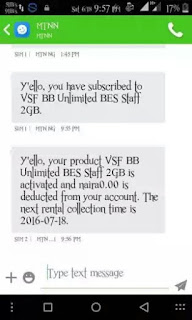
Mtn Blackberry Bundle Free 2GB has been available for a while, but to browse with it on other device is the major problem, but Im glad to tell you that you can now flex with your free MTN VSF Blackberry Bundle on Android device with the help of imei tweaking and Psiphon vpn.
Text JKCJHC to 444
You will receive a text message as shown in the screenshot Above .
To check data balance: Send STATUS to 444 .
HOW TO USE THE DATA ON ANY ANDROID DEVICES
To enjoy your free 2GB data on any Android devices. You need to tweak your phone IMEI to a Blackberry device imei, after that you also need Psiphon vpn to power it up.
You can use your installed or download Sypon Shield, ProNET, or Psiphon Handler.
Tweak your Android IMEI to any of the below Blackberry IMEI
358265011970677
358265019457685
358265019457624
358265019457680
358265019452453
358265019457298
358265019457784
358265019457902
358265019457810
358265019456820
358265019450532
358265019457689
358265019452094
358265019457687
358265019457908
358265019457309
Once you are through with above steps, configure your Psiphon vpn as show below.
Create New APN settings on your phone as follows:
» Open your phone settings > Go to more > Go to mobile network > Go to access point names > Select MTN, Then create new APN and configure as shown below:
» APN: blackberry.com
» Proxy: 10.199.212.2
» Port: 8080
» Save And Activate it as your default settings
Then Launch Sypon Shield or Psiphon Handler, in the handler menu:
» Remove Port: make sure you untick/unmark it
» Proxy type: Real Host
» Proxy server: http://172.16.5.226@ or
web.blackberry.com
» Real Proxy Type: HTTP
» Select save and click on "tunnel whole device".
Click on the option tab
» Region: select, USA or any other server
» Check "Connect through an HTTP Pro" then select "Use the following settings:" then configure as.
» Host address: 10.199.212.2
» Port:8080
Save and Click Connect.
ENJOY!
Text JKCJHC to 444
You will receive a text message as shown in the screenshot Above .
To check data balance: Send STATUS to 444 .
HOW TO USE THE DATA ON ANY ANDROID DEVICES
To enjoy your free 2GB data on any Android devices. You need to tweak your phone IMEI to a Blackberry device imei, after that you also need Psiphon vpn to power it up.
You can use your installed or download Sypon Shield, ProNET, or Psiphon Handler.
Tweak your Android IMEI to any of the below Blackberry IMEI
358265011970677
358265019457685
358265019457624
358265019457680
358265019452453
358265019457298
358265019457784
358265019457902
358265019457810
358265019456820
358265019450532
358265019457689
358265019452094
358265019457687
358265019457908
358265019457309
Once you are through with above steps, configure your Psiphon vpn as show below.
Create New APN settings on your phone as follows:
» Open your phone settings > Go to more > Go to mobile network > Go to access point names > Select MTN, Then create new APN and configure as shown below:
» APN: blackberry.com
» Proxy: 10.199.212.2
» Port: 8080
» Save And Activate it as your default settings
Then Launch Sypon Shield or Psiphon Handler, in the handler menu:
» Remove Port: make sure you untick/unmark it
» Proxy type: Real Host
» Proxy server: http://172.16.5.226@ or
web.blackberry.com
» Real Proxy Type: HTTP
» Select save and click on "tunnel whole device".
Click on the option tab
» Region: select, USA or any other server
» Check "Connect through an HTTP Pro" then select "Use the following settings:" then configure as.
» Host address: 10.199.212.2
» Port:8080
Save and Click Connect.
ENJOY!
Kelvin Alexander
Go to link Download
Tuesday, January 10, 2017
How to get Mtn free afunYafun 10GB Data Via MTN StartPack For Just N1 000
How to get Mtn free afunYafun 10GB Data Via MTN StartPack For Just N1 000

enjoy the 500% bonus on any recharge of their choice, e.g. you
recharge N100, you get N600; N200 gives you N1,200; N500 gives you
N3,000; N1,000 gives you N6,000. Full details about it was already
published on this blog few months ago, just click here to view it.
When running test on MTN StartPack, we noticed that after loading
?100, you can use up to 1GB, and your money will still be intact and
the amazing part, it does not fall into the categories of MTN data
plans that zapping the internet data anyhow.
On this so called MTN StartPack, there are cloak-and-dagger in which
many of you guys haven't dig it up and it is an important thing for
you to know in order to enjoy huge gigabyte internet data with a token
amount of money. This is not cheat or tweak in which you will be
fearing of blocking it, rather it is the simple application of common
sense.
With the instruction below which is very simple, you can either get
10GB or 11.5GB worth of data (based on your choice) for just N1000,
but I think you will love that 11.5GB. MTN StartPack is not something
new to us, but many of us are unconcerned about how much "Yafun Yafun
Bonus" you can actually get from it. Let's go straight to the main
business.
To Get Yafun Yafun 10GB or More For Just N1,000
Get a New MTN Sim that is fully registered
No need to migrate to any package, just leave it in the package it came with
Load N100 airtime to it and you'll be given N500 for calling and browsing
Don't use it for calling, Just use it for browsing
Note that you don't need to load the N1,000 at a time. You will use
1GB on each of the N100 Airtime you recharged. N100 x 10 = N1,000 and
1GB x 10 = 10GB! To check your data balance, dial *556# or *559#
The accumulated N1,000 balance will still be there untouched. Use it
to subscribe to an MTN data plan of 1.5GB for 1k (dial *123# to
subscribe) making a total of 11.5GB for just 1k all together. When you
exhausted your 11.5GB, follow the initial steps to get another one.
Simple as that! That is how you'll be doing it for the next 6months.
After 6 months, your StartPack 500% Yafun Yafun Bonus will expire, you
will have to get another new sim and repeat the steps above.
Your 11.5GB works for all devices ranging from Android, iPhone/iPad,
Laptops, Modems, Blackberry, BB10, Windows phone, Symbian/Java phones;
you just name it. If you wish to enjoy this Yafun Yafun Bonus,
consider getting yourself a new MTN sim, register and activate it and
you are automatically on the MTN StartPack tariff plan. Let's hope MTN
still keeps this tariff plan for us
Written by shelaf.com
Go to link Download
Saturday, December 31, 2016
HOW TO USE MTN WHATSAPP MB for free browsing
HOW TO USE MTN WHATSAPP MB for free browsing


So nw, i wont talk too much just to the point all u need to du is! text WAM TO 131 and this can also be renew by sending STOPWAM TO 131 u will unsubscribed it and resubscribe it again by sending WAM to 131 cost #60 only after that u download simple Android server and configure it below
Create new APN
NAME: MTN NG
APN: web.gprs.mtnnigeria.net
APN TYPE: default,supl,is
Proxy: 127.0.0.1
Port: 8080
Create new APN
NAME: MTN NG
APN: web.gprs.mtnnigeria.net
APN TYPE: default,supl,is
Proxy: 127.0.0.1
Port: 8080
Lunch ur simple android server
This is the configuration for simple server
Proxy server: 10.199.212.2
Port server: 8080
Tweak type: Host Replacement
Injection host:wam.mtnwhatsapp.com
Den click the little box at the right hand corner of the simple server menu for connection
U are nw go to go
This is the configuration for simple server
Proxy server: 10.199.212.2
Port server: 8080
Tweak type: Host Replacement
Injection host:wam.mtnwhatsapp.com
Den click the little box at the right hand corner of the simple server menu for connection
U are nw go to go
Go to link Download
Subscribe to:
Posts (Atom)