Showing posts with label loop. Show all posts
Showing posts with label loop. Show all posts
Sunday, May 7, 2017
How to Loop Through JavaScript Array
How to Loop Through JavaScript Array
You can loop any Array by using different types of looping statements in JavaScript, which I have previously posted. In this post you can loop through JavaScript Array. At first let you know basic concepts of Array ie. defining array, adding values to the array and accessing array elements.
The Array object is used to store a set of values in a single variable name. You can define Array object with the new keyword.
The following line of code defines an Array object called myArray.
var myArray=new Array()
You can also define the array size by passing an integer argument as follows.
var myArray=new Array(5)
You can add the values to an array as the following.
var myArray=new Array()
myArray[0]="value1"
myArray[1]="value2"
myArray[2]="value3"
You can also give values to the arrays while defining it as below.
var myArray=new Array("value1", "value2", "value3")
While accessing Arrays, you can refer to a particular element in an array by referring to the name of the array and the index number. The index number starts at 0. The following line accesses the first value of the array myArray.
document.write(myArray[0])
You can loop any Array by using any of the following looping statements in JavaScript.
You can loop any Array by using For Loop as below.
var myArray=new Array()
myArray[0]="value1"
myArray[1]="value2"
myArray[2]="value3"
for(i=0; i<myArray.length;i++)
{
document.write(myArray[i])
}
<html>
<head></head>
<body>
<script type="text/javascript">
var mycars=new Array()
mycars[0]="Saab"
mycars[1]="Volvo"
mycars[2]="BMW"
for(i=0; i<mycars.length;i++)
{
document.write(mycars[i]+"<br/>")
}
</script>
The Array object is used to store a set of values in a single variable name. You can define Array object with the new keyword.
The following line of code defines an Array object called myArray.
var myArray=new Array()
You can also define the array size by passing an integer argument as follows.
var myArray=new Array(5)
You can add the values to an array as the following.
var myArray=new Array()
myArray[0]="value1"
myArray[1]="value2"
myArray[2]="value3"
You can also give values to the arrays while defining it as below.
var myArray=new Array("value1", "value2", "value3")
While accessing Arrays, you can refer to a particular element in an array by referring to the name of the array and the index number. The index number starts at 0. The following line accesses the first value of the array myArray.
document.write(myArray[0])
Loop Through JavaScript Array
You can loop any Array by using any of the following looping statements in JavaScript.
Using For loop
You can loop any Array by using For Loop as below.
var myArray=new Array()
myArray[0]="value1"
myArray[1]="value2"
myArray[2]="value3"
for(i=0; i<myArray.length;i++)
{
document.write(myArray[i])
}
Example:
<html>
<head></head>
<body>
<script type="text/javascript">
var mycars=new Array()
mycars[0]="Saab"
mycars[1]="Volvo"
mycars[2]="BMW"
for(i=0; i<mycars.length;i++)
{
document.write(mycars[i]+"<br/>")
}
</script>
Preview:
Using For .... In Statement
You can loop any Array by using For .... In Statement as below.
var myArray=new Array()
myArray[0]="value1"
myArray[1]="value2"
myArray[2]="value3"
for(x in myArray)
{
document.write(myArray[x])
}
Example:
<html>
<head></head>
<body>
<script type="text/javascript">
var mycars=new Array()
mycars[0]="Saab"
mycars[1]="Volvo"
mycars[2]="BMW"
for(x in mycars)
{
document.write(mycars[x]+"<br/>")
}
</script>
</body>
</html>
Preview:
You can also loop any Array by using other looping statements like while and Do ... while loops as the same methods given above.
Read Next:How to Concatenate, Join and Sort Array in JavaScript?
Related Search Terms
Javascript For Loop Through Array
Javascript Array For .. In Statement
JavaScript Array Loop
Related Posts:
How to Show Pop Up Boxes Using JavaScript?
How to Write Conditional Statements in JavaScript?
How to Write JavaScript With HTML?
How to Loop using JavaScript?
Image Slideshow with Navigation Buttons Using JavaScript
How to create Changeable Date and Time Using JavaScript?
How to Create JavaScript Image Slideshow with LInks
How to Display Date Format in JavaScript?
How to Validate a HTML Form Using JavaScript?
What are the Different Ways to Redirect Page in JavaScript?
How to Detect Visitors Browser Using JavaScript?
How to make rounded corners border using CSS
How to Create Custom CSS Template for Printing
How to create a simple form using HTML?
Go to link Download

Friday, April 21, 2017
How to Loop using JavaScript
How to Loop using JavaScript
Loops in JavaScript are used to execute the same block of code a specified number of times or while a specified condition is true.
In JavaScript there are two different kinds of loops which are for loop, which loops through a block of code a specified number of times and while loop, which loops through a block of code while a specified condition is true.
The for loop is used when you know in advance how many times the script should run.
{
code to be executed
}
<head>
</head>
<body>
<script type="text/javascript">
var i=0
for (i=0;i<=10;i++){
In JavaScript there are two different kinds of loops which are for loop, which loops through a block of code a specified number of times and while loop, which loops through a block of code while a specified condition is true.
JavaScript For Loop
The for loop is used when you know in advance how many times the script should run.
Syntax:
for(var=startvalue; var<=endvalue;var=var+increment){
code to be executed
}
Example:
<html><head>
</head>
<body>
<script type="text/javascript">
var i=0
for (i=0;i<=10;i++){
document.write("The number is" +i)
document.write("<br/>")}
</script>
</body>
</html>
The above example defines a loop that starts with i=0. The loop will continue to run as long as i is less than, or equal to 10. i will increase by 1 each time the loop runs.
The while loop is ued when you want the loop to execute and continue executing while the specified condition is true.
{
code to be executed
}
<head></head>
<body>
<script type="text/javascript">
var i=0
while(i<=10)
{
document.write("The number is "+i)
document.write("<br/>")
i=i+1
}
</script>
</body>
</html>
The example above defines a loop that starts with i=0. The loop will continue to run as long as i is less than, or equal to 10. i will increase by 1 each time the loop runs.
The do .... while loop is a variant of the while loop. This loop will always execute a block of code Once, and then it will repeat the loop as long as the specified condition is true. The lop alway be executed at least once, even if the condition is false, because the code is executed before the condition is tested.
{
code to be executed
}
while (var<=endvalue)
<head></head>
<body>
<script type="text/Javascript">
var i=0
do
{
document.write("The number is "+i)
document.write("<br/>")
i=i+i
}
while (i<0)
</script>
</body>
</html>
There are two special statements that can be used inside loops: break and continue.
<head></head>
<body>
<script type="text/javascript">
var i=0
for(i=0;i<=10;i++)
{
if (i==3) {break}
document.write("The number is " +i)
document.write("<br/>")
}
</script>
</body>
</html>
<head></head>
<body>
<script type="text/javascript">
var i=0
for(i=0;i<=10;i++)
{
if (i==3) {continue}
document.write("The number is " +i)
document.write("<br/>")
}
</script>
</body>
</html>
Related Posts:
document.write("<br/>")}
</script>
</body>
</html>
The above example defines a loop that starts with i=0. The loop will continue to run as long as i is less than, or equal to 10. i will increase by 1 each time the loop runs.
Preview:
JavaScript While Loop
The while loop is ued when you want the loop to execute and continue executing while the specified condition is true.
Syntax:
while (var<=endvalue){
code to be executed
}
Example:
<html><head></head>
<body>
<script type="text/javascript">
var i=0
while(i<=10)
{
document.write("The number is "+i)
document.write("<br/>")
i=i+1
}
</script>
</body>
</html>
The example above defines a loop that starts with i=0. The loop will continue to run as long as i is less than, or equal to 10. i will increase by 1 each time the loop runs.
Preview:
JavaScript do .... while Loop:
The do .... while loop is a variant of the while loop. This loop will always execute a block of code Once, and then it will repeat the loop as long as the specified condition is true. The lop alway be executed at least once, even if the condition is false, because the code is executed before the condition is tested.
Syntax:
do{
code to be executed
}
while (var<=endvalue)
Example:
<html><head></head>
<body>
<script type="text/Javascript">
var i=0
do
{
document.write("The number is "+i)
document.write("<br/>")
i=i+i
}
while (i<0)
</script>
</body>
</html>
Preview:
JavaScrpt Break and Continue Statements
There are two special statements that can be used inside loops: break and continue.
Break
The break command will break the loop and continue executing the code that follows after the loop.Example:
<html><head></head>
<body>
<script type="text/javascript">
var i=0
for(i=0;i<=10;i++)
{
if (i==3) {break}
document.write("The number is " +i)
document.write("<br/>")
}
</script>
</body>
</html>
Preview:
Continue
The continue command will break the current loop and continue with the next value.Example:
<html><head></head>
<body>
<script type="text/javascript">
var i=0
for(i=0;i<=10;i++)
{
if (i==3) {continue}
document.write("The number is " +i)
document.write("<br/>")
}
</script>
</body>
</html>
Preview:
Read Next:How to Loop Through JavaScript Array?
Related Search Terms
Javascript For Loop
Javascript Do While Loop
JavaScript While Loop
JavaScript Break and Continue
Related Posts:
How to Show Pop Up Boxes Using JavaScript?
How to Write Conditional Statements in JavaScript?
How to Write JavaScript With HTML?
How To Create Simple Image Slideshow Using JavaScript ?
Image Slideshow with Navigation Buttons Using JavaScript
How to create Changeable Date and Time Using JavaScript?
How to Create JavaScript Image Slideshow with LInks
How to Display Date Format in JavaScript?
How to Validate a HTML Form Using JavaScript?
What are the Different Ways to Redirect Page in JavaScript?
How to Detect Visitors Browser Using JavaScript?
How to make rounded corners border using CSS
How to Create Custom CSS Template for Printing
How to create a simple form using HTML?
Go to link Download
Wednesday, February 8, 2017
How To Fix Or Recover Android Boot Loop NEW UPDATE
How To Fix Or Recover Android Boot Loop NEW UPDATE

If you have an android phone, you certainly know the name bootloop on android phones. What is a bootloop? Bootloop is damage to the android phones that failed to start up. It is usually characterized by the android logo on the phone constantly. If your android experience it, you do not need to panic and think that no-no.
How To Fix Or Recover Android Boot Loop
Bootloop on android phones can be caused by several factors. Factors that most influence the occurrence bootloop on android phones is because android phones has been upgraded to a higher OS. But there are also other causes. To overcome bootloop, we need to do things like the following:

Tips To Fix Or Recover Android Boot Loop
Using recovery. If youve installed the application recovery on your android phone, you might be able to save your android phone from the name bootloop that by going into recovery mode on your phone, then flash ROM wipe the phone or android phone.
The second way is to use flash tool offline.
- Download and install Flashtool applications on your PC. You can download the application on the internet with the keywords download flashtool.
- If already installed, please plug your android phone to your PC via USB cable. Then open the application flashtool, click the flash button. Wait a while until the process is already running 100%.
- If the flash is successful, then automatically your android phone will startup by itself.
Well, thats the way to solve bootloop on android phones.
Go to link Download
Wednesday, October 5, 2016
How To Fix A Windows 7 Reboot Loop
How To Fix A Windows 7 Reboot Loop
What Is an Reboot Loop?
The error occurs because of a problem with the Windows 7 system registry. Unfortunately without booting into Windows the registry cannot be fixed, leaving the operating system unreachable.
It is instantly recognizable by the failure of Windows to correctly load up after switching on your PC or laptop. Instead, the computer will reach a certain stage before the log on screen only to then reset back to the boot screen, at which point it will attempt to load Windows again, becoming caught in the loop (In some cases it might successfully boot) again and again.
In order to overcome this problem, the tools provided in the Windows 7 System Recovery Options can be used.
First you will need to boot your computer into the System Recovery Options screen. This is usually done with the installation DVD, which should be inserted into the optical drive. When the computer boots, Press any key to boot from CD or DVD as requested, select your language preference and then click Repair your computer. A list of installed operating systems should be displayed – select Windows 7 and click Next.
The System Recovery Options screen will appear. 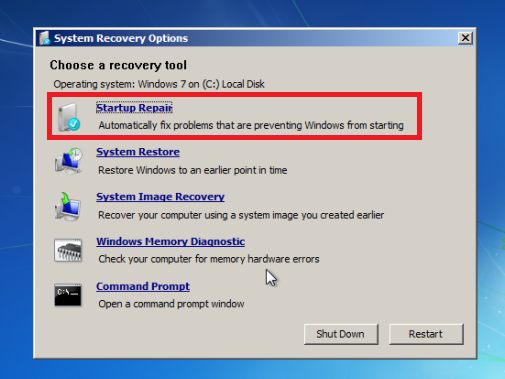 Select the first option, Use recovery tools that can help fix problems with Windows, and then select Startup Repair.
With Startup Repair selected, Windows will attempt to automate the repair; this might work – otherwise, further action will be required.
If the Start up Repair option fails, you will receive a message reading Windows cannot repair this computer automatically. At the bottom of the message, click View advanced options for system recovery and support to return to System Recovery Options, and instead click Command Prompt.
The black command line interface will open with X: selected by default; this is the Windows internal RAM disk that is used by System Repair. You will need to navigate to your Windows system drive, which will by default be on the C: drive.
To open this, type C: and press Enter. Type DIR and press Enter to check that you are in the right drive – the contents listed should include the Program Files, Users and Windows folders.
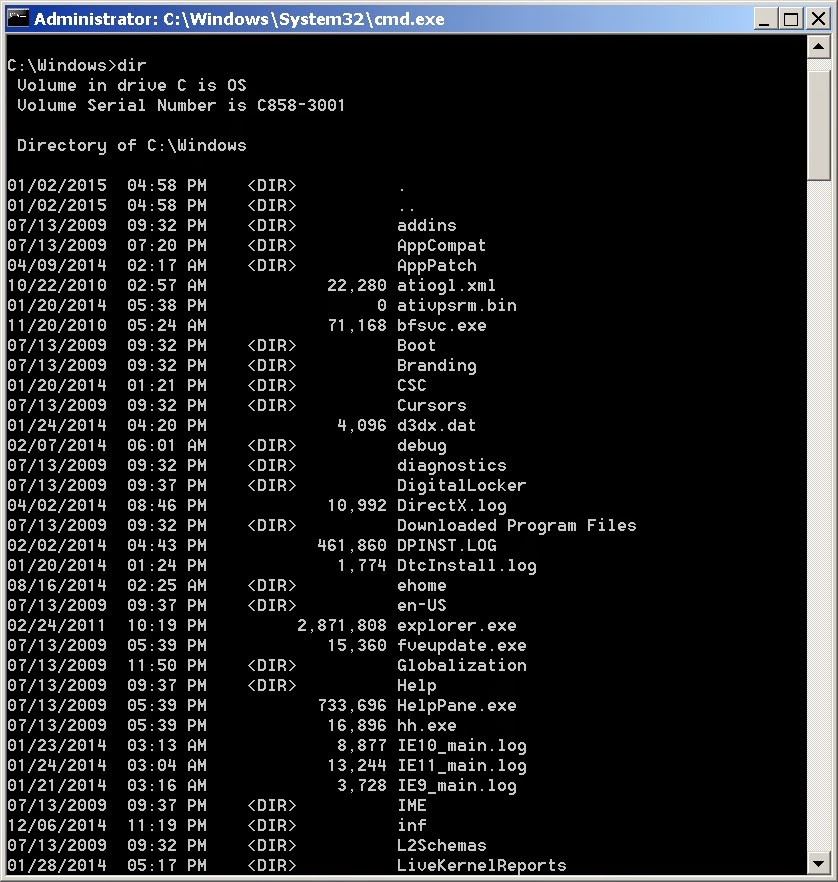 You will then need to change directory. Enter CD windowssystem32config and then DIR to check that the correct files and folders are listed:
- RegBack
- DEFAULT
- SAM
- SECURITY
- SOFTWARE
- SYSTEM
The RegBack folder stores automatic Windows registry backups. To check if these can be used in CD RegBack and then DIR to view the contents. In the folder, you should have the following:
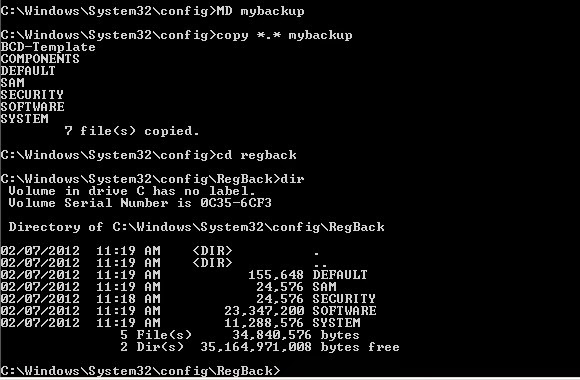
- DEFAULT, SAM and SECURITY files, each around 262,000 bytes
- SOFTWARE file, around 26,000,000 bytes
- SYSTEM file, around 9,900,000 bytes
You can Running the Windows 7 Recovery
With your RegBack folder containing the data you need to restore Windows 7 and rescue it from the reboot loop, you will be able to copy the contents and use them to get the operating system back up and running again.
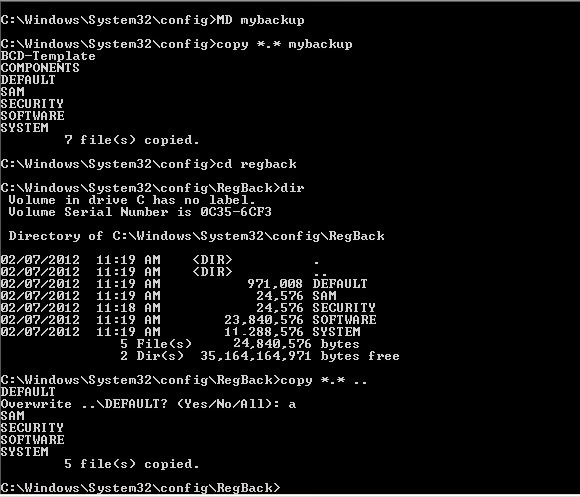
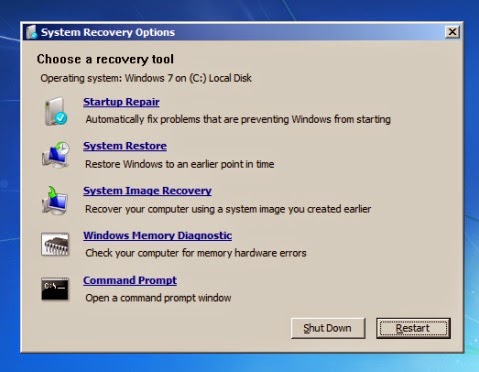
On the System Recovery Options screen, click Restart to reboot your PC – if everything has gone as it should, Windows 7 should now start correctly!
When following the steps outlined here, please take care to follow them precisely. Errors that you make while using the command line interface cannot be undone. Note also that these steps don’t guarantee success – you should be prepared to reinstall Windows in the event that fixing the reboot loop fails.
Go to link Download
Subscribe to:
Posts (Atom)