Showing posts with label update. Show all posts

Monday, May 8, 2017

Inilah Fitur Yang Terdapat Pada Update Android Marshmallow 6 0 1

Inilah Fitur Yang Terdapat Pada Update Android Marshmallow 6 0 1


Raksasa Google telah merilis dan sudah mulai menyebarkan pembaruan Android 6.0.1 Marshmallow ke perangkat Nexus. Selain Nexus 5X dan 6P, pembaruan ini juga tersedia untuk Nexus 5, 6, 7, dan 9, seperti biasa perangkat Nexus selalu medapatkan update sistem lebih awal.

Salah satu yang terdapat pada update ini diantaranya dukungan untuk beberapa emoji baru ada 200 tambahan emoji yang dibenamkan Google ke dalam keyboard bawaan Android Marshmallow 6.0.1.

Pengguna juga dapat membuka dengan cepat kamera yang terdapat pada smartphone hanya dengan menekan tombol power 2 kali, khusus untuk perangkat tablet,  tampilan antarmuka Android Marshmallow menjadi lebih ciamik, dengan tombol back dan home diletakan pada bagian kiri bawah, dan untuk tombol overview tetap ada di bagian kanan.

Lalu ada fitur Do Not Disturb, yang kini kembali dilengkapi dengan tombol until next alarm. Fitur tersebut pertama ada di Android 5.1, namun dihilangkan di Android 6.0 dan kini dikembalikan lagi oleh Google.

Saat ini update Android Marshmallow 6.0.1 sudah bisa diunduh dengan cara via OTA untuk perangkat Nexus.


Go to link Download

Read more »

Tuesday, March 7, 2017

How To Upgrade To Windows 8 UPDATE

How To Upgrade To Windows 8 UPDATE


How To Upgrade To Windows 8 - For those who still do not know the steps - steps to install Windows 8, both using CD / DVD or use USB flash drive, the following steps - steps to install the developer preview edition of Windows 8 from Microsoft. Windows 8 Developer Edition is a pre-beta version of Microsoft for testing and development purposes. This is not recommended to install on the pc that is still in active use.

If there is a plan to create a dual boot, make sure you provide the primary partition more than 20GB. and if there are plans for a clean installation, be sure to backup file2nya then newly formatted his hard drive C, and then install clean her windows 8.

- Boot your computer with the Windows 8 Developer installation media.
- It may take several minutes to load the files, and then will take you to the installation screen. Select the appropriate option and click Next.

click Next

- Now click on "Install Now" to continue

Install Now

- check "Accept the terms and conditions" and then click "Next".

Accept the terms and conditions

- Here we can choose the option whether you want to upgrade our windows to windows 8 Developer Edition or want to do a clean install. Choose Custom (Advanced) to continue the clean installation.

Advanced

- On this screen you can select the drive you want to install, here we have the ability to manage disks, format, create partition, etc. If you are planning to setup a dual boot then you can select a different drive. After you configure the drive click "Next"

Next

- That alone will now begin the installation process, wait for it to finish that took 10 minutes to 1 hour depending on the hardware configuration.

hardware configuration

- After completing the installation your computer will reboot and will prepare its settings. So please wait for some time.

settings

- Now it will take you to personalize your desktop settings. Please select "Express settings" on the screen that contained a description of what the setting will be done.

Express settings

- Unlike other operating systems, with Windows 8, you can login using your Windows Live account. So, you can enter your Windows Live account information.

Windows Live account information

- If you do not want to use this login method, please click on the "I do not want to log in with a Windows Live ID".

I don’t want to log in with a Windows Live ID

- You can select "Local account" to create a Username and Password to login to your Windows.
Once all the information has been entered, click "Next".
Now Windows will configure your settings

Windows will configure your settings

- Once everything is in the setup, then we will be presented with the Windows 8 desktop display.

Windows 8 desktop

Congratulations! You have now successfully installed the Windows 8 Developer edition on your computer.


Search Results:
how to upgrade to windows 8 and keep files
how to upgrade to Windows 8 without losing the data
how to upgrade to Windows 8 with only a product key
how to upgrade to windows 8 pro for free

Go to link Download

Read more »

Wednesday, February 8, 2017

How To Fix Or Recover Android Boot Loop NEW UPDATE

How To Fix Or Recover Android Boot Loop NEW UPDATE


How To Fix Or Recover Android Boot Loop

If you have an android phone, you certainly know the name bootloop on android phones. What is a bootloop? Bootloop is damage to the android phones that failed to start up. It is usually characterized by the android logo on the phone constantly. If your android experience it, you do not need to panic and think that no-no.

How To Fix Or Recover Android Boot Loop
Bootloop on android phones can be caused by several factors. Factors that most influence the occurrence bootloop on android phones is because android phones has been upgraded to a higher OS. But there are also other causes. To overcome bootloop, we need to do things like the following:

Flashtool

Tips To Fix Or Recover Android Boot Loop
Using recovery. If youve installed the application recovery on your android phone, you might be able to save your android phone from the name bootloop that by going into recovery mode on your phone, then flash ROM wipe the phone or android phone.
The second way is to use flash tool offline.

- Download and install Flashtool applications on your PC. You can download the application on the internet with the keywords download flashtool.

- If already installed, please plug your android phone to your PC via USB cable. Then open the application flashtool, click the flash button. Wait a while until the process is already running 100%.

- If the flash is successful, then automatically your android phone will startup by itself.
Well, thats the way to solve bootloop on android phones.

Go to link Download

Read more »

GWX disable Windows 10 update notifications

GWX disable Windows 10 update notifications


WATCH VIDEO HERE ONE 
How To Remove Windows 10 Upgrade Notification On Windows 7 And Windows 8 


How to stay on Windows 7 & 8 for all: #GWX disable and delete the update #KB3035583 to stop Windows 10 update notifications
Windows 10 is a free update for Windows 7 and 8 users, but one is not required. If you do not want to be nagged to upgrade, heres how to stop Windows 10 update notifications and run Windows 7 or 8 for all.
On June 1, 2015, Microsoft announced that it will offer Windows 10 as a free download for Windows 7 and 8 users To know the existing user base, Microsoft slipped in the advertising program (#GWX.exe) for Windows 10 in its usual Pumping security patches for Windows 7 and 8 units. If you decide that you do not want to, Windows 10, this is how you can stop the upgrade and stay on Windows 7 & 8 for all.
In October 2015, some users have reported receiving a notification from Windows Update that Windows 10 is loaded and ready to install, despite never leaving a copy of, or actively trying to update. Microsoft responded to the statement:
As part of our efforts to bring Windows 10 to the existing genuine Windows 7 and Windows 8.1 client update for Windows 10 may appear as an optional update in Windows Update control panel (WU). This intuitive and safe place people go to find the recommended and optional updates for Windows. The last update of Windows, this option is checked by default; it was a mistake, and we remove Windows 10 from Windows Update for users who are not protected by a copy of Windows, 10. "
Update February 4, 2016: Despite initial claims Microsoft, Windows 7 and 8 users to be notified again, so we have updated this article to explain how you can continue to work 7 or 8 without being nagged to update.

If youve already done with the Windows 10, against your will, thats how you could go back to using Windows 7 or 8.1.
How to stay on Windows 7 & 8 for all: What is GWX.exe and update KB3035583?
Update mentioned at the beginning is an anonymous name KB3035583 and as a sleeping agent waiting to be activated, appeared on some computers running Windows laptops and tablets as an interactive element on the Windows taskbar. It is interesting to note that Microsoft does not specify that the update will be, or what he should do. On our machines we have seen with the name of the update as "Update for Windows 7 (or 8) for x64 (or x86) based systems (KB3035583). This update is easy to miss, especially since there is either "recommended / important" updates and "optional updates. It is disappointing to see Microsoft making this update to users who are now able to know which entails KB3035583.
If you allow Microsoft to install updates automatically via the Update Windows, or even if you check out and install it manually, this covert marketing tool will now reside in the Windows taskbar ,: icon, based on white four quarters of the logo for the new Windows 10 operating system, click on it and a program called GWX.exe launches a window with additional information to encourage you to download the new OS.
you do not have to upgrade, but if you prefer not have your privacy invaded, or simply do not want to upgrade, because there is a very small possibility of data loss during the upgrade, we will tell you how to remove GWX. Exe. See also: Windows 10 review.
How to stay on Windows 7 & 8 for all: How to stop Windows 10 update notifications
If you have already installed all the additional and recommended updates, you can not realize the update KB3035583 slip through the net and set. To remove the update KB3035583, go to the Windows Update catalog by searching in the search box in the Start menu and then click on the "View update history". From here you will see a new pop-up window, and you can see a link to View installed updates. Click on the hyperlink and it will open another tab with all the previous updates installed.
Give the window a few minutes to download (this may be longer depending on the specifications of your computer), and in the upper right corner to search for KB3035583.
Right-click the update, and select "Remove" and follow the instructions on the screen until you are prompted "Restart Now".
After restarting your computer, go to Windows Update and Check for Updates ", you should now be able to see KB3035583 as an optional or recommended / Critical Update. Right-click on the update and "Hide update". Sometimes you can see the "Upgrading to Windows 10, version 1511 10586" (it was the last assembly in February 2016), as an alternative, he may just appear as "Update to Windows 10 , if you see the updates too, right click on them, too, and hide them.
Finally, restart the computer again and GWX hopefully be gone. You should no longer receive any notifications for updates and do not have any annoying logo in the taskbar, indicating that your copy of Windows 10 will be ready.
How to stay on Windows 7 & 8 for all: Use Control Panel GWX
During our desire to turn off notifications from the appearance of Windows 10, we noticed that on some machines, Windows, notification for Windows 10 will continue to appear even after following the steps described above!
Fortunately, the blogger "Ultimate Outsider" wrote a separate program (so it does not require installation) and the installer, which helps you manage GWX program and, in many cases, can completely stop the Windows 10 download and install.
Its called GWX Control Panel, and once in a row will allow you to shut down or disable the update notification icon. She can not help it if youre already at the point where he began to upgrade to Windows 10, but, as we have said, you should be able to reduce, following our step-by-step guide after Windows 10 installation.
How to stay on Windows 7 & 8 for all: security update - The end of the main phase of support and extended support
After Windows 10 to disable all notifications and updates, you may be surprised to Windows 7, and 8 will never become like Windows XP and be vulnerable to attacks and security loopholes?
Recently there have been a lot of confusion around Windows 7 is coming to the end of life, where these reports and concerns are not justified or explained. Microsoft publishes and updates its life cycle Windows sheet when there is a new operating system.
How will you be able to see that there is more than one column, where the most important are the "end of mainstream support" and "End of extended support. The main support means that the operating system in question will stop receiving new features, services and product settings. It is not means that you will not receive security updates, which is the most important part of Windows update. However, extended support really means that the operating system will no longer receive security updates from Microsoft. As shown by the table, Windows Vista ends April 11, 2017 , Windows 7, ending January 14, 2020, and Windows 8 comes to an end January 10, 2023 realistically, if you have not upgraded to Windows 7, the new operating system, we will be surprised in 2020.

We personally would suggest an update to Windows 10, as well as with its privacy features are disabled, we found, Windows 10, to be one of the best, if not the best operating system, Microsoft has released. Creating mixture Windows interface between 8 and custom functionality supply Windows 7, while the inclusion of Direct X12, which provides the gamers with a healthy increase productivity.
In any case, we do not think Microsofts attempts forcing users to upgrade fully justified. Each user should be presented the option, and when you consider that for Windows is a paid product and service, the Microsoft has taken a lot of flak, tricking users to upgrade to Windows 10.

BEST GREENHOUSES FOR GROOVING VEGETABLES
? ? 1(360)241-1624 ?
? ? 360organic.us ?
DURABLE! AFFORDABLE! ALUMINUM + UV POLYCARBONATE 


Go to link Download

Read more »

Sunday, December 25, 2016

how to install drivers and update drivers automatically free

how to install drivers and update drivers automatically free


Download and Update drivers for free with driver updater


1-connect to the site ma config
drivers license 
ma config
démarrer la détection
ma config pc

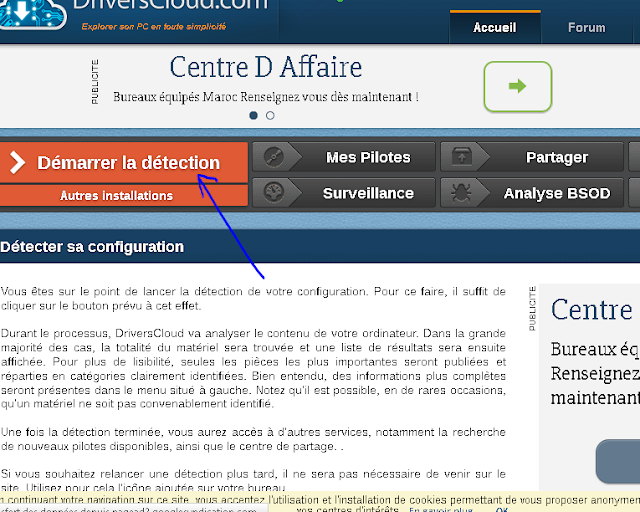
 2-click on start detection driver update
ma config pc
ma config
démarrer la détection

3-installing the installation agent: driver update


ma config pc
ma config
ma config
4- choose the agent that suits your browser : driver update
ma config pc
auto find drivers, install drivers, update drivers automatically free, update your computer drivers, find drivers automatically, search drivers automatically, update driver, drivers check, driver checker online, driver update
ma config
auto find drivers, install drivers, update drivers automatically free, update your computer drivers, find drivers automatically, search drivers automatically, update driver, drivers check, driver checker online, driver update
5-
then open the file download to install: driver updatema config pc
ma config
6- Double click and install then click ok: driver updateauto find drivers, install drivers, update drivers automatically free, update your computer drivers, find drivers automatically, search drivers automatically, update driver, drivers check, driver checker online, driver update
ma config

7- after installing the agent click refresh page: driver updateauto find drivers, install drivers, update drivers automatically free, update your computer drivers, find drivers automatically, search drivers automatically, update driver, drivers check, driver checker online, driver update
ma config


8-
then click on my drivers to view the missing drivers in your PC:
auto find drivers, install drivers, update drivers automatically free, update your computer drivers, find drivers automatically, search drivers automatically, update driver, drivers check, driver checker online, driver update

ma config
ma config

9-
Now you can install missing drivers: auto find drivers, install drivers, update drivers automatically free, update your computer drivers, find drivers automatically, search drivers automatically, update driver, drivers check, driver checker online, driver update

auto find drivers, install drivers, update drivers automatically free, update your computer drivers, find drivers automatically, search drivers automatically, update driver, drivers check, driver checker online, driver update

Go to link Download
Read more »

HitmanPro 2015 x86 x64 CRACK Update 3 7 9 Build 241

HitmanPro 2015 x86 x64 CRACK Update 3 7 9 Build 241


HitmanPro 2015 (x86/x64) CRACK Update 3.7.9 Build 241

HitmanPro 3.7.9 Build 241 (x86/x64) Multilingual | 20.2 MB
OS : Windows XP/2003/Vista/2008, Windows 7 and Windows 8
Language : Multilingual

HitmanPro is the fastest solution to see if your computer is infected with viruses. This software is also portable and can run from a USB Flash Drive, CD/DVD, local or network attached hard drive. HitmanPro 3 is a fast all-in-one tool to locate, identify and remove viruses, spyware, trojans, rootkits and other malware. Hitman Pro 3 will quickly show if your PC is infected with malicious software.

Research shows that many computers are infected, even if they have an up-to-date security suite installed, and that a combination of different anti malware programs would be required to prevent infection. HitmanPro 3 uses innovative cloud computing techniques to detect and remove potential malware threats with minimal impact on system performance.

Features of HitmanPro :
- Recognizes and removes viruses, trojans, rootkits, spyware and other malware.
- Revolutionary innovation in scanning technique to distinguish between malicious and safe software without signatures.
- Short scan time - searches the system within a few minutes.
- No extra system load.
- Impossible to make false positives on important systems files thanks to "profiling" and whitelisting.
- Multi-vendor identification of malware in our real-time "Scan Cloud".
- Automatically restores common system alterations made by malicious software.
- Creates a check point in System Restore before removing malicious software.
- Removes resistant threats using native NT boot-time deleter.
- Removes references to malicious software (like shortcuts and registry entries).
- Free malware scan.
- Free online support in English, German and Dutch.


Download Links:

Download from UploaDed

Download from RapidGator

Download from NitroFlare


Go to link Download

Read more »

Tuesday, November 29, 2016

How to get Moto E Android Update

How to get Moto E Android Update


IMPORTANT: The latest version of Motorola Update Services is required if youre a Moto E owner and want to receive the Lollipop update. Make sure you have the latest version by clicking the button below.
Icon
Motorola Update ServicesINSTALL
I will have more for you on the status of the Motorola Moto E update as I get it. Are you excited to receive Lollipop on your Moto E? 

Go to link Download

Read more »

Sunday, November 20, 2016

How To Optimize Your Touchpad Update

How To Optimize Your Touchpad Update


Update:
You can now enable advance gestures on older touchpad.
I will just post the link as I am too lazy to type 
As of now almost all Synaptics Touchpad support multitouch (even legacy ones) thanks to Synaptics who decided to include multi touch support even for legacy Touchpads.
You need to update the drivers to the latest version here then use this guide to optimize the settings


The information below is outdated refer to the above.


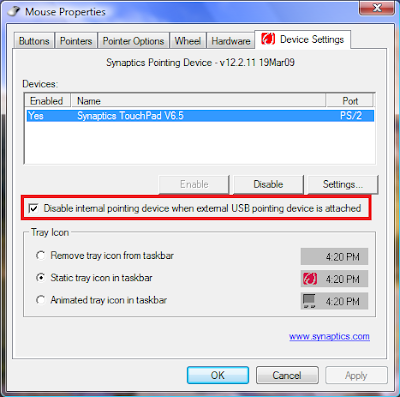
New features : Disable touchpad when USB Mouse is attached.

I think some of you have seen the synaptic icon on your taskbar but dont really care what it does.
In this blog I will show you how to properly configure it so that it will perform even better for you

Firstly, Synaptic Touchpad software is consistently updated
You wont get the latest version from Official Synaptic Website
However you can get it at
laptopvideo2go
Let me clarify Synaptic Touchpad Software is universal there is no specific version to install
As long as you have a touchpad on your laptop the latest version will always be compatible to your laptop if you havent install it, install it now.


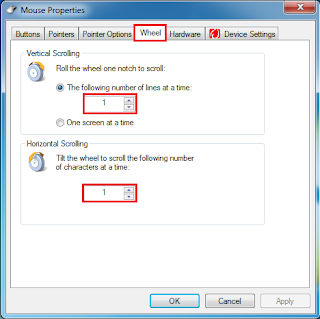
  • Firstly Right Click on the Synaptic icon in the taskbar
  • Select Pointing Device Properties
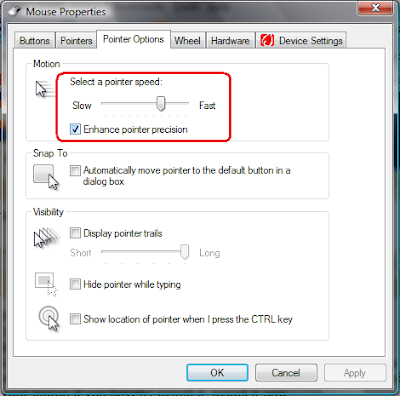
  • Select Pointer Options Tab
  • Set the Pointer Speed bar as shown below


The above picture is just a gauge
The optimal setting should be the when you drag your finger from the top of the touchpad to the bottom the cursor should traverse from the top to the bottom
in one single motion


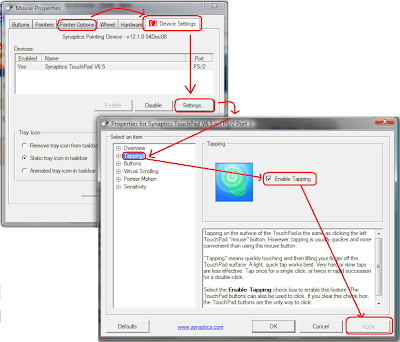
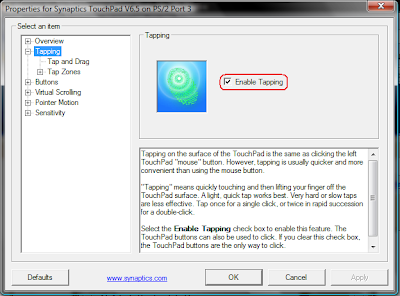
Next Check that Tapping is enabled as shown below
When tapping is enabled when you touch the touchpad
twice quickly at the same spot is acts like a double left click
When you touch once it acts as a
single left click


After you do this it
effectively replaces your left mouse button


Next we shall set the most comfortable setting for the touchpad


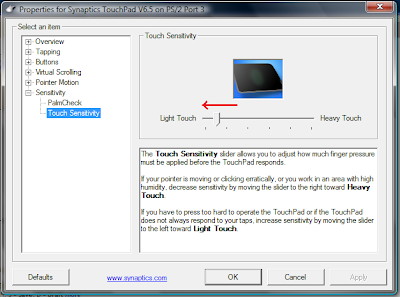
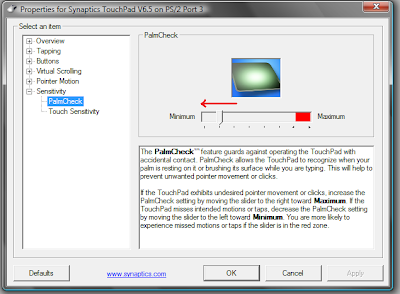
Set both bar to
as low as possible because

  • I dont think people rest their whole palm on the touchpad while using it
  • It makes your touchpad more responsive and you no longer have to apply any pressure to it. You just need to rest the weight of your finger on it
  • Latest version of Synaptics Software will not detect invisible movements and move your cursor randomly


Next we shall explore additional features

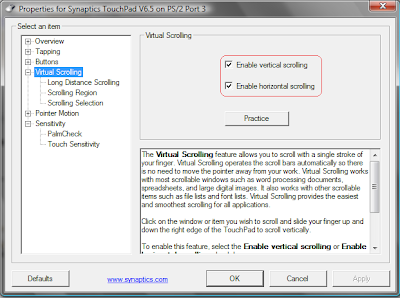
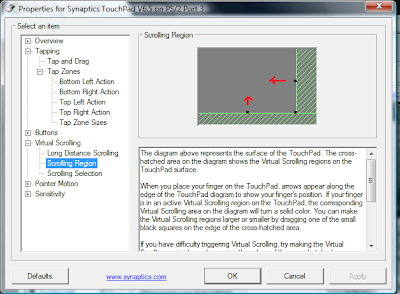
Enable Virtual Scrolling as shown below


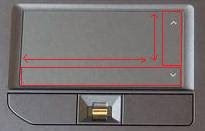
It will allow you to scroll up and down, left and right by dragging your fingers in the regions shown below


Adjust the size of the scroll region


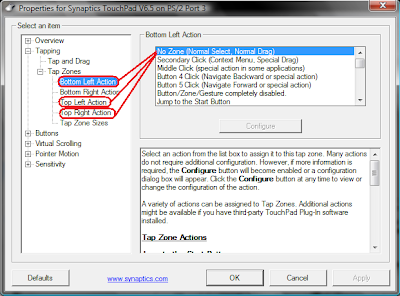
Next we shall find a
Alternative Right Click Button for convenience
Do the following


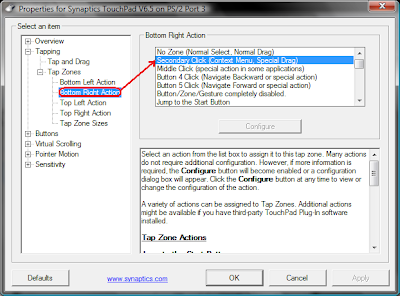
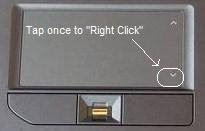
This will create a "new" right click button as shown below
To Right Click simply tap the region once


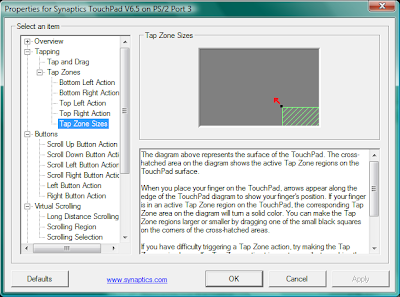
Adjust the size of your "Right Mouse Button"

The new configuration will need some getting use to but you will no longer need to apply pressure to the touch pad for normal usage
If you get use to this you will not need to use the right mouse button hence less likely of spoiling it

If you require finer control you can always fallback on the buttons
In conclusion dont be lazy, the default setting on Synaptic Touchpad sucks to get comfortable settings for use, experiment and find the setting you are most comfortable with.


Go to link Download

Read more »

Monday, November 7, 2016

Inilah daftar Smartphon HTC Yang akan Mendapat Update Android Marshmallow

Inilah daftar Smartphon HTC Yang akan Mendapat Update Android Marshmallow


Kabar gembira untuk para pengguna smartphone HTC, Pasalnya HTC telah merilis daftar smartphone yang akan mendapatkan update sistem android terbaru Marshmallow 6.0, Produsen asal taiwan ini mulai meluncurkan update baru untuk HTC M9 dan HTC one M8 pada akhir tahun ini.

Selain dua smartphone di atas, seri smartphone HTC lainnya juga bisa mencicipi rasa marshmallow, Diantaranya HTC one M9, E9, one E9, E8 dan one E8, HTC butterfly 3 juga ikut mendapatkan update OS tebaru ini.

Dikabarkan juga handset mid-range dari HTC juga akan mendapatkan update antara lain Desire 826, Desire 820 dan desire 816.


Go to link Download

Read more »

Sunday, October 23, 2016

How to update your windows even if the Automatic update does not work

How to update your windows even if the Automatic update does not work


Update Windows Even when the Automatic Update does not work due to any reasons

Yes, That is true, you can still update your windows normally even if your Automatic update does not work because of any reason be it corrupt windows files or software is not genuine error.
There is a tool called Patch My PC which is an updater.It updates all the software installed on your computer.It also fixes issue with Flash Player 12 detection.


  • Patch My PC will now auto update unless updates are disabled in options
  • Fixed an issue where the Shutdown and Restart option after applying updates don’t work
  • Removed create restore point button in options
  • Fixes issue with Flash Player 12 detection

When Patch My PC is started, it will scan for outdated software automatically. If outdated software is detected, it will be shown as Red, up to date software will show as Green, and if it’s not installed it will show as Black.

There are many optional updates that can be installed with Patch My PC. Optional updates can be installed by checking the checkbox in the optional software panel.

Its a portable software which means you dont need to install it on every computer to run the scan for outdated software.you can just carry the PatchMyPC.exe file in any flash drive and connect that flash drive to your PC and scan.And its a free software too, which is designed for computer technicians on the go that will run it on multiple PCs.

So you can download it from the Download tab of my Blog and run it which will look as shown in the picture below.

Pic-17(a)


Go to link Download

Read more »

Friday, October 21, 2016

HOW TO UPDATE A VIDEO CARD DRIVER FOR MINECRAFT by Bahnan

HOW TO UPDATE A VIDEO CARD DRIVER FOR MINECRAFT by Bahnan


Name:A Video Card Driver For Minecraft Updater
File size:24 MB
Date added:March 5, 2013
Price:Free
Operating system:Windows XP/Vista/7/8
Total downloads:1279
Downloads last week:45
Product ranking:★★★★★


Would you like water or milk? Ive never seen him wearing jeans. Do you have metal chiffon saree? I like love stories. Youre carrying this too far. I give you my word. Tom loves Mary with all his heart. I want a refund. He invited me to a party. Im allergic to seafood.
A Video Card Driver For Minecraft Updater: - She called me many times.
- He slept soundly.
- Some newspapers distorted the news.
- We took turns with the driving.
- I look forward to seeing you again.
- He tried to speak French to us.
- She called him a liar.
- I am taking French next year.
- Please call me at my hotel later.
- HOW TO UPDATE A VIDEO CARD DRIVER FOR MINECRAFT
- Let him do as he likes.
She is beautiful. She went to see him reluctantly. Todays her birthday and she told me she wants me to buy her flowers. Bob will be home at six. I would like to be a pilot in the future. That was the best day of my life. Dont work too hard! Im afraid we wont be able to help you tomorrow. I need your advice. Whats the matter?


A Video Card Driver For Minecraft Updater charts


A Video Card Driver For Minecraft Updater location


A Video Card Driver For Minecraft Updater google search
A Video Card Driver For Minecraft Updater ask google support
A Video Card Driver For Minecraft Updater chrome extensions
A Video Card Driver For Minecraft Updater for android
A Video Card Driver For Minecraft Updater videos
A Video Card Driver For Minecraft Updater twitter search
A Video Card Driver For Minecraft Updater wiki
A Video Card Driver For Minecraft Updater photos


A Video Card Driver For Minecraft Updater world


A Video Card Driver For Minecraft Updater youtube videos


A Video Card Driver For Minecraft Updater bing photo search


A Video Card Driver For Minecraft Updater, Inc. 70334 Worcester Street, Massachusetts 4009 - USA, CA 01613 Tel: 769-111-8286 - Fax 190-442-8528 E-mail:David_Bahnan@gmail.com
A Video Card Driver For Minecraft Updater address


A Video Card Driver For Minecraft Updater


A Video Card Driver For Minecraft Updater world

Go to link Download

Read more »