Showing posts with label 14. Show all posts
Showing posts with label 14. Show all posts
Monday, April 10, 2017
How I installed Owncloud v6 0 3 on Ubuntu Server 14 04
How I installed Owncloud v6 0 3 on Ubuntu Server 14 04
Update; 1 Jul 14
Decided to try installing via the:
http://software.opensuse.org/download/package?project=isv:ownCloud:community&package=owncloud

The version installed was 6.0.4.1 at the time.
This gives the ability if there are updates that they will be installed automatically through apt-get updates and no more manual updates.
I crossed out the items that were not necessary with the update install version verses the manual install.
So...
1. Installed Ubuntu Server 14.04 on the computer.
2. Installed with OpenSSH and LAMP. Root should be the default admin account created for mysql. Remember the password.
3. Performed updates:
sudo apt-get update
4. Performed upgrades:
sudo apt-get upgrade
5. Perform additional required installs (In Accordance With [IAW] Owncloud v6 Manual Installation):
sudo apt-get install php5-gd php5-json php5-mysql php5-curl php5-intl php5-mcrypt php5-imagick
sudo sh -c "echo deb http://download.opensuse.org/repositories/isv:/ownCloud:/community/xUbuntu_14.04/ / >> /etc/apt/sources.list.d/owncloud.list"
sudo apt-get update
wget http://download.opensuse.org/repositories/isv:ownCloud:community/xUbuntu_14.04/Release.key
sudo apt-key add - < Release.key
sudo apt-get install owncloud
sudo chown -R www-data:www-data /var/www/html/owncloud
10. Enabled ssl within Apache2"
sudo a2enmod ssl
sudo a2ensite default-ssl
sudo service apache2 restart
11. Modified the default-ssl file for Apache2:
sudo nano /etc/apache2/sites-available/default-ssl.conf Add ServerName; 
Add owncloud;
<Directory /var/www/html/owncloud>
 Options Indexes FollowSymLinks MultiViews
 AllowOverride All
 Require all granted
</Directory> 
12. Enable mod_rewrite
sudo a2enmod rewritesudo service apache2 restart 13. Might get error "Could not reliably determine the servers fully qualified domain name"
Add FQDN to /etc/hosts
sudo nano /etc/hosts

sudo service apache2 restart14. Log into your owncloud via http
-You will get a warning that your data directory is exposed. Well change that later.
-Create an admin account name with password.
-Leave the data folder alone.
-Hopefully you remembered the mysql root password.
-Call you database "owncloud_db".
-The database will be located on the "localhost".

15. Close the client download window.
-Select admin (upper right corner) --> users
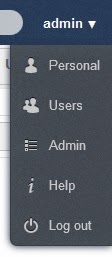
16. Create your first user.
-Provide that user with enough storage space.
-Select admin again and logout.

sudo mv /var/www/html/owncloud/data /
18.
You will need to edit the config.php file and add the fqdn:
sudo nano /var/www/
Add your FQDN; 1=> owncloud.no-ip.info

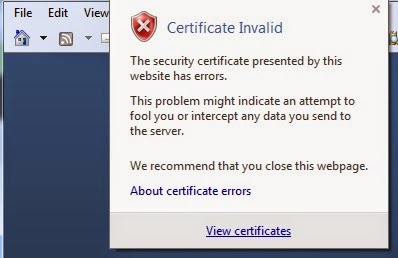
19. You should be able to access https now without complaint. Running owncloud through http is not healthy. It should be running under https. If you check the ssl cert (view certificates) the default cert used should be from the ubuntu installation and have the computer name in the "issued to" "issued by".
20. OPTIONAL if you dont like the default sizes to upload make these changes:
sudo nano /etc/php5/apache2/php.ini
Change;
post_max_size = 4G
cgi.fix_pathinfo = 0
upload_max_filesize = 4G
date.timezone = "America/New_York"
21. You should be good to go.
UPDATE; 16 Jun 14
1. If you get the following error:
isWebDAVWorking: NO - Reason: [CURL] Error while making request: SSL: certificate subject name XXXXX does not match target host name YYYYYsudo nano /var/www/html/owncloud/3rdparty/Sabre/DAV/client.php
Find; <ctrl w>curlsettingsAdd below;CURLOPT_SSL_VERIFYPEER => 0,
CURLOPT_SSL_VERIFYHOST => 0, 
sudo service apache2 restart2. I also added my own self created certs instead of using the default.
Now to get https ssl working with OwnCloud I created self-signed certs. Remember the self signed password as it will ask you again.
sudo openssl genrsa -des3 -out /etc/ssl/server.key 4096
sudo openssl req -new -key /etc/ssl/server.key -out /etc/ssl/server.csr
sudo openssl x509 -req -days 3650 -in /etc/ssl/server.csr -signkey /etc/ssl/server.key -out /etc/ssl/server.crt
sudo openssl rsa -in /etc/ssl/server.key -out /etc/ssl/server.key.insecure
sudo mv /etc/ssl/server.key /etc/ssl/server.key.secure
Go to link Download

Tuesday, March 7, 2017
Freemake Video Downloader v3 8 0 14 Portable
Freemake Video Downloader v3 8 0 14 Portable

Download videos from 10,000 sites - YouTube, Vimeo, Vevo, Dailymotion, etc. Convert any online video to MP3, AVI, MKV, WMV, iPhone, iPod, PSP, Android.
Free & Safe Video Downloader
Over 200,000,000 users download YouTube videos free with Freemake. No limitations and no signup. Our YouTube downloader is regularly updated and always delivers the guaranteed result.
Download Youtube MP3
Download Youtube MP3 in a fastest way. Our YouTube MP3 Downloader saves YouTube music in original quality. MP3 download is possible for YouTube, Facebook, Dailymotion, Vevo, etc. See supported sites
Download Video from 10,000+ Websites
Grab any web video from thousands of sites: YouTube, Facebook, Vimeo, download Dailymotion, Veoh, Vevo, adult sites. Rip any embedded video no matter where its hosted.
Turbo Fast YouTube Downloader
Download YouTube videos with "One click mode". Choose batch parameters for video quality, format, destination and our video downloader will automatically rip videos in accordance with your settings.
Online Video to AVI, MP4, MKV, iPhone, Android
Download online videos directly in AVI, MP4, MKV, WMV, WMV, 3GP, MP3. Convert YouTube to iPhone, iPod, iPad, PSP, Android. Use ready profiles for portable devices.
HD, HQ & 4K YouTube Downloader
Choose from 14+ different qualities for YouTube video download: 4K, 1440p, 1080p, 720p, 480p, 360p, 240p, 180p, MP4, WebM, 3GP, FLV.
YouTube Converter
Convert YouTube videos to AVI, MKV, WMV, MP3, 3GP, iPod, iPhone, PSP, Android.
Download YouTube Playlists
Download YouTube playlists, channels, favorites in two clicks. Download music collections from artists channels and directly send MP3s to iTunes, iPod, iPhone, iPad.
Download YouTube Ad-Free Video
YouTube Downloader from Freemake automatically removes all ads placed or going along with YouTube videos. Save videos without any ads, captions, or annotations.
Download YouTube Private & Embedded Videos
Download YouTube private & YouTube videos embedded into other sites.
To work with Freemake software, you will need .NET Framework 4.0 Client Profile.
Made With Turbo Studio
Size: 24 MB

Go to link Download
Tuesday, February 14, 2017
Freemake Video Converter v4 1 9 14 Portable
Freemake Video Converter v4 1 9 14 Portable

Convert between video formats, rip DVD, convert to devices, burn DVD, create photo slideshows and music visualizations, cut, join, rotate and upload video, photos, music to YouTube with our free video converter.
This is Freeware
Freemake.com offers absolutely free programs which have been developed as alternatives to paid ones. Make sure that our free video converter is freeware in the truest sense of the word.
Numerous Input Formats
Import videos from video cams (avi, mpg, tod, mov, dv, rm), mobile phones (3gp, 3g2, 3gp2), Internet (flv, swf, mp4) & PC (wmv, mkv, qt, ts, mts). Add music, DVD and photos. View all supported formats
Conversion to iPod, iPhone, iPad, PSP, Xbox, Blackberry
Get videos already prepared for your favourite multimedia devices. Simultaneously convert several videos using one and the same preset.
Rip DVD
Conversion to AVI, WMV, MP4, 3GP, DVD, MP3
Convert videos to the most popular video formats. Rip DVD (unprotected only). ?xtract audio from video clips & DVD. Convert audio files of different formats to MP3 with our free video converter.
YouTube Publishing
Upload videos, photo slideshows, music to YouTube. Upload AVI, WMV, MP4, 3GP, JPG, BMP, GIF, MP3 to YouTube. The program will help you cut videos (if required) into 15-minute parts and insert them into one YouTube playlist.
DVD Burning
Burn up to 20 hours of your favorite movies to a standard DVD disc. Apply different DVD menu types. Enjoy high-quality playback on your DVD Player.
Photo Slideshow Creation
Create your own photo slideshows with background music. Upload your slideshows to YouTube.
Video Editing
Cut unwanted parts from video files. Flip or rotate video. Join several videos into one file to get a full-length film.
Microsoft .NET Framework v4 Required To Run The Program
Made With Turbo Studio
Size: 41.5 MB

Go to link Download
Sunday, October 16, 2016
IDM 6 25 Build 14 Free Download with Crack Serial Key
IDM 6 25 Build 14 Free Download with Crack Serial Key
Internet Download Manager 6.25 build 14 with crack and serial key is the latest version of IDM which promises fast download speed upto 5 times. This IDM 6.25 build 14 activated has the feature to restore previous download in case of any system crash and can easily manage interrupted downloads. The latest features in this update includes windows 10 compatibility and compatibility bug fixes with different browsers. Internet Download Manager fully activated has the ability to increase the download speed of your files because it uses a parallel download system/threads which manages the download speed and files properly and provide maximum download speed.

IDM 6.25 Build 14 Free Download with Crack - Serial Key
IDM 6.25 fully cracked is a very well known and famous download manager software all over the world and is the best source to download files in high speed. You can also download the previous version Internet Download Manager 6.25 build 12.
IDM 6.25 Build 14 Crack 2016 Features
Very useful application for every Internet user.
Supports resume and schedule best features.
Supports a smart download logic accelerator that features.
Easy to download anything with one click on a browser.
Supports accelerate downloads by up to 5 times.
Easily connect to the Internet at a set time, download the files.
Allow to check and update for new versions of IDM tool
IDM license key supports multilingual.
Supports multi part download facility.
Easy to get high speed download.
Support windows operating system.
Allows to download up to 5 times speed.
Supports 150+ Internet browsers.
IDM 6.25 Build 14 Serial Keys
F9TZ9-P6IGF-SME74-2WP21
CJA0S-K6CO4-R4NPJ-EKNRK
N0Z90-KJTTW-7TZO4-I27A1
629U7-XLT5H-6SCGJ-2CENZ
L67GT-CE6TR-DFT1D-XWVCM
XONF7-PMUOL-HU7P4-D1QQX
F9TZ9-P6IGF-SME74-2WP21
CJA0S-K6CO4-R4NPJ-EKNRK
N0Z90-KJTTW-7TZO4-I27A1
How To Install?
Close/uninstall previous version of IDM.
Install version 6.25 build 14 from setup folder.
IDM may show you some notification like "You have registered IDM with a fake serial number" dont get frightened, just close those notifications.
Close IDM from system trey if it is still open (IDM must be closed during patching process).
Copy all files in "Crack" folder and past (replace) it in original installed folder (normally C:Program FilesInternet Download Manager);
Run reg file. Done!
If you still any problem in cracking, you can try idm universal crack to activate idm full version.
IDM 6.25 Build 14 Free Download with Crack - Serial Key
Go to link Download
Subscribe to:
Posts (Atom)