Showing posts with label blogger. Show all posts
Showing posts with label blogger. Show all posts
Monday, May 22, 2017
Gratis Template Blogger GREATWANDA Responsif dan SEO Friendly
Gratis Template Blogger GREATWANDA Responsif dan SEO Friendly
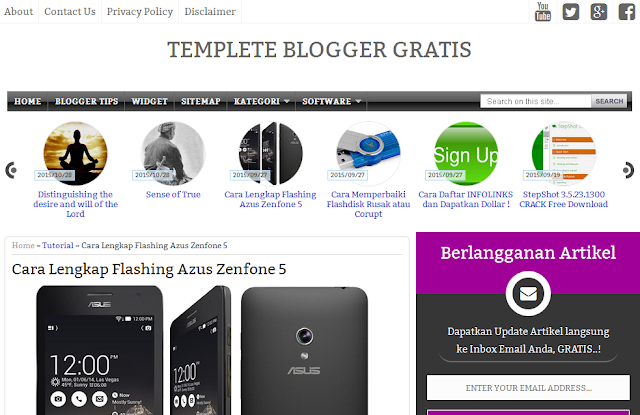
BLOGGINGPASURUAN – Disini saya akan memberikan template yang bagus baik dari sisi responsive dan SEO. Termplate yang saya pilih tentu saja selain template yang keren, fitur-fitur lain tetap harus menjadi bahan pertimbangan, contohnya seperti responsif, breadcrumb, related post dan lain sebagainya.
Mengapa Harus Menggunakan Template SEO Friendly?
Mungkin untuk blogger pemula akan sedikit bertanya-tanya mengenai template dengan kategori SEO Friendly. Sebenarnya tidak ada bumbu-bumbu ajaib yang diberikan kepada template dengan kategori SEO Friendly, ini hanyalah sebuah template yang sudah disesuaikan dengan anjuran google dan sedikit trial & error para pakar SEO. Dimulai dari load speed yang cepat, sampai dengan penggunaan heading tag sesuai aturan main SEO. Dengan penyesuaian tersebut, maka tidaklah mengherankan jika template yang termasuk dalam kategori SEO Friendly cenderung dapat lebih mudah mendatangkan pengunjung dibandingkan template yang menghiraukan faktor SEO. Jika kalian merupakan seorang blogger yang menginginkan banyak visitor, maka tidak perlu berpikir dua kalli untuk memilih jenis template SEO Friendly.
Langsung saja lihat demo dan jika tertarik bisa langsung di download ..gratis


Jika Anda tertarik dengan artikel Gratis Template Blogger ( GREATWANDA ) Keren Responsif dan SEO Friendly mohon kiranya di share di media sosial yang Anda miliki, dukungan Anda adalah semangat Admin untuk terus berkarya.
Semoga bermanfaat…
Go to link Download

Thursday, April 27, 2017
How to Create Responsive Website or Blogger Template
How to Create Responsive Website or Blogger Template
As the time goes, browsing websites from desktop computers decreasing and using Laptops, Tablets and Mobile devices increasing day by day. So why not to create our website design custom for each types of devices, that fits and looks more attractive for those devices to acquire the visitors entered from those devices.
Responsive web design is the approach that suggests in which design and development should respond user behavior and environment based on the size of the browser screen, platform and orientation.
Responsive web design includes the use of flexible layouts, images and intelligent use of media queries. You can make your blogger template responsive by using special tags in CSS. Media queries (@media) are such tags, which helps to make your CSS for every device screen size. You can make many media queries on CSS that matches for each screen size and you can put custom CSS codes for each media queries.
Here I have explained some steps for creating your blog responsive.
Step1: Add meta tags for responsiveness
Add the following meta tags on your blogger template using the following steps.
- Go to blogger dashboard and click on template
- Backup your template for the risk while editing template codes.
- Paste the following codes between and <head> and </head> tags.
- Save your blogger template.
Add the following codes to size the contents of blog equal to the device width.
<meta name="viewport" content="width=device-width/">
Add the following codes to size the contents of blog equal to the device width and device height.
<meta name="viewport" content="width=device-width, height=device-height/">
Add the following codes to size the contents of blog equal to the device width and initial zoom size.
<meta name="viewport" content="width=device-width, initial-scale=2"/>
Add the following codes to size the contents of blog equal to the device width, initial zoom size and maximum zoom size.
<meta name="viewport" content="width=device-width, initial-scale=1, maximum-scale=1/">
Instead or writing meta tags, you can do the same with the following codes in CSS.
@-moz-viewport {
width: device-width;
}
@-moz-viewport {
width: device-width;
height:device-height;
}
@-moz-viewport {
width: device-width;
initial-scale:2;
}
@-moz-viewport {
width: device-width;
initial-scale:1;
maximum-scale:1;
}
This works only for Mozilla browser, for other browsers you can use -o-, -webkit- and -ms- as prefixed properties.
Step2:Add media queries for each screen size
Add the following media queries between <![CDATA[*/ and ]]> tags.
@media screen and (max-width:320px){
/*For Small Screen Moblies*/
}
@media screen and (max-width:480px){
/*For Smart Phones and iPhones*/
}
@media screen and (max-width:768px){
/*For Small Tables*/
}
@media screen and (max-width:1024px){
/*For Notebooks*/
}
You can add more media queries according to your need for different screen sizes and orientations and can also use min-width: to specify minimum width of screen.
To specify the screen orientations landscape or portrait use
@media screen and (max-width:480px) and (orientation:landscape) { }
Step3: Write custom CSS code for media queries
Now, you have to add custom CSS codes for each media queries. The default CSS properties written are replaced by the properties written within these media queries. Here is the sample CSS code written for mobile devices, you can add these codes for media screen with max-width 320 and 480 px.
#wrapper {
  width:85%;
 }


#content{

 width:100%;
}


#sidebar-left{

 width:100%;
 clear:both;
}


#sidebar-right{

 width: 100%;
 clear:both;
}
Alternate method for adding CSS code with media queries
For the alternate method, you can write media queries with custom CSS codes on a single .css file and link it on header part of your blog or website as below.
<link rel="stylesheet" media="screen" href="screen.css"/>
You have to give the full path for "screen.css", where the file is placed.
You can also link different style sheet files for different screen sizes as below.
<link rel="stylesheet" media="screen and (max-width:1280px)" href="large.css"/>
<link rel="stylesheet" media="screen and (max-width:480px)" href="small.css"/>
Related Posts:
- How to Create Simple Blogger Template Easily?
- How To Make Simple CSS Stylesheet for a Website ?
- How To Create Simple Menu Using CSS ?
- How to validate required field in a form using javascript
- How to Display Date Format in JavaScript?
- How to Create a Digital Clock in JavaScript?
- What are the Different Ways to Redirect Page in JavaScript?
- How to Detect Visitors Browser Using JavaScript?
- Image Slideshow with Navigation Buttons Using Javascript
- How to Create Simple JavaScript Fade Effect Animation?
- Simple JavaScript Fade Effect Animation Using Jquery
Go to link Download
Friday, December 2, 2016
GoFrenzy Blogger Template Free Responsive 2016
GoFrenzy Blogger Template Free Responsive 2016

Pada kesempatan kali ini BLOGGINGPASURUAN akan berbagi template gratis yang saya beri nama GoFrenzy Responsive Tamplate, Ok langsung saja !
Template ini Saya bagikan khusus untuk Anda semua pengunjung BLOGGINGPASURUAN yang menginginkan sebuah template dengan loading yang cepat, ringan, serta dipadukan dengan tampilan yang menarik. Template ini pun sudah mendukung beberapa fitur penting seperti responsive, seo friendly, validasi pada HTML5 dan CSS3, high CTR, dynamic heading dan masih banyak lagi. Anda bisa lihat tabel dibawah ini :
| No | Features | Availability |
|---|---|---|
| 1 | Responsive | Cek |
| 2 | SEO Friendly | Cek |
| 3 | Google Testing Tool Validator | Cek |
| 4 | Mobile Friendly | Cek |
| 5 | Two Columns | true |
| 6 | Social share button | true |
| 7 | Dynamic Heading | true |
| 8 | Responsive Droopdown Menu | true |
| 9 | Custom Subscribe box Responsive | true |
| 10 | Search box Responsive | true |
| 11 | Author Box Responsive | true |
| 12 | Breadcrumbs | true |
Mohon untuk tidak menghapus link credit, jika Anda menginginkan template tanpa link credit Anda bisa membeli template dengan cara pesan ( kontak Admin ).
Go to link Download
Friday, September 30, 2016
How to Create Simple Blogger Template Easily
How to Create Simple Blogger Template Easily
To create successful blog, it needs to create blogger template more attractive and looks more professional. Even you can buy professional blogger template on the web, you may want to create blogger template by yourself for your blog. Creating a professional blogger template is more challenging task, but if you have some knowledge on HTML, XML, CSS and JavaScript, it is possible to create professional blogger template easily by yourself. In this series of tutorial, I am going to teach you basic to advanced steps to create blogger template. Today I am telling you "steps for creating a simple blogger template" with describing basic elements and along with its corresponding style sheet codes.
Step1: Preparing demo blog for creating blogger template
To test blogger template you have created, at first you need to set up a blogger blog and have to add some posts on the blog. To create a blog, go to blogger home page, log in using your Google user name and password and then click on create a blog link to get started. Write posts for a blog by clicking on create a new post button from the blogger dashboard.
Step2: Creating basic elements for blogger template
Open Notepad file write the codes according to the following format and save it as .xml extension.
# Creating XML Part
At first, add the following codes for Document Type Deceleration(DTD) on XML part.
<?xml version="1.0" encoding="UTF-8" ?>
<!DOCTYPE html PUBLIC "-//W3C//DTD XHTML 1.0 Strict//EN" "http://www.w3.org/TR/xhtml1/DTD/xhtml1 -strict.dtd">
<html expr_dir=data:blog.languageDirection ># Creating Header Part
After that, add the following header elements like head and title of the blog.<head>
<title>
<b:if cond=data:blog.pageType == "index">
<data:blog.pageTitle/>
<b:else/>
<b:if cond=data:blog.pageType != "error_page">
<data:blog.pageName/> | <data:blog.title/>
<b:else/>
Page Not Found | <data:blog.title/>
</b:if>
</b:if>
</title>
</head># Creating CSS Part
Add custom css codes for your template in the following format. The css codes must be placed inside<![CDATA[*/ and ]]>
body{
font:normal normal 14px Verdana,Geneva,sans-serif;
color:#000;padding:0 40px 40px 40px;
background:#fff;
font-size:14px;
}
#outer-wrapper{
CSS for outer-wrapper
}
#header-wrapper{
CSS for header-wrapper
}
#titlewrapper{
CSS for titlewrapper
}
#descriptionwrapper{
CSS for descriptionwrapper
}
#menuwrapper{
CSS for menuwrapper
}
#contentwrapper{
CSS for contentwrapper
}
#mainwrapper{
CSS for mainwrapper
}
# Creating a Menu
To create menu for a blog, add the code in the following format. Replace URL and name of the tabs.
<div id=menuwrapper>
<ul class=FirstLevel>
<li><a href=http://www.homepage.com/ target=_self>Home
</a></li>
<li><a href=http://www.homepage.com/menu1.html target=_self>Menu1
</a></li>
<li><a href=http://www.homepage.com/menu2.html target=_self>Menu2
</a></li>
<li><a href=http://www.homepage.com/menu3.html target=_self>Menu3
</a></li>
</ul></div>
# Creating blog content
To add main blog content part, add these codes to create a widget named Blog1.<div id=outer-wrapper>
<div id=header-wrapper>
<b:section class=header id=header maxwidgets=1 showaddelement=no>
<b:widget id=HTML1 locked=true title=Header type=HTML>
</b:widget>
</b:section>
</div>
<div id=content-wrapper>
<div id=main-wrapper>
<b:section class=main id=main showaddelement=no>
<b:widget id=Blog1 locked=true title=Blog Posts type=Blog>
</b:widget>
</b:section>
</div>
</div>
</div>
Step3: Creating gadgets on sidebar and footer.
To create sidebar and footer and to add widgets for them add these code, which allows you to add widgets on sidebar and footer.
<div id=sidebar-wrapper>
<b:section class=sidebar id=sidebar showaddelement=yes>
</b:section>
</div>

<div id=footer-wrapper>
<b:section class=footer id=footer showaddelement=yes>
</b:section>
</div>
Step4: Installing blogger template on required blog.
After creating a code file on Notepad in XML format, test it on demo blog. To install prepared template, click on backup and restore button from template option on blogger dashboard. Click on download full template, the xml file will be downloaded. Then go to the required blog then go to Template › Backup / Restore option and browse and upload that xml file. The template will be applied on your blog.
Related Posts:
- How To Make Simple CSS Stylesheet for a Website ?
- How To Create Simple Menu Using CSS ?
- How to validate required field in a form using javascript
- How to Display Date Format in JavaScript?
- How to Create a Digital Clock in JavaScript?
- What are the Different Ways to Redirect Page in JavaScript?
- How to Detect Visitors Browser Using JavaScript?
- Image Slideshow with Navigation Buttons Using Javascript
- How to Create Simple JavaScript Fade Effect Animation?
- Simple JavaScript Fade Effect Animation Using Jquery
Go to link Download
Subscribe to:
Posts (Atom)