Showing posts with label fake. Show all posts
Showing posts with label fake. Show all posts
Monday, January 2, 2017
How to Fix IDM Fake Serial Pop Up Message Guide
How to Fix IDM Fake Serial Pop Up Message Guide

IDM Fake Serial Pop-Up
Almost everyone is aware about Internet Download Manager (IDM). You might have been using this application since it helps you to download files from web at high speed. I would say, this is from one of the best tool to be used to download files from internet. But you may have been facing the pop up that IDM has been registered with the Fake serial number. This pop up is really very irritating since it appears every time when you are about to download some file or when you start your system. Here in this article I am going to reveal simple and easy steps to get rid of this pop up.
How to Fix ?
First of all uninstall all previous versions of cracks. Download Internet Download Manager Universal Crack Crack IDM using this crack. If pop-up still appearing after cracked, only then use the below methods.
- Method 1
- Download and extract “IDM Fake Fixed”
- Then run the “Reset (Fixed).exe” as Administrator
- Click on “Trial Reset” tab [By default it sets to HELP tab]
- Uncheck the “Automatically” box
- Click on “Reset the IDM trial now” and wait for the process
- Method 2
- Open RUN dialog box [Windows Key + R]
- Type “regedit” and hit ENTER
- Go to HKEY_CURRENT_USERSoftwareDownloadManager
- Find for “CheckUpdtVM”
- Change value to “0”
- Method 3
- Go to the IDM directory
- Find for “IDMGrHlp.exe” and delete it
- Now find for “idmBroker.exe” and copy/paste in same folder
- Rename the copied file to “IDMGrHlp.exe”
- Restart your system to apply this effect
- Method 4
- Go to the directory “C:WindowsSystem32driversetc”
- Find for “hosts”
- Right click on that file follow by Open With >> Notepad [Can be use any text editor]
- Now just copy the below lines of code and paste it after the last line in the “hosts” file
127.0.0.1 tonec.com
127.0.0.1 http://www.tonec.com
127.0.0.1 registeridm.com
127.0.0.1 http://www.registeridm.com
127.0.0.1 secure.registeridm.com
127.0.0.1 internetdownloadmanager.com
127.0.0.1 http://www.internetdownloadmanager.com
127.0.0.1 secure.internetdownloadmanager.com
127.0.0.1 mirror.internetdownloadmanager.com
127.0.0.1 mirror2.internetdownloadmanager.com
127.0.0.1 mirror3.internetdownloadmanager.com - Save this file and restart your system to see the effect
Download IDM Fake Fixed
Go to link Download

Monday, October 3, 2016
How To Remove ‘IDM Has Been Registered With The Fake Serial Number ’ Error
How To Remove ‘IDM Has Been Registered With The Fake Serial Number ’ Error
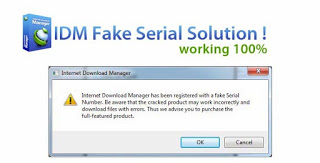
Almost everyone is aware about ‘Internet Download Manager’ (IDM). You might have been using this application since it helps you to download files from web at high speed. I would say, this is from one of the best tool to be used to download files from internet. But you may have been facing the pop up that ‘IDM has been registered with the Fake serial number ’.
This pop up is really very irritating since it appears every time when you are about to download some file or when you start your system. This error leads you to search for cracked file from torrent and other alternative.
Here in this article I am going to reveal a simple and easy steps to get rid of this pop up without using any torrent file or without using any fake serial key.
Let’s start with the methods to resolve problem of IDM which shows ‘IDM has been registered with the fake serial number ’.
Before proceeding use CCleaner Full Version to remove previously installed IDM completely.
Download Pre Activated Internet Download Manager from Here and install.
#1. Open window explorer and navigate to ‘Internet Download Manager’folder in program files.
Open ‘Internet Download Manager’ folder to see the list of files as shown below:
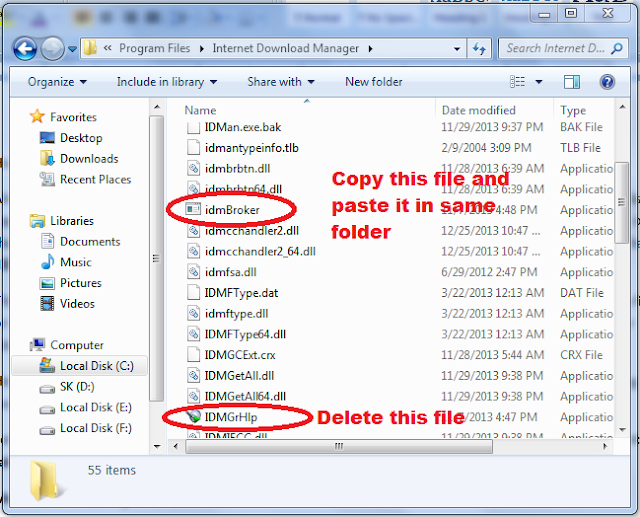
#2. In open window, search and delete ‘IDMGrHlp.exe’ file. And copy ‘idmBroker.exe’ from same folder and paste it in same folder.
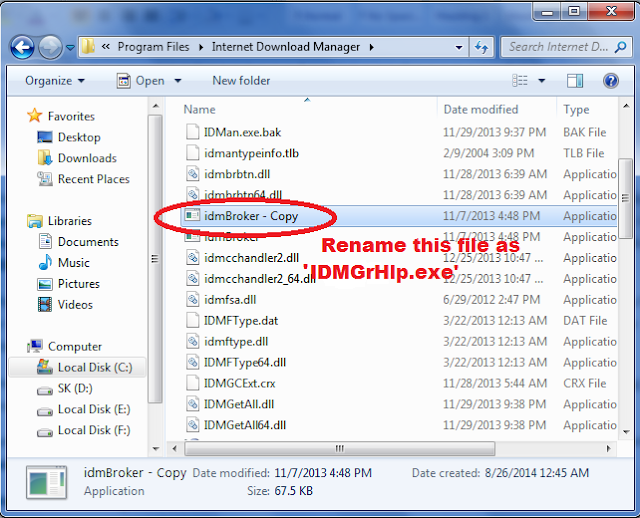
#3. Once you done with Step 2. Now rename the copied file of ‘idmBroker.exe’ to ‘IDMGrHlp.exe’ as shown below:
#4. Now last step is to restart your system to apply this effect and enjoy the downloading without any interruption.
Method #2
If above Method not works for you reinstall idm and try this one...
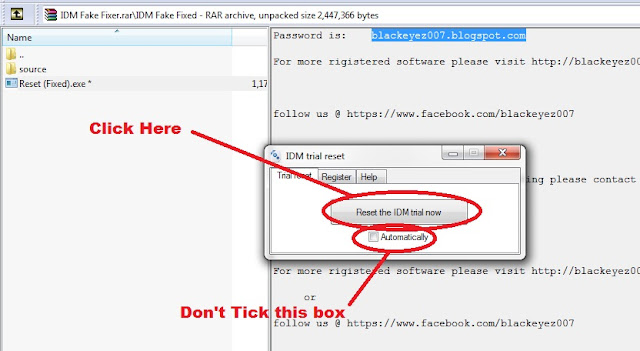
#1. Download and extract “IDM Fake Fixed”.
#2. Then run the “Reset (Fixed).exe” as Administrator.
#3. Click on “Trial Reset” tab [By default it sets to HELP tab].
#4. Uncheck the “Automatically” box.
#5. Click on “Reset the IDM trial now” and wait for the process.
Download IDM Fake Fixer from Here
Enjoy....
Method #2
If above Method not works for you reinstall idm and try this one...
#1. Download and extract “IDM Fake Fixed”.
#2. Then run the “Reset (Fixed).exe” as Administrator.
#3. Click on “Trial Reset” tab [By default it sets to HELP tab].
#4. Uncheck the “Automatically” box.
#5. Click on “Reset the IDM trial now” and wait for the process.
Download IDM Fake Fixer from Here
Enjoy....
Go to link Download
Subscribe to:
Posts (Atom)