Showing posts with label java. Show all posts
Showing posts with label java. Show all posts
Friday, May 19, 2017
Google defeats Oracle in Java code copyright case
Google defeats Oracle in Java code copyright case
Google has won a major US court battle with software firm Oracle after a jury rule

Oracle had argued that Google had infringed its copyright and had sought nearly $9bn (£6bn) in damages.
The outcome was eagerly awaited by software developers who feared that a victory for Oracle might encourage more such legal actions.
The company says it will appeal against the decision.
Google uses Java in its Android smartphone operating system which powers about 80% of the worlds mobile devices.
The company had argued that extending copyright protection to pieces of code called APIs (application programming interfaces) would threaten innovation.
The jury in San Francisco agreed that copyright law allowed "fair use" of the Java elements as they were only a part of a larger system Google had created for a new purpose.
"Todays verdict that Android makes fair use of Java APIs represents a win for the Android ecosystem, for the Java programming community, and for software developers who rely on open and free programming languages to build innovative consumer products," a Google spokesperson said in an emailed statement.

The legal battle began in 2010 and the two firms first faced each other in court in May 2012. A federal judge ruled against Oracle, but the company then appealed. After legal wrangling, the case was sent back to court.
Despite Thursdays outcome, Oracle lawyer Dorian Daley said it would pursue the matter further.
"We strongly believe that Google developed Android by illegally copying core Java technology to rush into the mobile device market," he said.
"Oracle brought this lawsuit to put a stop to Googles illegal behaviour. We believe there are numerous grounds for appeal and we plan to bring this case back to the federal circuit on appeal."
Go to link Download

Friday, September 30, 2016
How To Compile Java Program In Windows Command Prompt
How To Compile Java Program In Windows Command Prompt
This time I will discuss about How To Compile Java Program In Windows Command Prompt. Actually, this post should be in the early days before I post the java program, but rather than not, I will share the stages ...
1. you install Platform (JDK) first, if not there you can download HERE
2. After installing the JDK, you set java path by opening Explorer, right click on Computer -> Properties -> Advanced System Settings -> Environment Variables
3. Then select the "path" and select edit.
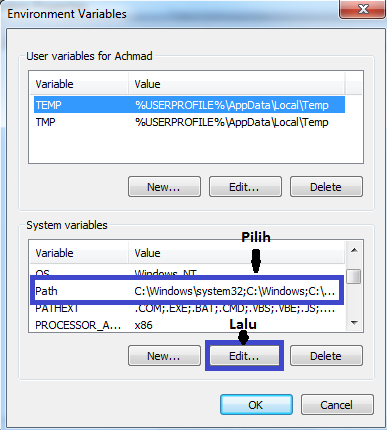
4. Enter the address of java bin folder already installed (example: C: Program Files Java jdk1.7.0 bin) to the Path earlier by:
-. Add mark; (semicolon) at the end of the variable value and copy the bin folder above address.
5. After that, check on your CMD (click the Windows icon, type CMD) is already in place or not. Previously moved first directory where you saved the java file, for example stored in the directory "D", then typing cd D: then D:.
Then, typing javac nameclass.java (Change nameclass with namakelas your files), then typing java nameclass.
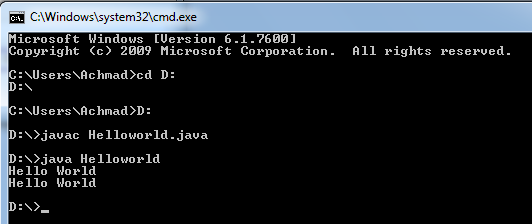
6. Completed. (^ _ ^)
A few of my discussion on How to Compile Java Programs in Command Prompt, may be useful.
1. you install Platform (JDK) first, if not there you can download HERE
2. After installing the JDK, you set java path by opening Explorer, right click on Computer -> Properties -> Advanced System Settings -> Environment Variables
3. Then select the "path" and select edit.
4. Enter the address of java bin folder already installed (example: C: Program Files Java jdk1.7.0 bin) to the Path earlier by:
-. Add mark; (semicolon) at the end of the variable value and copy the bin folder above address.
5. After that, check on your CMD (click the Windows icon, type CMD) is already in place or not. Previously moved first directory where you saved the java file, for example stored in the directory "D", then typing cd D: then D:.
Then, typing javac nameclass.java (Change nameclass with namakelas your files), then typing java nameclass.
6. Completed. (^ _ ^)
A few of my discussion on How to Compile Java Programs in Command Prompt, may be useful.
Go to link Download
Subscribe to:
Posts (Atom)