Showing posts with label program. Show all posts
Showing posts with label program. Show all posts
Wednesday, January 11, 2017
How To Full Remove uninstall any Program From Your PC
How To Full Remove uninstall any Program From Your PC
Clean Uninstall any program from Your PC..

Download Uninstall Tool Full Version

Download Method

Go to link Download

Friday, September 30, 2016
How To Compile Java Program In Windows Command Prompt
How To Compile Java Program In Windows Command Prompt
This time I will discuss about How To Compile Java Program In Windows Command Prompt. Actually, this post should be in the early days before I post the java program, but rather than not, I will share the stages ...
1. you install Platform (JDK) first, if not there you can download HERE
2. After installing the JDK, you set java path by opening Explorer, right click on Computer -> Properties -> Advanced System Settings -> Environment Variables
3. Then select the "path" and select edit.
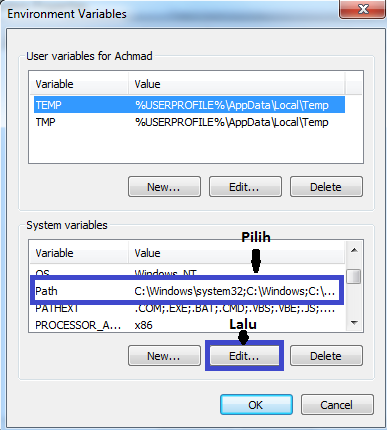
4. Enter the address of java bin folder already installed (example: C: Program Files Java jdk1.7.0 bin) to the Path earlier by:
-. Add mark; (semicolon) at the end of the variable value and copy the bin folder above address.
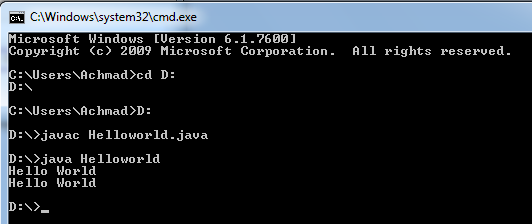
5. After that, check on your CMD (click the Windows icon, type CMD) is already in place or not. Previously moved first directory where you saved the java file, for example stored in the directory "D", then typing cd D: then D:.
Then, typing javac nameclass.java (Change nameclass with namakelas your files), then typing java nameclass.
6. Completed. (^ _ ^)
A few of my discussion on How to Compile Java Programs in Command Prompt, may be useful.
1. you install Platform (JDK) first, if not there you can download HERE
2. After installing the JDK, you set java path by opening Explorer, right click on Computer -> Properties -> Advanced System Settings -> Environment Variables
3. Then select the "path" and select edit.
4. Enter the address of java bin folder already installed (example: C: Program Files Java jdk1.7.0 bin) to the Path earlier by:
-. Add mark; (semicolon) at the end of the variable value and copy the bin folder above address.
5. After that, check on your CMD (click the Windows icon, type CMD) is already in place or not. Previously moved first directory where you saved the java file, for example stored in the directory "D", then typing cd D: then D:.
Then, typing javac nameclass.java (Change nameclass with namakelas your files), then typing java nameclass.
6. Completed. (^ _ ^)
A few of my discussion on How to Compile Java Programs in Command Prompt, may be useful.
Go to link Download
Subscribe to:
Posts (Atom)