Showing posts with label google. Show all posts
Showing posts with label google. Show all posts
Friday, May 19, 2017
Google defeats Oracle in Java code copyright case
Google defeats Oracle in Java code copyright case
Google has won a major US court battle with software firm Oracle after a jury rule

Oracle had argued that Google had infringed its copyright and had sought nearly $9bn (£6bn) in damages.
The outcome was eagerly awaited by software developers who feared that a victory for Oracle might encourage more such legal actions.
The company says it will appeal against the decision.
Google uses Java in its Android smartphone operating system which powers about 80% of the worlds mobile devices.
The company had argued that extending copyright protection to pieces of code called APIs (application programming interfaces) would threaten innovation.
The jury in San Francisco agreed that copyright law allowed "fair use" of the Java elements as they were only a part of a larger system Google had created for a new purpose.
"Todays verdict that Android makes fair use of Java APIs represents a win for the Android ecosystem, for the Java programming community, and for software developers who rely on open and free programming languages to build innovative consumer products," a Google spokesperson said in an emailed statement.

The legal battle began in 2010 and the two firms first faced each other in court in May 2012. A federal judge ruled against Oracle, but the company then appealed. After legal wrangling, the case was sent back to court.
Despite Thursdays outcome, Oracle lawyer Dorian Daley said it would pursue the matter further.
"We strongly believe that Google developed Android by illegally copying core Java technology to rush into the mobile device market," he said.
"Oracle brought this lawsuit to put a stop to Googles illegal behaviour. We believe there are numerous grounds for appeal and we plan to bring this case back to the federal circuit on appeal."
Go to link Download

Wednesday, May 17, 2017
Hosting Alternatif Selain Google Code untuk Proyek Open Source
Hosting Alternatif Selain Google Code untuk Proyek Open Source
Google telah menutup Google Code pada 25 Januari 2015, layanan hosting untuk proyek-proyek open source dan coding. Jika Anda belum mengalihkan proyek Anda ke layanan lain, sekarang adalah waktu yang baik. Berikut adalah beberapa alternatif layanan hosting untuk proyek-proyek open source dan coding.
GitHub

GitHub adalah raksasa untuk layanan hosting untuk proyek-proyek open source dan coding. Untuk pengguna dasar GitHub memberikan fasilitas yang benar-benar gratis. Jika Anda mencari fitur profesional, atau pilihan untuk membangun sebuah portofolio proyek GitHub menyediakan upgrade premium. Github memiliki kemampuan untuk kedua fungsi sebagai sumber pengembangan independen, di mana seseorang membangun proyek-proyeknya, kemudian berbagi dengan publik, yang nantinya juga mampu memberikan pekerjaan ( join proyek ) dengan pengguna lain, tweak, update, selesainya proyek akan memiliki kontribusi besar kepada banyak orang ( pengguna ), atau sebagai open source.
Google menyebutkan GitHub dalam pengumuman penutupan Google Code, dan bahkan memiliki alat ekspor ( untuk proyek proyek anda di google code ) dan panduan ekspor untuk mempermudah migrasi proyek anda dari Google code ke GitHub. GitHub memiliki pedoman bagaimana seorang calon pengembang memulai akrab dengan fitur terbaik GitHub. Ada banyak fitur sebagai bahan pembelajaran yang akan menghemat waktu dalam jangka panjang.
CodePlex
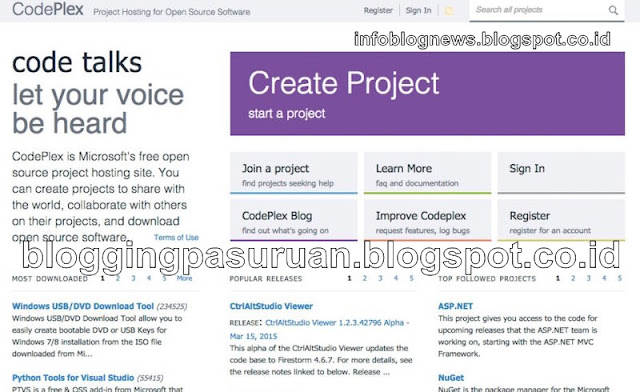
CodePlex adalah open-source untuk proyek hosting Anda yang dipersembahkan Microsoft. Ini adalah Web yang tepat untuk ribuan proyek populer, dan sementara banyak ( atau sebagian besar, bisa dibilang ) harus dilakukan dengan ekosistem ( yang terkait dengan ) Windows, bukan berarti bahwa aplikasi mobile atau proyek lintas-platform tidak diterima. Account gratis, dan Anda dapat membangun proyek opn source dalam setiap bahasa ( peng-kodean ) untuk platform apapun yang Anda pilih. Anda bisa mencoba coba CodePlex, CodePlex juga memudahkan Anda dalam membuat proyek-proyek dengan menggunakan bantuan, atau tim CodPlex akan membantu mencarikan solusi jika terjadi permasalahan, sehingga sebuah proyek mampu untuk berkontribusi. Seperti repositori kode yang baik, CodePlex menawarkan fitur seperti kontrol versi, wiki built-in dan dukukan FAQ, pelacakan masalah, homepage proyek, dan banyak lagi.
BitBucket
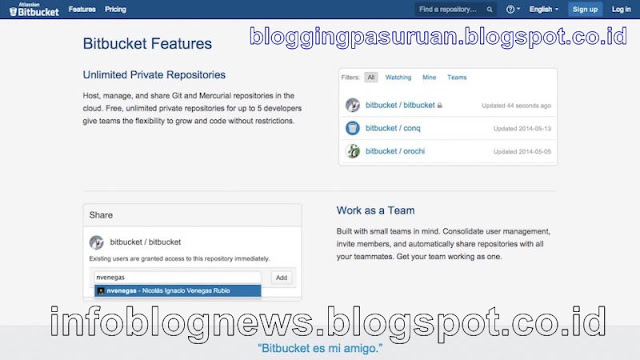
BitBucket adalah repositori kode yang memiliki nama besar bagi ribuan proyek dan pengembang. Didirikan oleh Atlassian ( perusahaan issue tracking software Jira dan layanan chatting HipChat), BitBucket juga layanan hosting untuk proyek-proyek open source dan coding populer dan Google memiliki panduan migrasi dengan ( tool ) alat yang dapat Anda gunakan untuk memindahkan proyek Anda dengan cepat.
Account BitBucket Gratis !, Namun Anda mendapatkan repositori kode terbatas, Namun Anda masih memiliki banyak ruang untuk membangun proyek-proyek Anda walau dengan space terbatas. Ketika Anda mendapatkan layanan gratis dari BitBucket namun Anda bisa membuat maksimal 5 tim untuk sebuah proyek. BitBucket juga memiliki integrasi dengan Jira, sehingga fitur pelacakan masalah diurus oleh Jira.
Launchpad
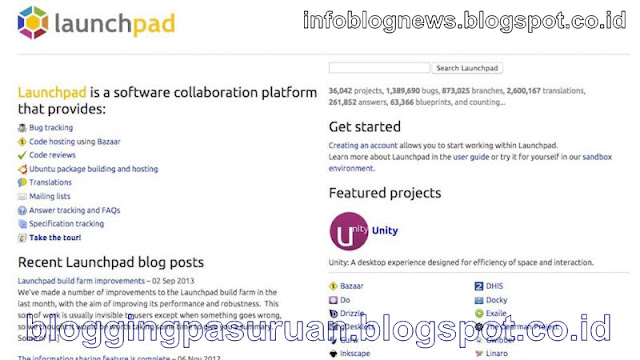
Launchpad adalah kolaborasi antara Ubuntu ( software platform ). Launchpad adalah home dari Unity, Docky, dan beberapa utilitas Linux populer lainnya. Sebagian besar proyek host di Launchpad dikembangkan oleh dan dibangun untuk komunitas Linux, tapi tidak berarti Anda tidak bisa menggunakan Launchpad, karena Launchpad telah built-in tools dan ini benar-benar untuk digunakan gratis.
SourceForge
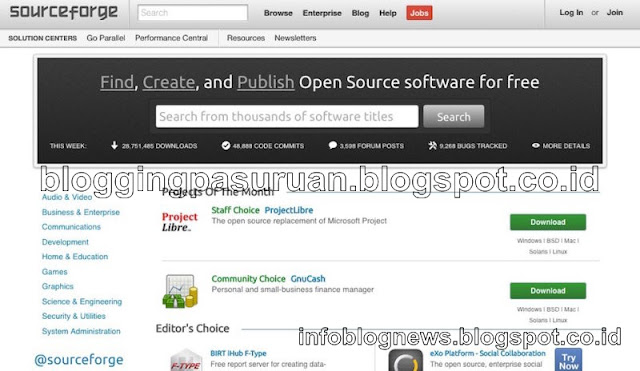
SourceForge yang satu ini sebenarnya tidak saya rekomendasikan, tetapi tidak lengkaplah jika alternatif selain Google Code tanpa SourceForge . SourceForge sebelumnya ditinggalkan oleh pemiliknya berikut staf admin selama bertahun-tahun, yang kemudian dioperasikan oleh sekelompok relawan dan admin namun masih menjadi momok bagi pengguna kala itu karena "proyek" yang sarat dengan malware, atau lebih buruk dari itu. Namun kemudian, pengguna menemukan Sourceforge memulai bundling download dengan adware di semua installer-nya.
Meski begitu, SourceForge masih salah satu repositori kode paling populer di web, dan menawarkan manajemen ( coding ) kelas dunia, masalah-pelacakan, versi, dan kolaborasi tool. Ada banyak proyek besar dan populer yang masih menggunakan situs SourceForge. Google memiliki panduan untuk bermigrasi ke SourceForge, dan SourceForge memiliki panduan sendiri untuk importi code yang bertujuan untuk memuluskan proses migrasi tersebut.
Berikut ini layanan lain yang perlu dipertimbankan juga
Ini mungkin juga bisa disebut sebagai hosting untuk proyek-proyek open source dan coding, yaaa sebagai pilihan alternatif untuk Google Code selain yang saya sebutkan di atas :
?GitLab: Jika Anda tertarik untuk menjalankan produksi kode sendiri, GitLab bisa dijadikan tempat alternatif proyek coding Anda. Yaaa kendalanya mahal di lisensi -nya, jadi bersiaplah untuk membuka dompet sebagai budget premium atau lisensi. GitLab akan menjadi home code produksi untuk publik dan pribadi Anda sendiri di server GitLab secara gratis (seperti layanan web lain. GitLab menangani serius untuk semua proyek Anda karena mereka ingin menjadi lebih baik dari GitHub.
?CodeBase: Codebase dengan layanan account gratis yang membatasi Anda dalam satu proyek, namun satu proyek dilengkapi dengan manajemen tool dan tool manajemen proyek yang kuat juga. Tool ini dirancang agar membuat Anda ketagihan dan kembali merencanakan proyek berikutnya dengan bayaran atau penghasilan.
?Beanstalk: Git Sederhana yang elegan dan Subversion hosting yang mendukung luas ke server Anda atau dalam lingkup web lain seperti AWS, DreamObjects, Rackspace, Heroku, dan lain-lain. Ideal untuk pengembangan web, Soal Harga masih dalam batas wajar lha.
Ditutupnya Google Code, bukan menjadi halangan untuk membangun proyek proyek coding Anda , karena banyak pilihan dan alternatif yang disesuaikan. Kebanyakan orang dari Google Code mungkin cenderung untuk memilih GitHub atau SourceForge, mengingat popularitas-nya, tetapi Anda tidak perlu merasa mereka saja yang mampu memberikan layanan terbaik. Ada banyak pilihan, baik yang gratis atau berbayar dan yang pasti menjadi salah satu yang terbaik untuk proyek Anda.
Semoga bemanfaat….
Go to link Download
Thursday, May 4, 2017
How To Enable Google Docs Offline Access
How To Enable Google Docs Offline Access
How To Enable Google Docs Offline Access - Offline mode in Google Docs is very handy, especially if youre on a plane or a cafe with no internet connection. When back online, the changes that have been made ??will be synchronized in the cloud.
There are several things to consider if you want to try to use the features of Google Docs. The main thing is, there is no offline support for Google Docs on the whole.
Users can only edit documents offline. For spreadsheets, users can only view it, but can not edit. While other items such as presentations and drawing from the list of documents can not been unlocked when offline.
There is one word that might sound disappointing. The offline mode only works for Chrome browser users, not to other browsers like Firefox and Internet Explorer.
After installing Chrome, you need to allow offline access on the computer. If using a classic look, click the gear button is grayed out in the list of your documents. Will appear a new option reads "Set up offline docs (beta)".
After clicking that option, you will be taken to a separate window with the "Enable offline Docs". Finished that step, you will be prompted to install Google Drive Chrome web apps from the Chrome Store. This application will appear side by side with other Chrome apps.
In the upper right corner, youll see a notification that informs the final documents and spreadsheets that are opened synchronized. Click "View Docs offline" from the menu and you can see which documents are available when offline.
Unfortunately, this is temporarily offline mode can not be used to create new documents offline. Although at the top of your offline documents are a window labeled "New Document".
There are several things to consider if you want to try to use the features of Google Docs. The main thing is, there is no offline support for Google Docs on the whole.
Users can only edit documents offline. For spreadsheets, users can only view it, but can not edit. While other items such as presentations and drawing from the list of documents can not been unlocked when offline.
There is one word that might sound disappointing. The offline mode only works for Chrome browser users, not to other browsers like Firefox and Internet Explorer.
After installing Chrome, you need to allow offline access on the computer. If using a classic look, click the gear button is grayed out in the list of your documents. Will appear a new option reads "Set up offline docs (beta)".
After clicking that option, you will be taken to a separate window with the "Enable offline Docs". Finished that step, you will be prompted to install Google Drive Chrome web apps from the Chrome Store. This application will appear side by side with other Chrome apps.
In the upper right corner, youll see a notification that informs the final documents and spreadsheets that are opened synchronized. Click "View Docs offline" from the menu and you can see which documents are available when offline.
Unfortunately, this is temporarily offline mode can not be used to create new documents offline. Although at the top of your offline documents are a window labeled "New Document".
Go to link Download
How To Install Apps Without Google Play Store and Internet
How To Install Apps Without Google Play Store and Internet
Why I decided to post this topic. Imagine following situations:
- You dont want to connect your Google account because you afraid of "To many Pattern Attempt"
- Google Play Store Slow Down Your Smartphone and Internet. So You want to keep it Off
- You have a Google Android device but you dont have Internet connectivity
- You have Internet connectivity but you dont have Google Play Store in your device
- You have Google Play Store but you dont have a Google account to sign in
- Your desired app is not compatible with your Android device
- Your desired app has been removed from Google Play Store
- You cant download your desired app due to any other reason
In any of the above mentioned situations, you wont be able to download and install apps in your Google Android device whether its a mobile phone or tablet. It might be possible that you purchased an Android mobile or tablet which didnt contain Google Play Store (e.g. Nokia X) or it might be also possible that you dont have a Gmail account and you dont want to create a new Google account to sign into Play Store.
Now the question comes how would you install apps in your Android device if you dont have Play Store or Google account or Internet connection in your device? The answer is using Sideloading feature.
Sideload an application means offline installation of the app without using Google Play Store in your Android device. In this way you wont need Google Play Store, Google account and Internet connection in your Android device.
With the help of sideloading feature, you can directly install any desired app in your Android mobile phone or tablet just like you install a software in your Windows PC.
If you also want to learn this method to install apps offline in your Android device, just check out following simple steps:
Step 1:
Download .APK File From InternetFirst of all youll need the .APK file of your desired Android app. Actually all Android apps come in form of a .APK file (Android Package file). When you install an app using Play Store, your Android device automatically downloads and installs its .APK file.
Since you dont want to download apps using Play Store, youll need to download the .APK file of your desired app from Internet.
If you can access Internet in your Android device, then you can download the .APK files using a web browser. If you cant access Internet in your device, then youll need to download the .APK files using a computer with Internet connection.
There are many websites offering .APK files of free apps for download. You just need to search for "App name APK file" on Google and youll get several websites containing the .APK file of your app. For example if you want to download Subway Surfer games .APK file, just search for "Angry Birds APK file" and youll get many download links.
But if You want to download Purchased or Modded App for free then you can find it on our website at Black Eyezs Software Android Apps & Games.
Step 2:
Copy .APK File to SD Card of Android DeviceOnce you grab the .APK files of your desired apps, its time to copy those .APK files to SD card (memory card) of your Android mobile or tablet.
You can either attach the SD card to your computer using a card holder/reader and copy .APK files to it or you can connect your Android device to your computer using data cable and then copy .APK files to its drives using My Computer window.
Step 3:
Enable "Apps Installation from Unknown Sources" OptionBy default your Android device doesnt allow sideloading feature which means you cant install apps from your SD card but you can enable this feature with the help of following easy steps:
1. Open Settings page in your Android device and go to Security settings.
2. Now look for "Unknown Sources" option which contains following information:
Allow installation of apps from sources other than the Play Store
OR
Allow installation of apps from unknown sources
The option is not enabled by default, just tap on it to enable the option. Itll ask for confirmation, accept it.
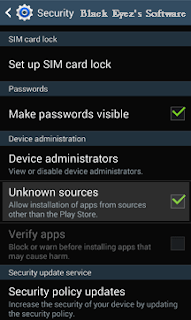
You may also need to disable "Verify Apps" option which disallows or warns you when you try to install apps from unknown sources.
After changing options, exit from Settings page.
Step 4:
Run .APK File Using File ManagerThats the final step. Now you can install the apps directly using the built-in File Manager app in your Android device or Download ES File Explorer (best Android file manager) from our site.
Just Open ES file Explorer or similar apps in your Android device and then navigate to SD card and tap on the downloaded .APK file.
Itll ask for confirmation, tap on Install button and itll start the installation process.
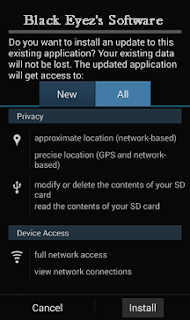
Itll take a few seconds and your desired app will be installed in your Android mobile phone or tablet without need of Google Play Store and Internet connection.
This method also helps when you have more than one Google Android mobile phone or tablet and want to install same apps and games in those devices. With the help of this method, you just need to download those apps only once and then you can install them in multiple devices and also can use as backup without any need of downloading them again and again in all devices. Itll save your time and money.
Note:-
If you need any Paid .APK for free contact us, we will upload it in two or three business days.
Go to link Download
Sunday, April 23, 2017
How to get the all opened tab back in Google Chrome if you have closed all the tab by mistake
How to get the all opened tab back in Google Chrome if you have closed all the tab by mistake
Hi Friends,
This is just for an information I am sure most of you must know it already.I wanted to let you know how you can get all the opened tab in Google Chrome back if you have closed all the tab by mistake, because when you manually close it, you dont get the option of restore so if you dont get the restore option here is how you can get all those opened tab back.
Get all opened pages that you were working on back
1. Open chrome and click on the three small parallel lines on the top right hand side and then move to Recent Tab and click the no. of Tab option so here in this picture it shows 9 Tab because I had 9 tabs opened before closing the Chrome.
So click on the 9 Tab.
OR
Just press Ctrl+Shift+T.
2. And then it will open all previously opened tabs with the webpages you were browsing.
Happy Learning
Nasir
People Also read my Following Posts.
Get a Website ups and running @ $2.95
What is a website and how is it accessed on the web?How to build and host it free?
How to Speed up your computer 20 Times faster.
Restore and Reset your iPhone, iPad or iPod back to the original Factory Default Settings.
This is just for an information I am sure most of you must know it already.I wanted to let you know how you can get all the opened tab in Google Chrome back if you have closed all the tab by mistake, because when you manually close it, you dont get the option of restore so if you dont get the restore option here is how you can get all those opened tab back.
Get all opened pages that you were working on back
1. Open chrome and click on the three small parallel lines on the top right hand side and then move to Recent Tab and click the no. of Tab option so here in this picture it shows 9 Tab because I had 9 tabs opened before closing the Chrome.
So click on the 9 Tab.
OR
Just press Ctrl+Shift+T.
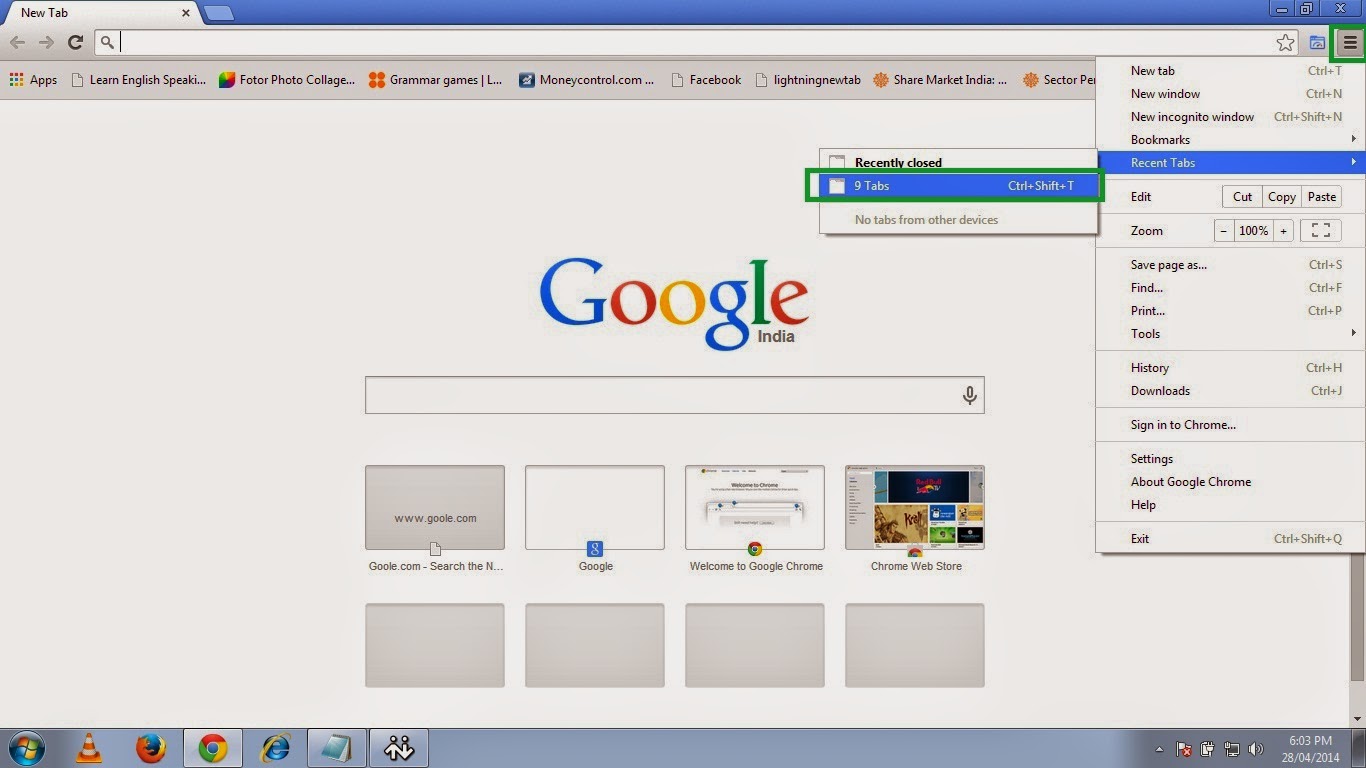 |
| Pic-14(a) |
2. And then it will open all previously opened tabs with the webpages you were browsing.
 |
| Pic-14(b) |
Happy Learning
Nasir
People Also read my Following Posts.
Get a Website ups and running @ $2.95
What is a website and how is it accessed on the web?How to build and host it free?
How to Speed up your computer 20 Times faster.
Restore and Reset your iPhone, iPad or iPod back to the original Factory Default Settings.
Go to link Download
Sunday, April 9, 2017
Google tricks to know the Live cricket scores and predict the game
Google tricks to know the Live cricket scores and predict the game
Predict the game from the quick facts available on Google.
Yes you can find from the live cricket scores of a game to match schedules easily on Google by just typing one or two words.Google will show you all these information in quick facts results.See the live cricket scores of currently playing games,see the team participating in a tournament, see the standing and scores of different teams and keep yourself updated with the live cricket scores all with just two or three simple words query.
Here are few example of them to know the Live cricket score with other information.
If you wanna know the live cricket scores of currently happening Cricket tournament or ODI or test cricket series just type live cricket score or cricket scores or the name of the two cricket team among which the match is being played or the name of the tournament followed by live scores.
It does not only show you the live cricket score but also the name of the stadium and where is this game being played,who is batting and who is yet to bat and if the match is finished it will show you who has won the game.
To know the live cricket score of a team just type the name of the team followed by the word score or name of the country followed by the word score or scorecard or live score and it will show you the Live cricket score.
Now if you wanna see the Live Cricket score as well as the full scores with scheduled matches click on the Full schedules and scores and it will show as the following picture.
For example to know the Indian team standing and Live Cricket score in ICC World cup type India world cup standing.
and to know the standing of the whole tournament with Live Cricket score and group distribution simply type the name of the tournament followed by the word standing.
Not just the Live Cricket score you could also see the video recap or the video highlights of any game on Google and predict the team after watching the performance of any team and to get to know how they reached here.
Whenever you search the information of any game Google like Live Cricket score,or team standing Google also gives you the option to see the Highlights or video recap.
when you click on the video Highlights it will open a new window or a tab and start streaming the some not to miss video and would give you the information on how the team reached to next level.
Yes you can find from the live cricket scores of a game to match schedules easily on Google by just typing one or two words.Google will show you all these information in quick facts results.See the live cricket scores of currently playing games,see the team participating in a tournament, see the standing and scores of different teams and keep yourself updated with the live cricket scores all with just two or three simple words query.
Here are few example of them to know the Live cricket score with other information.
1. Know the live cricket scores of currently playing cricket Match
If you wanna know the live cricket scores of currently happening Cricket tournament or ODI or test cricket series just type live cricket score or cricket scores or the name of the two cricket team among which the match is being played or the name of the tournament followed by live scores.
It does not only show you the live cricket score but also the name of the stadium and where is this game being played,who is batting and who is yet to bat and if the match is finished it will show you who has won the game.
 |
| Live cricket score |
2. Know the live cricket score of a Team
To know the live cricket score of a team just type the name of the team followed by the word score or name of the country followed by the word score or scorecard or live score and it will show you the Live cricket score.
 |
| Live cricket score |
Now if you wanna see the Live Cricket score as well as the full scores with scheduled matches click on the Full schedules and scores and it will show as the following picture.
 |
| Live Cricket score |
3. To know the Live Cricket score and standing of a team or tournament
To know the Live Cricket score standing of a team in a tournament or in any other game type the name of the team followed by the name of the tournament and word "standing".For example to know the Indian team standing and Live Cricket score in ICC World cup type India world cup standing.
 |
| Live Cricket score and standing |
and to know the standing of the whole tournament with Live Cricket score and group distribution simply type the name of the tournament followed by the word standing.
 |
| Live Cricket score and standings |
4. See the Live Cricket score between two specific team
To know the Live Cricket score or results of a match between two specific team just type the name of the first team vs name of the second team followed by the name of the tournament.It will show you the Live Cricket score between only those two countries. |
| Live Cricket score between two contestant |
 |
| Score between two contestant |
5. See the video recap or the video highlights directly on Google
Not just the Live Cricket score you could also see the video recap or the video highlights of any game on Google and predict the team after watching the performance of any team and to get to know how they reached here.
Whenever you search the information of any game Google like Live Cricket score,or team standing Google also gives you the option to see the Highlights or video recap.
 |
| Live Cricket score |
when you click on the video Highlights it will open a new window or a tab and start streaming the some not to miss video and would give you the information on how the team reached to next level.
 |
| Video highlights |
5. find all the upcoming schedules of the current tournament
Not just the Live Cricket score you could also find the upcoming schedule of the all cricket events of a current tournament by just typing the name of the tournament or world cup championship and Google will show you the last and all the upcoming cricket events along with the results.
Look at the below picture to know the future events just click on the arrow on the right to move right and to see the past events click on the left arrow or move left.
 |
| ICC World Cup Schedules |
Incoming search
- Live Cricket score
- Live Score
- Cricket Score
- Live Cricket Standing
- Live cricket highlights
- Live cricket video
People also read following top most searched issue
Best Google Search Tips and Tricks
How to start Installer,Print spooler,windows Audio or any other services in safe mode
Read how to fix black screen with only mouse cursor issue- Explorer.exe does not start automatically
Get a Website ups and running @ $2.95
Fix USB 3.0 External Hard drive installation issue ( Not detecting in Windows )
What is a website and how is it accessed on the web?How to build and host it free?
Go to link Download
Thursday, March 23, 2017
Google Earth Pro 6 2 2 6613 Premium Final Full Licensed box net
Google Earth Pro 6 2 2 6613 Premium Final Full Licensed box net

Google Earth Pro 6.2.2.6613 Premium Final Full Licensed | 42 MB
Google Earth Pro includes the same easy-to-use features and imagery as the free version of Google Earth, but with additional professional tools designed specifically for business users.
- Utilize data layers to locate your target demographic
- Compute distances and areas using measurement tools
- Use Movie Maker to produce media collateral
- Print high-resolution images for presentations and reports
- Import large vector image files to quickly map GIS data
- Map addresses with the Spreadsheet Importer
Download:
Google Earth Pro 6.2.2.6613 Premium Final Full Licensed | 42 MB
Go to link Download
Tuesday, March 21, 2017
Google Play Music 6 0 200 For Android
Google Play Music 6 0 200 For Android

Description:-
Google Play Music provides free, ad-supported radio for what you’re doing, how you’re feeling, or what you want to hear. Instantly start radio stations based on songs, artists, or albums, or browse by genre, mood, activity, decade, and more. Bring your own music collection with you by uploading 50,000 of your own songs; then listen to them across Android and the web, for free.
Want more? Subscribe to remove the ads and get on-demand access to millions of songs. Plus, download anything to your mobile device and listen even when you’re not connected.
Free features:
Radio curated by experts for anything you want to hear
Store up to 50,000 songs from your personal music collection
Smart recommendations based on your taste
Listen on Android and the web
Subscription-only features:
Ad-free, uninterrupted listening
On-demand access to over 30 million songs
Download music to your device and listen when you’re not connected
Skip as many songs as you like
Version:-
6.0.200
Requirements:-
4.1 + or Up
File Size:-
7 MB
Previews:-


Download Link:-

Go to link Download
Wednesday, March 1, 2017
Get back your deleted files on 16GB Google HTC Nexus 9 Tablet
Get back your deleted files on 16GB Google HTC Nexus 9 Tablet

For Google/HTC Nexus 9 users, it is common thing to capture photos and videos, download movies or save files in .doc, ppt, excel on Nexus 9. However, there are many reasons that you may delete or lost files on Nexus 9, once your files are lost after the system update; restore the Nexus 9 factory setting cause Nexus 9 data lost; lost important file due to formating the Nexus 9; Even if the Nexus 9 is crashed, smashed or broken, here are two ways for Google Nexus 9 users easily recover your files or file folders those lost or deleted from Nexus 9. Whats the way to recover Google/HTC Nexus 9 deleted file?
As we know, HTC Nexus 9 features a 8.9-inch IPS screen with 2048x1536 pixels resolution (4:3 aspect ratio), Mobile solutions include Plus, your favorite Google apps – Gmail, Google Drive, Docs, Sheets and Slides and more, Bluetooth 4.1 connectivity and 16 or 32GB of storage. The Nexus 9 is powered by a 64bit NVIDIA tegra K1 dual-core processor clocked at 2.3GHz and 2GB of DDR3 memory. To recover files deleted from Nexus 9,you need to use an effectively HTC Nexus 9 File Recovery-H-Data Recovery Master for Windows(Windows 8.1/Windows 8/Windows 7/Windows Vista/Windows XP supported).
This powerful and helpful HTC Nexus 9 Data Recovery can help HTC Nexus 9 users recover the lost and deleted photos/videos on Google Nexus 9. If you have mistakenly deleted other files like SMS, Contacts, Call History, DOC, XLS, and PPT etc. from Google Nexus 9 and want to get them back, it is the right software you are looking for. You can regard it as an all-in-one file recovery software to recover all types of deleted file from Google/HTC Nexus 9. Whats more,the Nexus 9 data recovery not only recover photos/videos form Nexus 9,but also supports restore photos/videos from other android phones like LG G Flex 2, Samsung Galaxy S6, Galaxy Note 4, etc, as well.
Steps to recover lost photos,video files from 16 GB HTC Nexus 9 Tablets
Step 1. Free Download HTC Nexus Photo Recovery

Step2. Connect Google/HTC Nexus 9 to Computer and Enable USB Debugging
Note: Once you deleted photos/videos/audios from Nexus 9 by mistake, stop using the phone to take any new photos or videos or save new files to it. Any new data written into the phone will overwrite the deleted photos and make them unrecoverable.
Connect your Google Nexus 9 to computer via USB cable or link your phones SD card to Windows with card reader.
Step 3. Scan Deleted Photos on Nexus 9
Launch the Photo Recovery, then click "files deleted accidentally" or "empted the recycle bin" to start scanning lost photos/videos/audios on Google Nexus 9.

Step 4. Preview and Recover Deleted Photos from Nexus 9
After scanning done, you are allowed to preview the scanned photos/videos/audios. Then select the photos or videos you need to recover and click on the "Recover" button to get them back.
View more posts
Recover lost/formatted photos pictures from HTC Nexus 9 32GB Tablet
Samsung Galaxy S6 Data Recovery – Recover Pics, Photos, videos
Not difficult to recover deleted data from Android cell phone
Step by Step to recover LG G Flex 2 Media Data with no backup
Is it possible to recover accidently deleted pictures from Nikon S8100
Restore Deleted Pictures, Videos, Files on Windows 8.1 Tablets
Go to link Download
Wednesday, February 22, 2017
How To Change Google Account In Google Play Play Store Android
How To Change Google Account In Google Play Play Store Android
To change the google account on google play / play android store, or replace google account on google play / play android store, follow the steps below:
For Android phone non-rooted
Home back to the first.
click Menu
Heading to Settings-> Application-> Manage Application.
Locate and click Google Apps
Click the "Clear Data", when appearing prompted, "All information youve saved in this, the application will be deleted permanently", click OK
Then press the "Back" and then to click "Synchronize Data" or through, Home> Menu> Settings> Data synchronization, it will display a wizard to insert a new Google account, this wizard also appears when we recently bought a new android handset or when weve just done a wipe through hardreset.
For Android phone is already rooted
Hp must be rooted first.
After in-root, use root explorer.
Insert into the data / system
Delete the file "accounts.db"
Once removed, please in-Restart / Reboot.
For Android phone non-rooted
Home back to the first.
click Menu
Heading to Settings-> Application-> Manage Application.
Locate and click Google Apps
Click the "Clear Data", when appearing prompted, "All information youve saved in this, the application will be deleted permanently", click OK
Then press the "Back" and then to click "Synchronize Data" or through, Home> Menu> Settings> Data synchronization, it will display a wizard to insert a new Google account, this wizard also appears when we recently bought a new android handset or when weve just done a wipe through hardreset.
For Android phone is already rooted
Hp must be rooted first.
After in-root, use root explorer.
Insert into the data / system
Delete the file "accounts.db"
Once removed, please in-Restart / Reboot.
Go to link Download
Tuesday, February 21, 2017
GOOGLE DRIVE MEDIA PENYIMPANAN ONLINE
GOOGLE DRIVE MEDIA PENYIMPANAN ONLINE
GOOGLE DRIVE MEDIA PENYIMPANAN ONLINE
Google drive adalah penyimpanan online atau yang sering disebut dengan sebutan cloud. Google menyediakan penyimpanan data yang free dan mudah diakses dengan meggunakan akun google. Penyimpanan ini sangat aman untuk menyimpan file file penting anda. Google drive ini secara real time mampu mengupload file dengan kecepatan tinggi.

Kapasitas penyimpanan yang besar menjadikan Google drive sebagai altenative penyimpanan. File yang dapat diupload sampai sekitar 5 Gigayte. Dengan kapasihtas yang besar, google drive mampu meyimpan bayak file-file.

Google drive mampu menyimpan 15 GB penyimpanan online untuk menyimpan foto foto, cerita, desains, gambar, rekaman, video dan lainnya.
Google drive juga compitable dengan berbagai macam devices seperti hp, ios, android, os, linux dll. Amankan file file penting anda di google drive sekarang.
https://www.google.com/drive/
Semoga bermanfaat sukses selalu
Go to link Download
Friday, February 17, 2017
Google prepares to test Project Loon in India
Google prepares to test Project Loon in India
in partnership with telecom providers

Google’s managing director for South East Asia and India Rajan Anandan told The Economic Times in an interview that the company is in talks with local telecom service providers to pilot Project Loon, its program to beam internet access from balloons floating thousands of feet up in the air.
We’ve known for a couple of years now that Google planned to bring its moonshot initiative to the country. In December 2014, the company met with government authorities to address potential issues concerning Loon transmissions interfering with cellular networks and to look into ways to work with existing telecom firms.
Last December, Sundar Pichai reiterated how important the Indian market was for Google and cited Project Loon as well as a program to bring free Wi-Fi to 400 railway stations across the country. The first of these went online in January and 99 more are expected to get connected by the end of 2016.
It’s worth noting that Google hasn’t claimed that Loon will provide internet access for free. However, it will solve the problem of bringing connectivity to rural populations and those who live in far-flung areas, where installing terrestrial networks proves difficult.
Anandan said that the government has been “very supportive” of Project Loon. That’s not surprising, given that India still has 1 billion who are yet to be connected to the Web, according to McKinsey & Co. However, he declined to name the telecom companies that Google is in talks with concerning the trial program.
It’ll be interesting to see how soon Google can begin to offer its balloon-powered internet across the nation and how it will monetize its offering. Zero-rating services that favor select sites and content are not an option, as the Telecom Regulatory Authority of India banned them last month and effectively forced Facebook to shutter its Free Basics initiative in the country.
Google will have to figure out ways to educate millions of Indians who have never been online about its new service and also offer it at an affordable price. Local partnerships could help in those respects, but it will no doubt face a challenge in communicating the value of internet access to people who haven’t tried it before.
The company began technical trials of Project Loon balloons in Sri Lanka last month and is set to launch tests in Indonesia this year too.
Go to link Download
Thursday, February 16, 2017
Google Chrome 43 0 2357 81 Offline Installer Free Download Latest
Google Chrome 43 0 2357 81 Offline Installer Free Download Latest

Google Chrome is today’s most popular browser in the world, managing in early 2015 to capture little over 42% of world’s non-mobile browser usage, easily beating all of its competitors in the likes of Internet Explorer (18%), Mozila Firefox (15%), Safari (6%) and Opera (2%).
Google’s game changing browser Chrome combines sophisticated technology with a simple UI, to create a faster, safer and easier browsing experience. Launched in 2008, Google Chrome quickly dominated the browser market to become the most used browser globally within 4 years of its public release. Google’s rapid and continuous development cycle ensures the browser continues to compete with the other most popular and advanced web browsers available.
Speed Perhaps the area Google invested most of its development time to differentiate from other browsers. Google Chrome launches extremely quickly from your desktop, runs applications at speed thanks to a powerful JavaScript engine and loads pages rapidly using the WebKit open source rendering engine. Add to this quicker search and navigation options from the simplified UI and you have a browser that is pretty hard to beat on speed
Download Google Chrome Standclone Offline Setup & Installer Every Version Like
Google Chrome 40.0 Offline Installer
Google Chrome 41.0 Offline Installer
Google Chrome 42.0 Offline Installer
Google Chrome 43.0 Offline Installer And Up To Soon New Version You Can Download From Here
For Download Google Chrome Offline Setup Or Installer Click On Download Now
Download Now
Go to link Download
Tuesday, February 14, 2017
Google Secure Socket Layer For Internet Explorer
Google Secure Socket Layer For Internet Explorer
SSL is a additional layer of encryption that protects your session with a Server that offers SSL as an option.
I am sure you guys heard about Googles New SSL for Firefox and Chrome, so how about Internet Explorer?
Simply go to Create a Search Provider for Internet Explorer then
Under "URL" Copy and Paste the following into the box:
To remove this warning message:
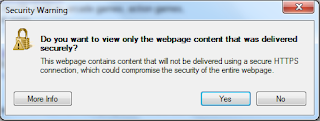
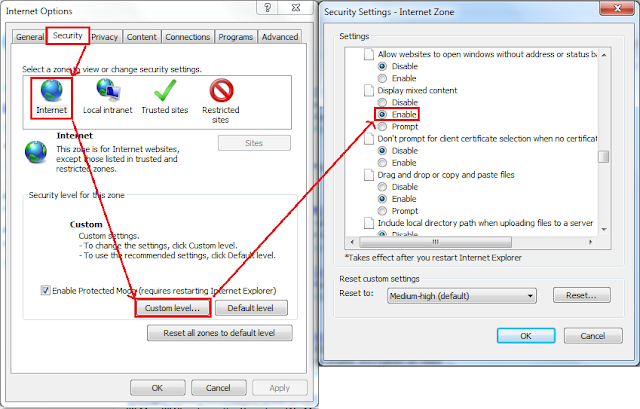
Simply go to Internet Options -> Security -> Internet -> Custom Level and Choose Enable Display Mixed Content.
Thats all =).
I am sure you guys heard about Googles New SSL for Firefox and Chrome, so how about Internet Explorer?
Simply go to Create a Search Provider for Internet Explorer then
Under "URL" Copy and Paste the following into the box:
https://encrypted.google.com/search?hl=en&q=TEST&aq=f&aqi=g10&aql=&oq=&gs_rfai=Under "Name" just label it Google (SSL) and you are done!
To remove this warning message:
Simply go to Internet Options -> Security -> Internet -> Custom Level and Choose Enable Display Mixed Content.
Thats all =).
Go to link Download
Thursday, February 9, 2017
Google Chrome 44 0 2403 107 instal offline
Google Chrome 44 0 2403 107 instal offline
 Google Chrome merupakan sebuah browser yang dalam kurun waktu lama, telah berjaya Browser Mozilla Firefox dan Internet Explorer, masing masing bersaing untuk menarik lebih banyak pengguna dengan fungsi fungsi browser tersebut.
Namun, Mesin raksaksa Google Akhirnya memutuskan untuk membuat Browser sendiri guna memasuki persaingan sengit dalam hal memperbanyak pengguna, Tools, fungsi dan kecepatan semua bersaing untuk menjadi sang Raja Browser Internet. dan Kini browser tersebut kita kenal dengan nama : GOOGLE CHROME
Dan seiring waktu berjalan, sejak perluncuran perdananya di tahun 2008, Browser Google Chrome dengan cepat menarik perhatian pengguna, karena fiture dan kecepatan, serta kemudahan yang membuat banyak pengguna lain beralih memilih Google Chrome ini.
Antar muka yang bersih , menarik, sederhana, membuat browser ini memiliki kareakter khusus, untuk memanjakan pengguna dalam hal coustumize nya penamabhan theme agar jauh lebih menarik.Sebuah hal baru yang di terapkan di dalam google Chrome adalah pada kenyataan penggguna yang sering mengunjungi website dengan tab lebih dari satu, sehingga ketika salah satu halamn Chras, pengguna hanya perlu mengeluarkan tab tersebut tanpa harus mengeluarkan seluruh tab dari Google Chrome,
Freeware License dan selalu update adalah suatu kebanggan tersendiri dengan menggunakan browser ini, yang mana pengguna dapat selalu mengupdate guna memperbaiki, terus memperbaiki segala bug/celah yang dapat merugikan pengguna.
Dirancang dengan kesederhanaan dan mudah untuk menambahkan Add ons membuat browser ini menjadi sebuah browser dengan paket yang handal.
Download
Go to link Download
Tuesday, February 7, 2017
Google Chrome eating the Windows resources
Google Chrome eating the Windows resources
If you use Google Chrome and found your system is very slow, it may related to the Chrome. Google Chrome will leave a list of process running in the background even you are not using it, and they are memory and network intensive. It has a little icon on the system tray (next to the system clock), you will need to close the Google Chrome from the tray to free up its memory and process.

Go to link Download
Wednesday, February 1, 2017
Google Plans to Map the Interior World in 3 D BW
Google Plans to Map the Interior World in 3 D BW
- Tango to give phones new sense of their immediate surroundings
- Project is crucial part of Googles virtual reality efforts
Google already maps the world, but the internet giant has bigger plans for its next location-based technology.
The Alphabet Inc. unit wants to digitally map the interiors of buildings in 3-D down to a resolution of a few inches, and make money in virtual reality along the way, through a project named Tango.
The company plans a big expansion of the technology this year and ultimately wants to make it ubiquitous, according to a person familiar with the situation. Job postings and recent updates to Tango’s developer software show steps toward this ambitious goal. Google will showcase progress at its I/O developer conference near its Silicon Valley headquarters May 18 to 20.
Tango packs cameras and depth sensors along with other software into Android smartphones and tablets. Fire up the application and point the device at a space and it sucks in images and depth information to re-create the environment on the screen and locates itself within that new digital realm.
Google hopes Tango will support a system for independent developers to create new virtual reality applications and services. Video games could have characters that hide behind real-life furniture. A museum app could show 3-D animations when you walk past an exhibit. A grocery store could highlight sale items and guide shoppers to the right shelf.
Unlike most emerging virtual reality systems, Tango doesn’t need external equipment to re-create the world digitally. And unlike Google Maps it can figure out the details of a space without additional data sources.
"Tango is the indoor extension of their outdoor mapping platform," said Lex Dreitser, a virtual reality developer who builds Tango applications.
’Goose Bumps’
Tango started in a Google research lab more than two years ago, but the company is trying to take it mainstream this year. It’s going into new smartphones from Intel Corp. and Lenovo Group Ltd. and the software has been updated to let it easily run on more devices. And there are signs Google is working on the most important challenge: Making Tango 3-D maps shareable so the company can someday patch them together into a single, detailed digital representation of many of the world’s buildings, rooms and the stuff inside them.
Google Maps is one of Google’s most successful services, used by more than a billion people every month. It’s stitched into other popular Google services, like Gmail, Calendar and Photos. With more detailed maps, Google could build new advertising and location-based services into its products. It could also offer these capabilities to outside developers, letting them create more powerful applications for its Android operating system.
"If Tango could digitize every single physical commerce place, then all of a sudden Google has an exponential opportunity to place very relevant contextual physical advertising in every space," said Nathan Pettyjohn, Chief Executive Officer of Aisle411, a mobile commerce and location company that has built applications for Walgreens Boots Alliance Inc. and Toys R Us Inc. "It literally gives me goose bumps talking about it."
Tango could also make Google a potent virtual reality rival to Facebook Inc.’s Oculus and HTC Corp.’s Vive. The Vive and the Oculus need separate sensors along with their headsets to map a room, while Tango does it with components in the phone or tablet. The closest competitor may be Microsoft Corp.’s HoloLens, a headset that integrates the technology. Occipital, a startup, makes a device that can be attached to standard Apple Inc. iOS and Android devices to give them 3-D sensing capabilities. Apple may be working on VR and 3-D sensing too through PrimeSense, a company it acquired in 2013.
Gina Scigliano, a spokeswoman for Google, declined to comment.
In January, Google software engineer Eitan Marder-Eppstein saidthe technology had "a lot of potential for indoor navigation." And back in 2014, another Google engineer, Simon Lynen, said the company was researching how to use multiple Tango devices to build large, detailed maps that could be combined and downloaded to devices giving them "a human-scale understanding of space and motion."
Tango’s Cloud
The company is hosting four I/O sessions on Tango this year, up from one in 2015.
"With I/O it feels like they’re really doubling down on it," said Andrew Nakas, who has been building Tango applications for two years. "I can do things now I had no expectation I could do back then in 2014."
Kris Kitchen, an inventor, built an application for the blind using Tango and a backpack-sized speaker called a SubPac. Tango maps a space and passes that data to the SubPac, which vibrates differently according to the proximity of objects. That gives blind people an additional sense -- touch -- alongside hearing to get around.
For Tango applications like this to reach the most people, 3-D data will need to be easily shareable among devices. That would mean one person could map a museum, and another person could build an application based on the original map, or extend it, saving effort.
Google is working on this by building a system that allows Tango devices to share maps with other devices. It may also weave all these maps together and store the information in its data centers so it can be accessed by even more devices.
Tango will "rely on cloud infrastructure to store, merge, and serve location data to specific Project Tango devices," Google wrote in ajob posting in February for a mobile software engineer to work on the project. The company asked for "experience with Google Maps and other related location products."
A cloud service would make life easier for developers, according to Pettyjohn. "Right now you have to save these mapping files on the device," he said. A cloud service would make it so "anytime you need it, you pull down a file on the spot."
Go to link Download
Subscribe to:
Posts (Atom)