Friday, May 12, 2017
How to restore your iPhone iPad or iPod back to factory default settings if you have forgotten the passcode
How to restore your iPhone iPad or iPod back to factory default settings if you have forgotten the passcode
 |
| Pic-7(a) |
Now after you have installed the iTunes and open it first time it will show you the welcome screen as shown in the picture below.
 |
| Pic-7(b) |
iTunes is a media management software created by Apple, Inc., for both the Macintosh and Windows operating systems. You can use it to manage and play both audio and video files on your computer.You can take it anywhere which means all the contents like songs, your playlists, purchase and other stored items are available to you everywhere whenever and wherever you login onto iTunes using your Apple Id.
Someone else can log onto his iTunes account on your iPad if he signs out of your ID in the settings app first.The option can be found by selecting iTunes and App Store, then tapping on your ID. Any purchases downloaded on the device stay until they are deleted, but apps must be updated using the ID that originally downloaded them.And You can share purchases from both accounts on the same iPad with very little difficulty.
iTunes can also be used to restore and back up your settings, Messages, Camera Roll, documents, saved games, and other data loke Histories, cookies, bookmarks and much more. Backups dont contain content synced to the device, such as movies, music, podcasts, and apps.
If you choose to backup your iOS device on your PC it is saves the back up files at the following location, otherwise you can choose to save the back up at iCloud.
Mac: ~/Library/Application Support/MobileSync/Backup/
The "~" represents your Home folder. If you dont see Library in your home folder, hold Option and click the Go menu.
Windows XP: Documents and Settings(username)Application DataApple ComputerMobileSyncBackup
To quickly access the Application Data folder, click Start, and choose Run. Type %appdata% and click OK.
Windows Vista, Windows 7, and Windows 8: Users(username)AppDataRoamingApple ComputerMobileSyncBackup
To quickly access the AppData folder, click Start. In the search bar, type %appdata% and press Return.
Restoring your iPhone, iPad or iPod
Now depending on the condition of your phone you can go about this a number of ways. If your phone is functioning you can simply click "Settings" then go to "About" and click "Restore to Factory Defaults". If however the phone is not working it can be a little trickier. If you have forgotten the password and can not access the settings menu.Then you have to connect your iOS device to iTunes on your PC and restore it under recovery mode.
Method -1. Reset and Restore iPhone to Original Default Factory Settings with Recovery Mode
iPhone display freezing? iPhone doesn’t detect by or appear in iTunes? iPhone cannot sync with iTunes on PC or Mac? Cannot make or receive calls, send or receive text messages, or access email or the web? Or worse, iPhone simply won’t turn on and does not respond to tap or button press? If the problem still persists after you have reseted the iPhone, or tried various iPhone troubleshooting, it may be worthwhile to invoke recovery mode to restore iPhone to default factory settings, the original state as when you first received and unwrapped the phone.
Restoration of iPhone to original factory defaults will likely to fix all problem, with the downside that all data and information stored on your phone will be lost. Normally iTunes will make a backup automatically when you connect and sync the iPhone with the program, however, it’s still a good recommendation to copy out and backup everything that you may need on the phone before proceed to restore the iPhone.
To restore iPhone and reset the phone to default factory settings, follow these steps:
1. Turn off iPhone – Hold down the Sleep/Wake button for a few seconds until the red slider appears, then slide the red slider. Ignore this step if your iPhone is already off.
2. Press and hold down the Home button for about 10 seconds until a yellow triangle with a text which says Please Connect to iTunes appears.

- You cant update or restore because iTunes doesnt recognize your device or says its "in recovery mode".
- The Apple logo remains onscreen for several minutes with no progress bar.
- The Connect to iTunes screen appears.
- Turn off your device. If you cant turn it off, press and hold the Sleep/Wake and Home buttons at the same time and wait a few seconds for it to turn off.
- Plug the devices USB cable into your computer only.
- Hold down the devices Home button as you connect the USB cable to it.
- When you see the Connect to iTunes screen, release the Home button. If you dont see this screen, try steps 1 through 3 one more time.
 |
| Pic-7(c) |

 |
| Pic-7(d) |
 |
| Pic-7(e) |
5. Now as in the picture 7(e) above click OK and then Click Restore.Its now gonna ask you are sure you want to restore this iPhone to its factory default settings as shown in the pic-7(f) below, Click Restore and update.It will then start restoring the device which may take several minutes so make sure your computer has a power source connected to avoid unwanted power outage.
 |
| Pic-7(f) |
Additional Information
If you started your device in recovery mode by mistake, restart it to exit recovery mode. Or you can just wait-after 15 minutes the device will exit recovery mode by itself.
Method-3. Using DFU Mode in iPhone, iPad and iPod touch (Recovery)
In addition to recovery mode on iPhone, iPad and iPod touch, the iOS-based iDevices also has another mode which calls DFU. The main difference between the recovery mode and DFU mode is whether iBoot bootloader is loaded or bypassed during boot, with iBoot agent, when available, ensures that user cannot flash a firmware OS software which is lower or older version than the current one, effectively disable downgrade.
In recovery mode, which is the standard default way to upgrade or restore iDevices, iBoot is used when restoring or upgrade iPhone to make sure that the a iOS .ipsw which has the version number greater than or equal to current one is flashed or written to the device, or otherwise does not allow restoration process to proceed. In addition, unless the iPhone, iPad and iPod touch has been jailbroken or pwned”, custom-built firmware OS cannot be flashed. If the device is not connected to computer in recovery mode, the screen will display “Please connect to iTunes” logo.
DFU mode bypasses the loading of iBoot while still maintain the interfacing with iTunes, allow a older or lower version of iOS .ipsw to be flashed and restored to the device, including flashing a custom-build or home-made firmware iOS software. DFU mode is mostly used by hackers to downgrade or upgrade with a pre-jailbroken firmware created by PwnageTool. In DFU mode, the screen is totally black with no text display, just like when the phone is in power down state.
Here’s how to enter DFU Mode in iPhone, iPad and iPod touch:
1. Power on the iPhone, iPad or iPod touch if it’s in off state.
2. Connect the device to computer via USB cable or dock.
3. Run and open the iTunes program so that user will be notified when device enters DFU mode.
4. Press and hold Power or Sleep-Wake and Home buttons simultaneously for 10 seconds.
5. Release the Power or Sleep-Wake button and continue holding the Home button for 10 to 60 more seconds.
6. Wait until iTunes detects and recognizes the iDevice in DFU Recovery mode with notification message or system sound indicating hardware connect or disconnect.
 |
| Pic-7(g) |
Now you will see the message as shown below.

Alright So thats Enough to know about restoration..If you have any question or doubt please feel free to contact me at nasir@simulato.com.
In the next Post I am gonna write some interesting troubleshooting on Printers So Stay connected keep visiting.
Happy troubleshooting..
Best of Luck.!!!
Nasir
Go to link Download

Sunday, April 23, 2017
How to get the all opened tab back in Google Chrome if you have closed all the tab by mistake
How to get the all opened tab back in Google Chrome if you have closed all the tab by mistake
This is just for an information I am sure most of you must know it already.I wanted to let you know how you can get all the opened tab in Google Chrome back if you have closed all the tab by mistake, because when you manually close it, you dont get the option of restore so if you dont get the restore option here is how you can get all those opened tab back.
Get all opened pages that you were working on back
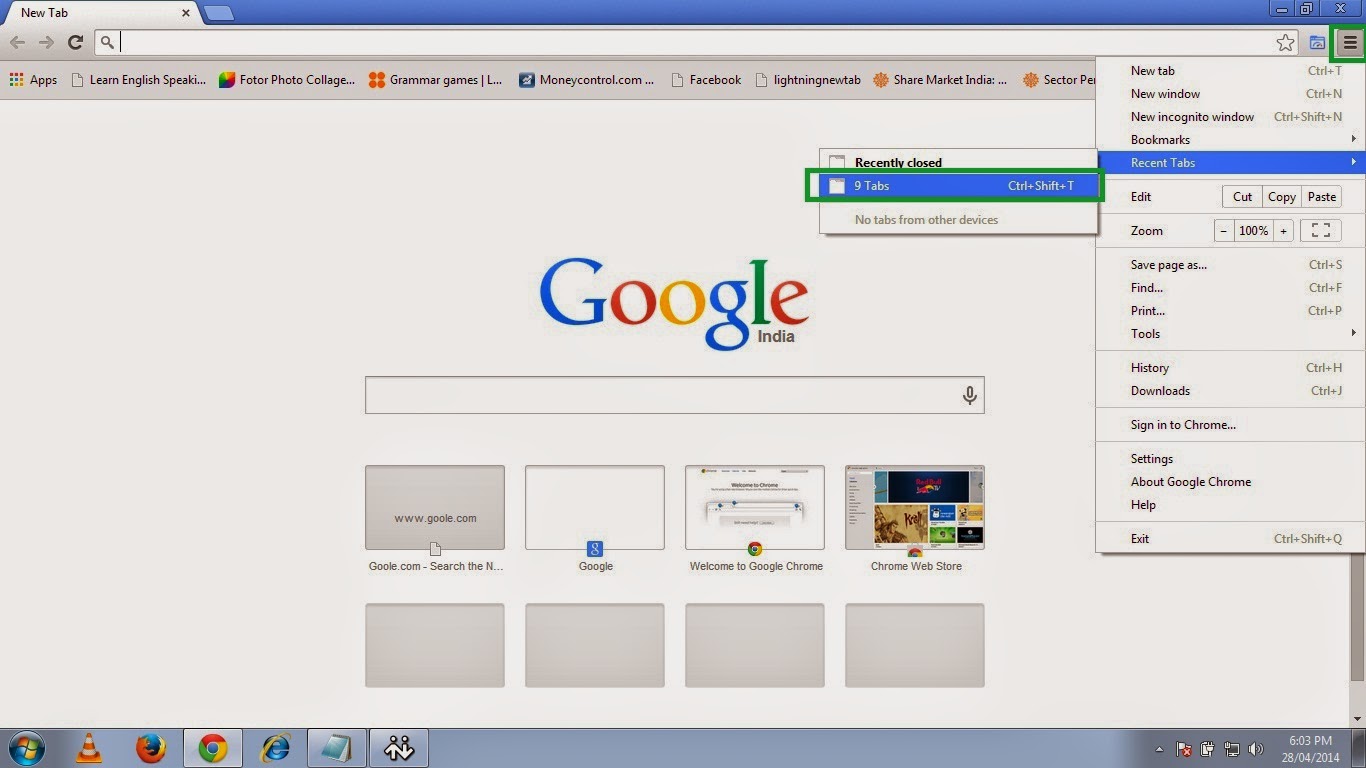
1. Open chrome and click on the three small parallel lines on the top right hand side and then move to Recent Tab and click the no. of Tab option so here in this picture it shows 9 Tab because I had 9 tabs opened before closing the Chrome.
So click on the 9 Tab.
OR
Just press Ctrl+Shift+T.
 |
| Pic-14(a) |
2. And then it will open all previously opened tabs with the webpages you were browsing.
 |
| Pic-14(b) |
Happy Learning
Nasir
People Also read my Following Posts.
Get a Website ups and running @ $2.95
What is a website and how is it accessed on the web?How to build and host it free?
How to Speed up your computer 20 Times faster.
Restore and Reset your iPhone, iPad or iPod back to the original Factory Default Settings.
Go to link Download
Wednesday, March 1, 2017
How to Fix after installing windows 7 pinnacle studio 12 cannot be started anymore What could have happened
How to Fix after installing windows 7 pinnacle studio 12 cannot be started anymore What could have happened
after installing windows 7, pinnacle studio 12 cannot be started anymore. What could have happened?__
after installing windows 7, pinnacle studio 12 cannot be started anymore.
What could have happened?
Solutions to the Problem after installing windows 7, pinnacle studio 12 cannot be started anymore. What could have happened?__
Download Error Fixer (Free)
Hello Tinotino,
Thank you for posting to the Microsoft Answers Forum.
Are you getting an error message when trying to start Pinnacle Studio 12? If so, then please reply back with the exact error message.
Have you tried to install in safe mode?
Have you tried to install in Compatibility mode?
If the program is not compatible, then you may try to install and run the program in compatibility mode.
Use the following steps:
1) Right click on the Program
2) Click on Properties
3) Click on Compatibility tab
4) Select Run this program in compatibility mode and select Windows Vista or whatever operating system the program was running successfully.
Pinnacle Studio 12 shows to be compatible with Windows 7 but Pinnacle Studio Plus version 12 and Pinnacle Studio Ultimate version 12 are not compatible.
They need an upgrade to be compatible.
Please reply back with an update and let us know if your issue is resolved or if you still need assistance.
Sincerely,
Marilyn
Microsoft Answers Support Engineer
Visit our
Microsoft Answers Feedback Forum and let us know what you think
- Access the files on your computer via MY COMPUTER
- Under the C: drive, access the WINDOWS folder
- Select the SOFTWARE DISTRIBUTION folder, followed by the DOWNLOAD folder.
- Delete any files within this download folder.
- If you are unable to delete these files, open the command prompt (CMD) as the administrator, and type "net stop wuauserv" into the CMD prompt window. Press ENTER. This should allow you to delete the files from step 4.
- Once the files are deleted, open and run the CMD as the administrator and type "wuauclt.exe /updatenow". Press ENTER.
Another Safe way to Fix the Problem: after installing windows 7, pinnacle studio 12 cannot be started anymore. What could have happened?__:


How to Fix after installing windows 7, pinnacle studio 12 cannot be started anymore. What could have happened?__ with SmartPCFixer?
1. Click the button to download Error Fixer . Install it on your system. Run it, and it will scan your system. The errors will be shown in the list.

2. After the scan is finished, you can see the errors and problems which need to be fixed.

3. The Fixing part is finished, the speed of your computer will be much higher than before and the errors have been removed.

Related: Fast Solution to Problem: Error http//go.microsoft/fwlink/?linkId=144689 occurs at every reboot,,Troubleshooting:I tried to download the latest version of Internet Explorer 9, but it will not update the download due to a message that states "Wrong version of Internet Explorer installer" Error,Fast Solution to Error: IE9 Search Taking Me to Web Pages Rather Than Search Results,Random freezing after updating to SP1 (Windows 7) Tech Support,[Anwsered] Thinkpad 8611 Boot,How to Resolve - Svchost Helper?,Fast Solution to Problem: L30 101 Driver Windows 7,Troubleshooter of Error: Io Device,How to Fix Error - Dell Laptop Code 39?
Read More: Troubleshooting:After repairing Word 2010 starter it as it asked. It wont let me open Microsoft Word 2010. It pops up and says internet lost and then freezes.,Tech Support: After upgrading from Vista to Windows 7 my IE8 becomes blurry sometimes....,After Upgrade from Vista to W7 HomePrem Removable HDs arent recognized. How Fix? [Anwsered],After running Disk Defragmenter in XP, system hangs or runs very slow,[Solved] After sign on to share point online, it ask for the credentials when trying to open a word or excel file,Able To Install Multiple Versions Of Office?,A couple of years ago I downloaded a homeccounting template I cant find now is there a place where I can look for other templates that are not lis ated?,add on information bar - Preventing me from being able to download anything,addin for excel doesnt exist in "C:Program FilesMicrosoft OfficeOffice121033",Adding degrees on Calculator
Go to link Download
Monday, December 19, 2016
Have a music fun with google translator BEATBOX
Have a music fun with google translator BEATBOX
Have a music fun with google translator.

Go to link Download
Monday, December 5, 2016
How To Fix a Mobile Phone That You Have Dropped Down The Toilet
How To Fix a Mobile Phone That You Have Dropped Down The Toilet
We walk you through a guide of what to do in infographic format to enable you to give you phone that kiss of life, unless however you just wish to put your phone to the graveyard of mobiles in the sky? A perfect illustrated guide is far easier to read than 500 works of text, so help a friend out or better still know what to do should you drop your phone down the loo.

Scott Morris is a keen blogger on various topics, Do-it-yourself, technology, tools and automotive, you can catch me over at my bathrooms related site and creator of this infographic Plumbworld. A petrol head with a love for music. All words and ramblings by Scott Morris
Go to link Download
Friday, November 11, 2016
Have you Met HTC 10 Check HTC 10 SPEC and Prices
Have you Met HTC 10 Check HTC 10 SPEC and Prices
Have you Met HTC 10? Check this Out

HTC 10
Inside: ==> Qualcomm Snapdragon 820 (quad-core, 2.15 GHz)
Memory: ==> 4GB of RAM
Storage: ==> 32GB internal (plus up to 2TB microSD expansion)
Rear Camera: 12MP (f/1.8) UltraPixel sensor (1.55µm pixels), OIS, laser autofocus, 4K video recording with Hi-Res Audio, Slow motion video recording at 720p, 120fps, Modes include Auto-HDR, Panorama, Pro mode with manual control and 12-bit RAW format support, Hyperlapse, Zoe capture, Video Pic, and continuous shooting up to 8fps
Front Camera: ==> 5MP, f/1.8, 1.34µm, OIS, Full HD 1080p video recording, Modes include Auto-HDR, Auto Selfie, Voice Selfie, and Live Makeup
Battery: ==> 3,000 mAh, Talk time on 3G/4G network: up to 27 hours, Standby time on 3G/4G network: up to 19 days
Software: ==> Android 6.0.1 with HTC Sense UI
Colors: ==> Glacier Silver, Carbon Gray, Topaz Gold
Price tag: ==> Launch Price $699

BEST FEATURES YOU LIKE TOO
- The HTC 10 is strong and it’s beautiful.
- The BoomSound HiFi audio delivers.
- The camera is one of the best in the business
- It’s not small. There’s a top and bottom bezel, so the HTC 10 might be a bigger size than you prefer.
- It’s not huge. If you like those phones that are almost tablet-size, this isn’t it.
- It’s not an iPhone. Let’s face it, some people out there will never stray from Apple… and that’s fine. But if you aren’t that dedicated and want to try something new, the HTC 10 is one of the best phones out there right now.


Go to link Download