Thursday, May 25, 2017
How Can You Improve Your SEO Performance with Webmaster Tools
How Can You Improve Your SEO Performance with Webmaster Tools

The greatest advantage of Webmaster Tools is that it allows you to view one or more sites from the Google angle.
It is necessary if you want a strong SEO impact. With the toolset, you can view your site in a way Google does. It gives you insights into the indexed pages of your site, the various links that are pointing to it, the most popular keywords etc.
Hence, a site that is active in Webmaster Tools has much better chances of being fully indexed and rank well as compared to the ones that are inactive in the toolset. You can also get other deeper insights from the tool set, which can be leveraged to get the best Search Engine Optimization benefits.
If you are not yet active in Google Webmaster Tools, let me tell you that it’s pretty simple. All you need to do is sign up for an account, login to the dashboard of Google Webmaster Tools and from there, add your website. You will then be asked to prove that the domain is yours. On the basis of your host, Google may offer to do the needful through an uncomplicated pop-up process that allows you to login and verify in a few steps.
The other options include getting a Google-provided meta tag to your homepage, followed by an HTML file upload to the root folder of your site, or confirming your ownership with the help of Google Analytics, if that is already installed in your website. It generally starts populating data within 24 to 48 hours.
Google Webmaster Tools Features:
The best SEO Company India says that once you are done with the site set up, its time to log in and make yourself familiar with the interface. The toolset, at its core, is all about metrics i.e. what’s getting indexed, linked and traffic.The data you get should then be broken down in different ways to use it to formulate a plan regarding the steps you need to take to get your SEO campaign going.
The various Webmaster Tools metrics are:
Search queries:
Impressions: It indicates the number of times a website is visited through a particular keyword. It, thus, helps you renew your web content with keywords of greater value.
Clicks: This shows the number of people who have taken action and clicked on your site in the search result.
CTR: This shows the number of users who have clicked on your website from the search results. If you find your number to be dissatisfactory, you can change your meta description to attract more traffic.
Middle position: This tells your exact rank for each keyword that you use. It helps you determine your performance and the impact you have on your traffic.
Keywords:
In order to understand how your keywords are performing, you need to click on the terms while being on the search query section. Studying the data for individual keywords informs you about the pages that are ranking for those keywords. This way, you not only understand your overall SEO achievements but also get to know about the different elements of your content campaign.Top Pages:
Within “Search Queries”, you get the opportunity to view “top pages”. This indicates content that gets the maximum number of impressions and clicks. It, thus, offers low hanging fruit opportunities you can easily capitalize on.Page Level Strategy:
A site is structured in a way, so that each keyword points to a section of the website. Webmaster Tools enables you to identify ideal keywords for each of the sections. Once you get your keywords mapped, use them to rank tracking tool to find out extra data like competition and traffic.Author statistics:
It allows you to tie in guest posts on other websites by linking to your Google + account. It can be easily accomplished by the “rel=author’ tag that is embedded as a link in particular write-ups. Your picture appears next to your content; and readers find it easier to read your other write-ups.The best SEO company will always suggest you to use Google Webmaster Tools when developing an SEO strategy, as it offers you better opportunities and the perfect medium to determine the performance of your site.
Go to link Download

Wednesday, May 24, 2017
How do I install Windows XP Lost Password Override XP if you forget it
How do I install Windows XP Lost Password Override XP if you forget it
How do I install Windows XP Lost Password Override XP if you forget it?
Q: I forgot my password for Windows XP and now Im stuck on my computer, there is a way to bypass Windows XP password?
Forgotten Windows XP Password
Answer: Do not worry - if you have forgotten your password, Windows XP, there are many ways you can find your password in Windows XP.
Method 1: Try the password Windows XP recommended.
Do not laugh! Youd be surprised how often it works. So, before you jump into a high-tech solutions Windows password recovery, try to remember what would have you forget your password for Windows XP can be.
Most passwords can be complex, often to common things in our lives, as people, places and things in our personal and professional life today.
Can the Windows XP Password have, had to do something?
Your name or the name of your friend or relative?
Your birthday or the birthday of your loved one?
Your home or office?
The name of your pets nice?
Your favorite food?
A series of frequently called?
A combination of the above?
Method 2: Use the Windows XP password reset disk
Suppose you are interested and have a Windows XP password reset disk at some point in the past, use the XP login screen to change your password.
My work Windows XP password reset disk continues, even if the password of Windows XP as the creation of the disk. Follow these steps to reset the password of Windows XP.
Step 1: Click the password reset disk. The Password Wizard starts. The Password Reset Wizard to create a new password for your account. Click on Next.
Step 2: Insert the password reset disk into drive A: and click Next.
Step 3: Enter a new password in the Type a new password and confirm the password. Click on Next.
Step 4: Click on Finish. The Password Wizard quits and you return to the login screen of Windows XP.
Method 3: Another account with administrator privileges
If you have other user accounts on the computer, one of them can be configured with administrator-level access. This means you can change the account password to access the password for Windows XP.
Method 4: Hack your Windows XP account with Windows Password Recovery
If you do not always retrieve your password in Windows XP by the above method, then its time for something a bit more technical trial.
Windows password recovery tools are software programs designed to retrieve or recover a lost / forgotten password for Windows XP. They are considered the best solution to recover Windows password. Windows Password Recovery SmartKey here as an example. You can change the password of Windows XP with 3 easy steps:
Step 1: Download and install Windows XP Password Recovery.
Step 2: Burn Windows Password Recovery 6.0 CD / DVD or USB Flash Drive
Step 3: Change your Windows password
Method 5: Still can not find the password of Windows XP?
If you still can not find the password of Windows XP, even after using the recovery programs of the Windows password link above, you need to reinstall Windows XP, the delete everything on your PC.
How do I install Windows XP Lost Password Override XP if you forget it?
Go to link Download
Friday, May 12, 2017
How to restore your iPhone iPad or iPod back to factory default settings if you have forgotten the passcode
How to restore your iPhone iPad or iPod back to factory default settings if you have forgotten the passcode
 |
| Pic-7(a) |
Now after you have installed the iTunes and open it first time it will show you the welcome screen as shown in the picture below.
 |
| Pic-7(b) |
iTunes is a media management software created by Apple, Inc., for both the Macintosh and Windows operating systems. You can use it to manage and play both audio and video files on your computer.You can take it anywhere which means all the contents like songs, your playlists, purchase and other stored items are available to you everywhere whenever and wherever you login onto iTunes using your Apple Id.
Someone else can log onto his iTunes account on your iPad if he signs out of your ID in the settings app first.The option can be found by selecting iTunes and App Store, then tapping on your ID. Any purchases downloaded on the device stay until they are deleted, but apps must be updated using the ID that originally downloaded them.And You can share purchases from both accounts on the same iPad with very little difficulty.
iTunes can also be used to restore and back up your settings, Messages, Camera Roll, documents, saved games, and other data loke Histories, cookies, bookmarks and much more. Backups dont contain content synced to the device, such as movies, music, podcasts, and apps.
If you choose to backup your iOS device on your PC it is saves the back up files at the following location, otherwise you can choose to save the back up at iCloud.
Mac: ~/Library/Application Support/MobileSync/Backup/
The "~" represents your Home folder. If you dont see Library in your home folder, hold Option and click the Go menu.
Windows XP: Documents and Settings(username)Application DataApple ComputerMobileSyncBackup
To quickly access the Application Data folder, click Start, and choose Run. Type %appdata% and click OK.
Windows Vista, Windows 7, and Windows 8: Users(username)AppDataRoamingApple ComputerMobileSyncBackup
To quickly access the AppData folder, click Start. In the search bar, type %appdata% and press Return.
Restoring your iPhone, iPad or iPod
Now depending on the condition of your phone you can go about this a number of ways. If your phone is functioning you can simply click "Settings" then go to "About" and click "Restore to Factory Defaults". If however the phone is not working it can be a little trickier. If you have forgotten the password and can not access the settings menu.Then you have to connect your iOS device to iTunes on your PC and restore it under recovery mode.
Method -1. Reset and Restore iPhone to Original Default Factory Settings with Recovery Mode
iPhone display freezing? iPhone doesn’t detect by or appear in iTunes? iPhone cannot sync with iTunes on PC or Mac? Cannot make or receive calls, send or receive text messages, or access email or the web? Or worse, iPhone simply won’t turn on and does not respond to tap or button press? If the problem still persists after you have reseted the iPhone, or tried various iPhone troubleshooting, it may be worthwhile to invoke recovery mode to restore iPhone to default factory settings, the original state as when you first received and unwrapped the phone.
Restoration of iPhone to original factory defaults will likely to fix all problem, with the downside that all data and information stored on your phone will be lost. Normally iTunes will make a backup automatically when you connect and sync the iPhone with the program, however, it’s still a good recommendation to copy out and backup everything that you may need on the phone before proceed to restore the iPhone.
To restore iPhone and reset the phone to default factory settings, follow these steps:
1. Turn off iPhone – Hold down the Sleep/Wake button for a few seconds until the red slider appears, then slide the red slider. Ignore this step if your iPhone is already off.
2. Press and hold down the Home button for about 10 seconds until a yellow triangle with a text which says Please Connect to iTunes appears.

- You cant update or restore because iTunes doesnt recognize your device or says its "in recovery mode".
- The Apple logo remains onscreen for several minutes with no progress bar.
- The Connect to iTunes screen appears.
- Turn off your device. If you cant turn it off, press and hold the Sleep/Wake and Home buttons at the same time and wait a few seconds for it to turn off.
- Plug the devices USB cable into your computer only.
- Hold down the devices Home button as you connect the USB cable to it.
- When you see the Connect to iTunes screen, release the Home button. If you dont see this screen, try steps 1 through 3 one more time.
 |
| Pic-7(c) |

 |
| Pic-7(d) |
 |
| Pic-7(e) |
5. Now as in the picture 7(e) above click OK and then Click Restore.Its now gonna ask you are sure you want to restore this iPhone to its factory default settings as shown in the pic-7(f) below, Click Restore and update.It will then start restoring the device which may take several minutes so make sure your computer has a power source connected to avoid unwanted power outage.
 |
| Pic-7(f) |
Additional Information
If you started your device in recovery mode by mistake, restart it to exit recovery mode. Or you can just wait-after 15 minutes the device will exit recovery mode by itself.
Method-3. Using DFU Mode in iPhone, iPad and iPod touch (Recovery)
In addition to recovery mode on iPhone, iPad and iPod touch, the iOS-based iDevices also has another mode which calls DFU. The main difference between the recovery mode and DFU mode is whether iBoot bootloader is loaded or bypassed during boot, with iBoot agent, when available, ensures that user cannot flash a firmware OS software which is lower or older version than the current one, effectively disable downgrade.
In recovery mode, which is the standard default way to upgrade or restore iDevices, iBoot is used when restoring or upgrade iPhone to make sure that the a iOS .ipsw which has the version number greater than or equal to current one is flashed or written to the device, or otherwise does not allow restoration process to proceed. In addition, unless the iPhone, iPad and iPod touch has been jailbroken or pwned”, custom-built firmware OS cannot be flashed. If the device is not connected to computer in recovery mode, the screen will display “Please connect to iTunes” logo.
DFU mode bypasses the loading of iBoot while still maintain the interfacing with iTunes, allow a older or lower version of iOS .ipsw to be flashed and restored to the device, including flashing a custom-build or home-made firmware iOS software. DFU mode is mostly used by hackers to downgrade or upgrade with a pre-jailbroken firmware created by PwnageTool. In DFU mode, the screen is totally black with no text display, just like when the phone is in power down state.
Here’s how to enter DFU Mode in iPhone, iPad and iPod touch:
1. Power on the iPhone, iPad or iPod touch if it’s in off state.
2. Connect the device to computer via USB cable or dock.
3. Run and open the iTunes program so that user will be notified when device enters DFU mode.
4. Press and hold Power or Sleep-Wake and Home buttons simultaneously for 10 seconds.
5. Release the Power or Sleep-Wake button and continue holding the Home button for 10 to 60 more seconds.
6. Wait until iTunes detects and recognizes the iDevice in DFU Recovery mode with notification message or system sound indicating hardware connect or disconnect.
 |
| Pic-7(g) |
Now you will see the message as shown below.

Alright So thats Enough to know about restoration..If you have any question or doubt please feel free to contact me at nasir@simulato.com.
In the next Post I am gonna write some interesting troubleshooting on Printers So Stay connected keep visiting.
Happy troubleshooting..
Best of Luck.!!!
Nasir
Go to link Download
Sunday, April 23, 2017
How to get the all opened tab back in Google Chrome if you have closed all the tab by mistake
How to get the all opened tab back in Google Chrome if you have closed all the tab by mistake
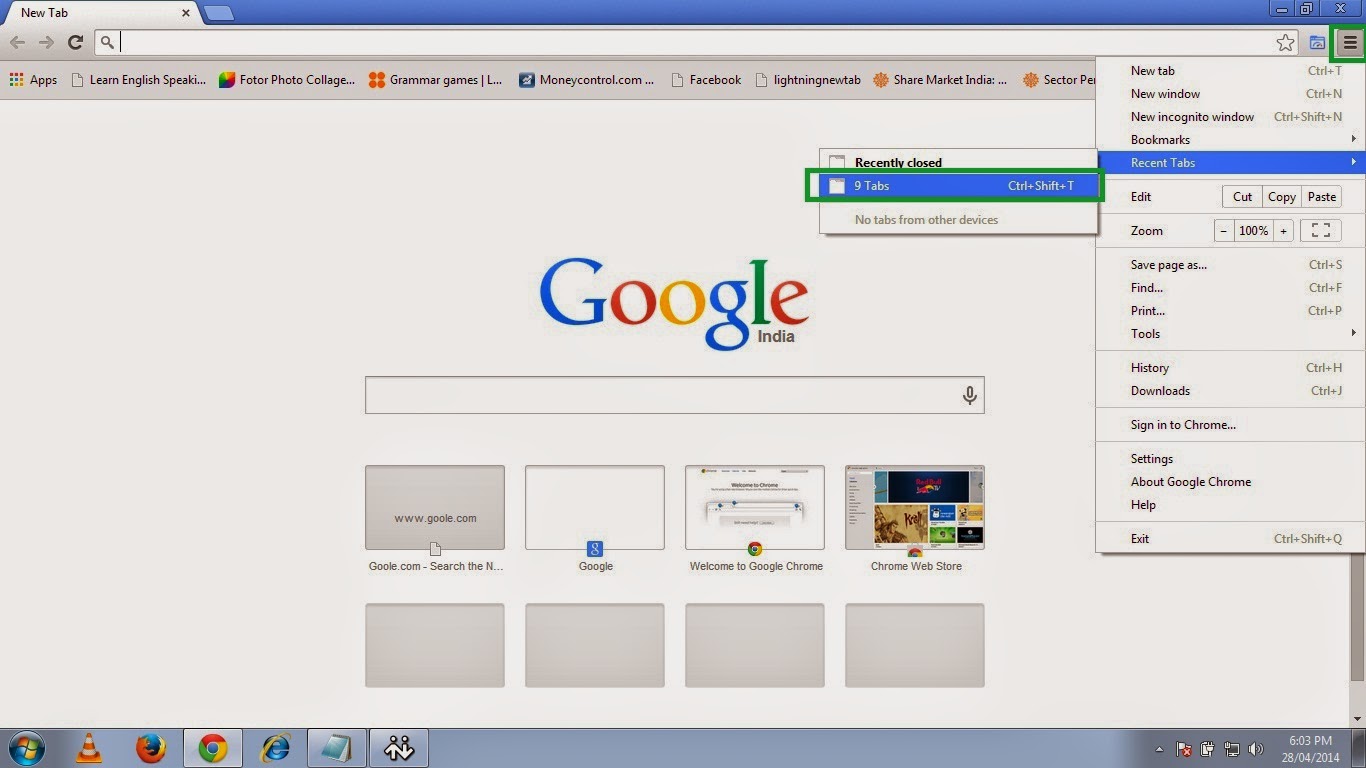
This is just for an information I am sure most of you must know it already.I wanted to let you know how you can get all the opened tab in Google Chrome back if you have closed all the tab by mistake, because when you manually close it, you dont get the option of restore so if you dont get the restore option here is how you can get all those opened tab back.
Get all opened pages that you were working on back
1. Open chrome and click on the three small parallel lines on the top right hand side and then move to Recent Tab and click the no. of Tab option so here in this picture it shows 9 Tab because I had 9 tabs opened before closing the Chrome.
So click on the 9 Tab.
OR
Just press Ctrl+Shift+T.
 |
| Pic-14(a) |
2. And then it will open all previously opened tabs with the webpages you were browsing.
 |
| Pic-14(b) |
Happy Learning
Nasir
People Also read my Following Posts.
Get a Website ups and running @ $2.95
What is a website and how is it accessed on the web?How to build and host it free?
How to Speed up your computer 20 Times faster.
Restore and Reset your iPhone, iPad or iPod back to the original Factory Default Settings.
Go to link Download
Friday, April 21, 2017
IBM builds a service to help you know who to trust in the cloud
IBM builds a service to help you know who to trust in the cloud

Go to link Download
Tuesday, April 11, 2017
How Can You Fix AVCHD MTS Files Crash Windows Live Movie Maker
How Can You Fix AVCHD MTS Files Crash Windows Live Movie Maker
AVCHD MTS Files Crash Windows Live Movie Maker
Windows 7 Ultimate
Core 2 Quad
8GB RAM
No other applications running
Loaded most current Windows 7 drivers from Canon support site.
Windows Media Player can play these HD movies created with a Canon Vixia HF20 camcorder
Right-click on downloaded MTS (AVCHD) file on hard drive prompts to open with WL Movie Maker.
Application launches and crashes--with small and large MTS files.
This is a long-standing problem that has not been addressed.
Why advertise that this program works with these HD formats if it only does so in your labs and not on real customer systems?
__________________________________________________________________
William Vaughn
Mentor, Consultant, Trainer, MVP
http://betav.com
http://betav.com/blog/billva
http://www.hitchhikerguides.net
“Hitchhiker’s Guide to Visual Studio and SQL Server (7th Edition)”
Please click the Mark as Answer button if a post solves your problem!
Solutions to the Problem AVCHD MTS Files Crash Windows Live Movie Maker
Download SmartPCFixer to Fix It (Free)
Hello William Vaughn,
Windows Live Movie Maker does not ship with Windows 7 operating system. It is part of Windows Essentials therefore that is why you were redirected to get help from the Windows Live Help.
Here is a link to the supported file types in Windows Live Movie Maker.
Please post in the following link for assistance with Windows Live Movie Maker:
http://windowslivehelp.com/product.aspx?productid=5
Sincerely,
Marilyn
Microsoft Answers Support Engineer
Visit our
Microsoft Answers Feedback Forum and let us know what you think
Make Sure that your Computer Meets the System Requirements
This error can be due to some configuration requirements for you system. If your PC hardware is not up to par, then make sure you update where necessary before continuing:
Microsoft Windows Requirements :
- 1 gigahertz (GHz) or faster 32-bit (x86) or 64-bit (x64) processor
- 16 GB available hard disk space (32-bit) or 20 GB (64-bit)
Recommended Method to Fix the Problem: AVCHD MTS Files Crash Windows Live Movie Maker:


How to Fix AVCHD MTS Files Crash Windows Live Movie Maker with SmartPCFixer?
1. Download SmartPCFixer. Install it on your system.

2. After the scan is done, you can see the errors and problems which need to be repaired.

3. The Fixing part is done, the speed of your computer will be much higher than before and the errors have been removed.

Related: AMD Radeon HD 7800M Win8 not working [Anwsered],I can access the internet, get on facebook and get to hotmail, but I cant play games on facebook and I cant open or respond to my e-mails,I keep getting this Media Player error when I log on my computer. [Anwsered],[Anwsered] System Hanging on shutdown and restart,Unable to get the Vlookup property of the WorksheetFunction class,Solution to Error: Error: "0x81000032 make sure the C: drive is online and set to NTFS" when trying to backup to external hard drive.
,Troubleshoot:External Hard Drive not listed in Windows 7 backup wizard Error
,Im always being signed off so annoying Tech Support
,Solution to Problem: Impossible to use Internet Explorer! I keep getting the same error message every time i try to use IE.
,Solution to Problem: Referencing data in another file
,Troubleshoot:Error: "0x81000032 make sure the C: drive is online and set to NTFS" when trying to backup to external hard drive. Error,External Hard Drive not listed in Windows 7 backup wizard Tech Support,Tech Support: Im always being signed off so annoying,Solution to Problem: Impossible to use Internet Explorer! I keep getting the same error message every time i try to use IE.,Referencing data in Access using Excel [Anwsered],Need Best Way To Present Data [Anwsered],Same question but for windows 7 home edition,sometimes fullscreen wont activate [Solved],Solution to Error: We bought a new computer with windows 7 and it is constantly freezing. How do we fix this?,Solution to Error: Windows 8 update crash (2013-07-22)
Read More: Fast Solution to Error: automatically add date to filename when saving a word document?,Fast Solution to Error: Back up - lock screen,How Can I Fix - Auto-Row Height in Merged Cells?,Troubleshoot:Atheros AR9002WB-1NG Wireless Network Adapter problems Error,Troubleshooting:Backup problem 0x8100002f - Backup skipped backing up E: as it is on the backup target. Error,application not found error,any problems in a team where one has Windows XP and the other has Windows 7?,Application/Object-Defined Error,An Excel formula question where hours are totalled and cumulating,Anyone know the hardware email?
Go to link Download
Monday, March 27, 2017
Guest Post Healthcare application development – The things you should know how to build apps
Guest Post Healthcare application development – The things you should know how to build apps
Healthcare application development – The things you should know how to build apps

- UI/UX Considerations
- Handling security issues
- Testing healthcare apps
Go to link Download
Friday, February 3, 2017
How Do You Know if It’s Hardware or Software That’s Behind a Problem
How Do You Know if It’s Hardware or Software That’s Behind a Problem

When your computer decides to act up, how do you decide if its a hardware problem or a software problem thats behind it? The tips that follow should help you determine where the cause of your problems lies.
Go to link Download
Monday, January 9, 2017
How to Identify you HP Compaq Model
How to Identify you HP Compaq Model
| 1 | Model Number (shown in area below the bar codes) | dv9095xx | The Model Number is unique to the hardware components, and is the most useful for finding drivers and support content. |
| 2 | Product Number (p/n) | RQ877AS | When using the Product Number to find a part or driver, enter only the letters and numbers before the # sign. |
| 3 | Product Name (Product) | HP Pavilion dv9000 | The Product Name (also seen on the front of your notebook) is not useful, as there may be duplication across several PC models. |
source of this post:HP support
Go to link Download
Saturday, December 31, 2016
How Can You Fix all my icons are the same thing and it opens whatever that icon is Urgent!
How Can You Fix all my icons are the same thing and it opens whatever that icon is Urgent!
all my icons are the same thing and it opens whatever that icon is. Urgent!
All my icons have changed to the same thing, I dont know how to fix it.
Ive downloaded AVG and it scans but still all the icons appear the same.
How do I fix this? This is Urgent thank you!
Keys to the Problem all my icons are the same thing and it opens whatever that icon is. Urgent!
Download Error Fixer (Free)
Check Windows System Requirements
Microsoft Windows Requirements :
- 1 gigahertz (GHz) or faster 32-bit (x86) or 64-bit (x64) processor
- 1 gigabyte (GB) RAM (32-bit) or 2 GB RAM (64-bit)
- 16 GB available hard disk space (32-bit) or 20 GB (64-bit)
This error can be due to some configuration requirements for you system. If your PC hardware is not up to par, then make sure you upgrade where necessary before continuing.
Recommended Method to Repair the Problem: all my icons are the same thing and it opens whatever that icon is. Urgent!:

How to Fix all my icons are the same thing and it opens whatever that icon is. Urgent! with SmartPCFixer?
1. You can Download SmartPCFixer here. Install it on your system. When you open SmartPCFixer, it will perform a scan.

2. After the scan is done, you can see the errors and problems need to be fixed. Click Fix All.

3. When the Fixing part is finished, your computer has been speeded up and the errors have been fixed

Related:
Read More: How Can I Fix - All my usb isnt working error "Windows has stopped this device because it has reported problems (Code 43)"?,Troubleshooter of Error: all of a sudden I cant open any documents I already have in excel 2010...why?,all my incoming e-mails are attachments [Anwsered],How to Resolve - All my icons have changed and my programs dont show on the Start Button?,Troubleshooter of Error: all icons to word pad icons,All browsers and the softwares which run from internet is also not working,all free space now used?.,All icons open with Windows Media Player,all emails, docs, music etc are being saved in the pictures library as well as appropriate locaton,all icons are displayed in IE & not oppening
Go to link Download