Showing posts with label know. Show all posts
Showing posts with label know. Show all posts
Friday, April 21, 2017
IBM builds a service to help you know who to trust in the cloud
IBM builds a service to help you know who to trust in the cloud
Networking experts create an experimental system to offer better security in the promiscuous world of the cloud.

Today even the simplest web app can rely on a diverse mix of online services.
These services support a range of crucial functions in modern applications: Facebook for authentication, Box for storage, Twilio for messaging, Square for payments, Google AdSense for advertising and more.
Moving further down the software stack, it is also becoming increasingly common to weave together apps using even smaller on-demand components, such as Amazon ElastiCache or the cloud-based graph database GrapheneDB.
IBM predicts this trend of gluing together online services into "mesh applications" will accelerate as the number of cloud platforms continues to increase, growing beyond Amazon Web Services, Microsoft Azure, Google Cloud Platform, Heroku, IBM BlueMix, CloudFoundry and others available today.
The challenge for firms is that every time they bolt a new cloud-based service onto an app the company is trusting data and the smooth running of their software to a potentially unknown third party.
A new security model for the cloud
In a world where many different and sometimes geographically dispersed services regularly share data, networking experts say a new approach to application security is needed.
"Despite the shift in how applications are being disaggregated, the management of security between services and tenants remains largely the same: one focused on a perimeter defense with a largely static security configuration," write researchers from IBM Watson Research Center, the University of Colorado and Princeton University.
"While isolation enables tenants to reason about their perimeter, perimeter defense is widely considered insufficient."
With the many different cloud services that make up these applications regularly swapping data and commands, attacks on apps can be hard to detect, the researchers argue, as criminals can "rely on their relative anonymity to bypass the perimeter".
In such complex systems, software-defined networking (SDN) and network function virtualization (NFV) are increasingly being used to enforce security policies on traffic as it flows over the network.
While the programmable infrastructures that SDN and NFV enable can boost security for these mesh applications, the researchers believe these automated systems need better guidance.
To help address the issue of knowing which cloud services can be trusted, IBM and its research partners have designed an experimental system called Seit, which means reputation in Arabic.
Seit is designed to be integrated into cloud management systems to help track the reputation of different services.
Seit allows cloud-based services to interface with its reputation manager, which acts as a repository for ratings assigned to cloud-based services or tenants. These ratings are based on the past behaviour of these services and are automatically generated from alerts, events, and status updates from the cloud infrastructure components these services rely on, such as firewalls, load balancers and network controllers.
When different online services are preparing to interact, they query Seit to discover each others crowd-sourced reputation. Using this information each service can then decide how, and if, they should interact, based on their respective reputations and expectations.
To allow cloud services to engage in this reputation sharing, Seit provides a framework that enables a software shim to be created around cloud infrastructure components. This shim allows cloud services and tenants to interface with Seits reputation manager.
The researchers say Seit makes it easier to isolate cloud services and tenants that are likely to cause problems, as well as optimizing communication between services.
Because reputations are updated each time cloud services or tenants interact with each other, Seit also proved able to warn about malicious and problematic behaviour as it emerged. For example, in a recreation of a denial of service (DoS) attack similar to that launched from AWS EC2 instances in 2014, Seit lowered the reputation of the compromised virtual machines spewing out large amounts of DoS traffic, to the point where the instances driving the attack were isolated.
The researchers provide various examples of how they used Seit - including creating an SDN controller that blocked or screened network traffic from virtual machines with a low reputation, allowing a cloud service broker to filter services offered on CloudFoundry by reputation and building a reputation-guided load balancer.
"Using our emulated environment, we show that Seit can provide improved security by isolating malicious tenants, reduced costs by adapting the infrastructure without compromising security, and increased revenues for high quality service providers by enabling reputation to impact discovery," the researchers claim in the paper.
IBM and its partners have trialled Seit with various cloud and network components, including the Floodlight SDN controller, CloudFoundry, the HAProxy load balancer, the Snort intrusion detection system and the Nagios monitoring system.
In future they plan to integrate more components with Seit, improve the systems performance and study scalability challenges when managing a large number of components and tenants spread across autonomous clouds in different locations.
Go to link Download

Sunday, April 9, 2017
Google tricks to know the Live cricket scores and predict the game
Google tricks to know the Live cricket scores and predict the game
Predict the game from the quick facts available on Google.
Yes you can find from the live cricket scores of a game to match schedules easily on Google by just typing one or two words.Google will show you all these information in quick facts results.See the live cricket scores of currently playing games,see the team participating in a tournament, see the standing and scores of different teams and keep yourself updated with the live cricket scores all with just two or three simple words query.
Here are few example of them to know the Live cricket score with other information.
If you wanna know the live cricket scores of currently happening Cricket tournament or ODI or test cricket series just type live cricket score or cricket scores or the name of the two cricket team among which the match is being played or the name of the tournament followed by live scores.
It does not only show you the live cricket score but also the name of the stadium and where is this game being played,who is batting and who is yet to bat and if the match is finished it will show you who has won the game.
To know the live cricket score of a team just type the name of the team followed by the word score or name of the country followed by the word score or scorecard or live score and it will show you the Live cricket score.
Now if you wanna see the Live Cricket score as well as the full scores with scheduled matches click on the Full schedules and scores and it will show as the following picture.
For example to know the Indian team standing and Live Cricket score in ICC World cup type India world cup standing.
and to know the standing of the whole tournament with Live Cricket score and group distribution simply type the name of the tournament followed by the word standing.
Not just the Live Cricket score you could also see the video recap or the video highlights of any game on Google and predict the team after watching the performance of any team and to get to know how they reached here.
Whenever you search the information of any game Google like Live Cricket score,or team standing Google also gives you the option to see the Highlights or video recap.
when you click on the video Highlights it will open a new window or a tab and start streaming the some not to miss video and would give you the information on how the team reached to next level.
Yes you can find from the live cricket scores of a game to match schedules easily on Google by just typing one or two words.Google will show you all these information in quick facts results.See the live cricket scores of currently playing games,see the team participating in a tournament, see the standing and scores of different teams and keep yourself updated with the live cricket scores all with just two or three simple words query.
Here are few example of them to know the Live cricket score with other information.
1. Know the live cricket scores of currently playing cricket Match
If you wanna know the live cricket scores of currently happening Cricket tournament or ODI or test cricket series just type live cricket score or cricket scores or the name of the two cricket team among which the match is being played or the name of the tournament followed by live scores.
It does not only show you the live cricket score but also the name of the stadium and where is this game being played,who is batting and who is yet to bat and if the match is finished it will show you who has won the game.
 |
| Live cricket score |
2. Know the live cricket score of a Team
To know the live cricket score of a team just type the name of the team followed by the word score or name of the country followed by the word score or scorecard or live score and it will show you the Live cricket score.
 |
| Live cricket score |
Now if you wanna see the Live Cricket score as well as the full scores with scheduled matches click on the Full schedules and scores and it will show as the following picture.
 |
| Live Cricket score |
3. To know the Live Cricket score and standing of a team or tournament
To know the Live Cricket score standing of a team in a tournament or in any other game type the name of the team followed by the name of the tournament and word "standing".For example to know the Indian team standing and Live Cricket score in ICC World cup type India world cup standing.
 |
| Live Cricket score and standing |
and to know the standing of the whole tournament with Live Cricket score and group distribution simply type the name of the tournament followed by the word standing.
 |
| Live Cricket score and standings |
4. See the Live Cricket score between two specific team
To know the Live Cricket score or results of a match between two specific team just type the name of the first team vs name of the second team followed by the name of the tournament.It will show you the Live Cricket score between only those two countries. |
| Live Cricket score between two contestant |
 |
| Score between two contestant |
5. See the video recap or the video highlights directly on Google
Not just the Live Cricket score you could also see the video recap or the video highlights of any game on Google and predict the team after watching the performance of any team and to get to know how they reached here.
Whenever you search the information of any game Google like Live Cricket score,or team standing Google also gives you the option to see the Highlights or video recap.
 |
| Live Cricket score |
when you click on the video Highlights it will open a new window or a tab and start streaming the some not to miss video and would give you the information on how the team reached to next level.
 |
| Video highlights |
5. find all the upcoming schedules of the current tournament
Not just the Live Cricket score you could also find the upcoming schedule of the all cricket events of a current tournament by just typing the name of the tournament or world cup championship and Google will show you the last and all the upcoming cricket events along with the results.
Look at the below picture to know the future events just click on the arrow on the right to move right and to see the past events click on the left arrow or move left.
 |
| ICC World Cup Schedules |
Incoming search
- Live Cricket score
- Live Score
- Cricket Score
- Live Cricket Standing
- Live cricket highlights
- Live cricket video
People also read following top most searched issue
Best Google Search Tips and Tricks
How to start Installer,Print spooler,windows Audio or any other services in safe mode
Read how to fix black screen with only mouse cursor issue- Explorer.exe does not start automatically
Get a Website ups and running @ $2.95
Fix USB 3.0 External Hard drive installation issue ( Not detecting in Windows )
What is a website and how is it accessed on the web?How to build and host it free?
Go to link Download
Monday, March 27, 2017
Guest Post Healthcare application development – The things you should know how to build apps
Guest Post Healthcare application development – The things you should know how to build apps
Healthcare application development – The things you should know how to build apps
Based on one research, global health market is expected to increase by leaps and bounds till 2020. Healthcare application development team gives most promising solutions tailored to business needs and requirements. Healthcare is one of the most popular industries that is getting popular with innovation and technology. In this blogs, we will discuss on factors that you should consider when building healthcare apps.

- UI/UX Considerations
Plan for one clean interface where patients have to enter records every day or after every hour. Also, there are cases when doctors visit patient’s home and update their medical history from time to time. So you should always design interactive User Interface that can accept inputs freely and large amount of data. This is true that healthcare apps generally have more data than regular ones.
For amazing healthcare app, you should first consider design of user interface and how it can help you. Design of application should be seamless where data can flow easily without any issue. UI should also be personalized and supportive for users. This makes feel users positive and more intuitive.
- Handling security issues
Healthcare apps have to pass through various barriers before its actual implementation. So, privacy or security issues should be handled carefully especially at the time when you communicate with customers over network.
There are cases when you have to work on sensitive data that are directly related to patient’s health and safety. There are also various safety regulations that should be followed for each app before its actual implementation. So, whenever you are building apps, you need to make plan first, how to design or develop apps for assured outcomes.
- Testing healthcare apps
Application testing matters a lot that is done by healthcare application development team as soon as product gets completed. Testing is performed in different ways, it is always better to perform testing at different stages to avoid serious pitfalls at the end.
Now, you must be clear how to build successful app and how it can help you in best possible way. TO know about healthcare app development tailored to particular project, contact leading development Company right away.
Author Bio:-
Aaron Jacobson is a senior content marketing writer at digital marketing, B2B agency with more than a decade of professional writing with more than 5 years’ experience, as well as Master degree in writing and deep technology expertise to current trends content campaigns. Im a contributing editor of Technologist. You can follow me on Twitter @ Techno_Ligent.
Go to link Download
Friday, February 3, 2017
How Do You Know if It’s Hardware or Software That’s Behind a Problem
How Do You Know if It’s Hardware or Software That’s Behind a Problem

When your computer decides to act up, how do you decide if its a hardware problem or a software problem thats behind it? The tips that follow should help you determine where the cause of your problems lies.
When your computer has slowed down
Computer magazines and knowledgeable people often talk about older computers being slower. If you arent that familiar with computers, you may misinterpret what they actually mean.
A computer can be slow in two ways. One way is when it takes too much time to complete simple, everyday tasks such as starting up or opening programs. The second way is when it grows obsolete because modern programs make demands that it cant meet. An obsolete computer doesnt exhibit slowness when performing everyday tasks.
Any computer from the last 10 years should be able to start up in one minute and quickly load commonly used programs as long as it runs an OS that it was designed for. If you find that your computer takes much more time than it did before to merely start up or to fire up programs, the problem isnt usually the hardware. You may have malware or some sort of operating system housekeeping problem. Cleaning up the browser cache, defragmenting and running your antivirus program should take care of the problem. You dont need to buy a new computer just because it seems to have slowed down.
If your computers components are too slow for modern programs, the problem usually appears as a complete inability to work rather than a general slowness. For instance, if you run a Celeron from 2007, youll find that while browsers do open quickly, they arent able to play high-definition YouTube videos at all. It is when you see such complete inability to function that you should consider your computer old enough to replace. Theres an easy way to tell if your computers slowness comes from obsolete hardware -- simply go to the Task Manager and check out your CPU graph. If it is at or near 100% most of the time, your computer can no longer keep up.
You have a blue screen problem
In the past, blue screen crashes -- when your computer spontaneously crashed after a brief blue-colored error display -- used to be a Windows problem. They were so common and such a drag on Microsofts reputation that hundreds of jokes about it circulated the Internet. These days, though, Windows is a stable OS that rarely crashes on its own. If your computer has a frequent blue screen problem, the problem is usually hardware-related or related to poorly programmed drivers that come with low-quality hardware. You should check either recently added hardware or recently installed drivers. If neither seems to be a problem, you can safely assume that you have failing hardware -- the motherboard, a graphics card or anything else.
If your computer refuses to start
A computer thats completely dead always has a hardware problem - it could be as simple as loose connections within the computer or as complicated as defective hardware. If your computer starts but doesnt go as far as fully booting up, it could either be the hardware or the software. You could try repairing your Windows installation or reinstalling Windows to see if it fixes the problems you experience.
Fixing computer problems can be a trial-and-error process
It can take a great deal of patience to narrow a computer problem down. The easiest way to tell if its the hardware or the software thats at fault in a particular problem is to reinstall Windows. If the problem persists, you can safely assume that you have a hardware problem.
Hardware problems dont always have to be major ones. If you have a frayed-out or rat-bitten cable going from your graphics cards to your monitor, for instance, it can make your computer spontaneously crash. Narrowing down a computer hardware problem can be painstaking work.
Go to link Download
Friday, January 13, 2017
How to Know Your Computer Configuration Easily
How to Know Your Computer Configuration Easily
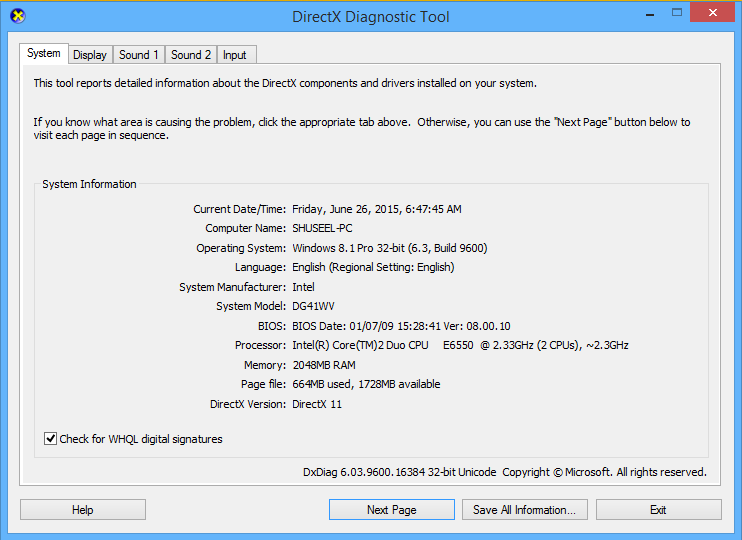
If you dont know your computers configurations like how much RAM is used, which operating system was installed, whats the name of computer, you can find them easily from DirectX Diagnostic Tool. By using this tool you can find not only these things but also know about the configuration of display adapter, sound and input devices. Here is a sort and very easier method to find out those information about computer configuration.
To open DirectX Diagnostic Tool, go to Run and type "dxdiag" then click on OK. The DirectX Diagnostic Tool dialog box will appear which gives information about the following.
Machine name: It includes the name of your computer.
Operating System: It includes the name of Operating system installed on your computer.
Language: It includes the language used on computer.
System Manufacturer: It includes the manufacturer name of system.
System Model: It includes model number of the system.
Processor: It includes the information about the processor.
Memory: It includes how much RAM is used on computer.
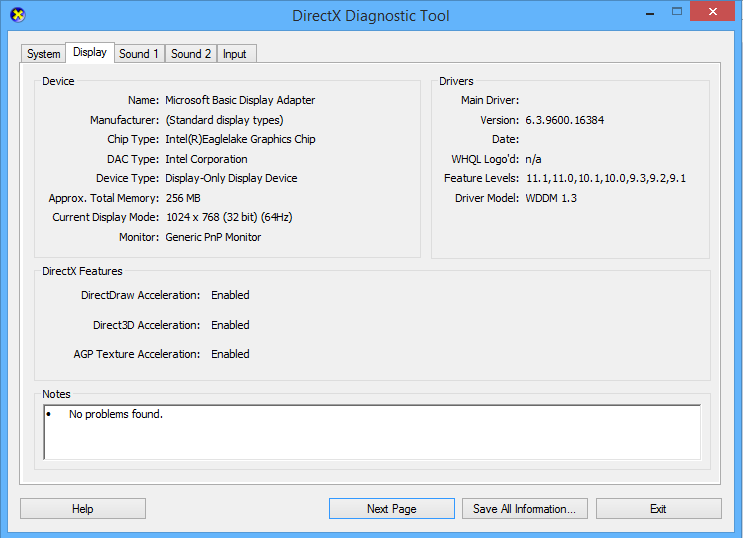
Card name: It is the name of Display Adapter
Manufacturer: It is the name of manufacturer of display adapter.
Chip type: It is the type of Graphics Chip
On sound Tab, you can find the information about your sound devices attached on computer.
And the last Tab of DirectX Diagnostic Tool is input, which includes information about input devices used in computer.
There are different methods to get information about your processor that supports 32-bit or 64-bit and the installed operating system is 32 or 64 bit, I have presented some of them below.
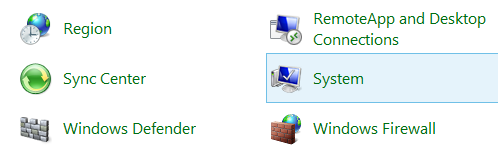
1. At first, go my computer, right click on it and click on properties option or go to control panel and click on system option.
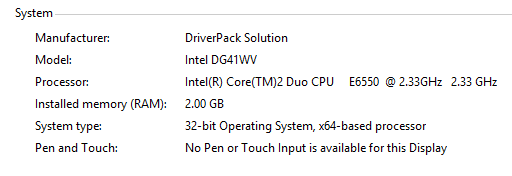
 2. Here the system properties window will appear, on the system block you can find the information about your system model, processor type, installed memory(RAM) and system type which includes what type OS installed 32 or 64 bit and processor supports 32 or 64 bit. Here in the image below system has 32-bit operating system and have 64-bit processor, so in this computer 64-bit operating system can be installed.
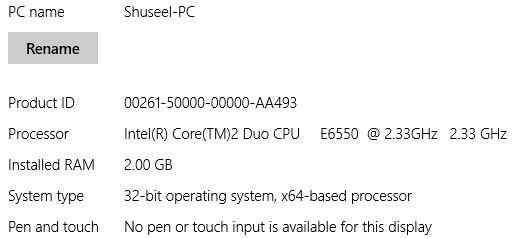
How to Open DirectX Diagnostic Tool
To open DirectX Diagnostic Tool, go to Run and type "dxdiag" then click on OK. The DirectX Diagnostic Tool dialog box will appear which gives information about the following.
On the System Tab, you can find the following information.
Machine name: It includes the name of your computer.
Operating System: It includes the name of Operating system installed on your computer.
Language: It includes the language used on computer.
System Manufacturer: It includes the manufacturer name of system.
System Model: It includes model number of the system.
Processor: It includes the information about the processor.
Memory: It includes how much RAM is used on computer.
On the Display Tab, you can find the following information.
Card name: It is the name of Display Adapter
Manufacturer: It is the name of manufacturer of display adapter.
Chip type: It is the type of Graphics Chip
On sound Tab, you can find the information about your sound devices attached on computer.
And the last Tab of DirectX Diagnostic Tool is input, which includes information about input devices used in computer.
How to Know Computer Supports 32-bit or 64-bit
There are different methods to get information about your processor that supports 32-bit or 64-bit and the installed operating system is 32 or 64 bit, I have presented some of them below.
1. At first, go my computer, right click on it and click on properties option or go to control panel and click on system option.
How to Get System Information on Windows 8
On windows 8 you can find system information from PC settings also. You can get PC information from PC settings with the following steps.- At first, search PC setting from window start and open it.

- Go to PC and devices and then PC info.
Related Posts
How to make USB boot drive to Install Windows ?
How to Keep Computer from Sleeping
Top 5 Free Methods to Make Your Computer Faster
How to Know Your Computer Configuration Easily
Top 10 Questions that Computer Beginner may Asked
How to Manage Drives Using Drive Tools
How to Share Printer for Computers on LAN
What are the Basic Components of operating Systems.
How to Share Drive Folder and File in Computer Network
What is Cyber Crime and What are the types?
What is intellectual property law?
What is literal and non-literal copying of computer programs?
Go to link Download
Friday, October 7, 2016
If You Paid 500 for a Gene Test Would You Know What to Do With It BusinessWeek
If You Paid 500 for a Gene Test Would You Know What to Do With It BusinessWeek
The FDA questions three companies marketing DNA tests directly to consumers.

DNA4Life offers a $249 test to help customers understand whether their genes put them at risk of having bad reactions to more than 100 common medicines. Interleukin Genetics sells a $169 test that “may help you lose more weight by properly matching diet and exercise plans” to genetic profiles. And DNA-CardioCheck has suggested its test, at $450, is a "reliable method to determine whether or not you might be at risk for developing blood clots which might result in cardiovascular disease."
All three companies got letters from the Food and Drug Administration in early November suggesting they didn’t have the proper clearance to sell medical tests to consumers. It’s the latest sign that regulators are concerned about how companies market DNA tests for health insights, sometimes bypassing doctors entirely.
There’s good reason for that worry: For most people, the genetic analysis available today doesn’t provide much meaningful health information at all.
DNA tests can reliably establish family ties, like paternity tests, or reveal a person’s ethnic heritage. They can also tell whether people are at risk for certain rare diseases like cystic fibrosis that are directly linked to genetic mutations, or for passing the risk on to their children. But when it comes to information relevant to people’s health, especially about common conditions like heart disease or diabetes, the value of genetics becomes much murkier.
"Right now, almost all of this is premature and not terribly useful to individuals,” said George Annas, a Boston University bioethics professor and co-author of Genomic Messages, a book about how genetics is changing medicine. “It’s complicated, and these testing companies are trying to make it appear that it’s much more simplistic so they can sell you a product."
Companies see a gold mine in turning genetic data into information people can use to stay healthy or battle illness. A few years ago, Booz Allen Hamilton estimated that there were nearly 3,000 tests available; market researcher Technavio says the industry is growing by close to 10 percent a year. Many of these tests are available only through health-care providers.
The FDA didn’t tell the three companies to stop selling their tests. But the agency pointed out that it considers them medical devices that need regulatory clearance, and asked for justifications if the companies believe the clearance isn’t necessary. "The FDA actively regulates genetic tests sold directly to consumers to make sure they are safe and do what they claim to do," spokeswoman Jennifer Dooren said in an e-mail. "Without FDA oversight, the safety and efficacy of these tests have not been determined and could potentially lead to patient harm."
DNA4Life and DNA-CardioCheck didn’t respond to requests for comment. Mark Carbeau, chief executive of Interleukin Genetics, said the company’s main product, a test that predicts the risk of gum disease, is sold primarily through dentists. Other products "can be purchased by a consumer, though a medical professional needs to be involved,” Carbeau said. "We think, properly done, genetic tests offer real value to the health-care community, and we’re certainly supportive of the FDA’s efforts to protect the public and provide guidance.”
The FDA has cracked down on testing companies marketing straight to the public before. In late 2013, it ordered 23andMe to stop selling its personal genome analysis. This past February, the agency approved 23andMe’s test for a limited use, to detect whether people carry the gene for Bloom syndrome, a rare genetic disorder. The company has since added other approved uses to determine whether people carry mutations that could be passed down to their children.
One of the risks of making genetic tests available directly to consumers is that people may confuse diseases caused by complex risk factors with those caused by a single genetic abnormality. While a single gene mutation can cause cystic fibrosis, “for things like cardiovascular disease that’s just not true," said Michael Christman, CEO of the Coriell Institute, a Camden (N.J.) research center focused on genetic medicine.
Unlike with some rare hereditary conditions, many pieces of a person’s DNA may influence his or her risk for heart disease, cancer, or diabetes, and they’re not all well understood. And genetics are only one risk factor, along with environmental exposures and lifestyle, that helps determine whether someone will get a disease.
In an ideal world, genetic tests would go through physicians or other experts capable of interpreting results, Christman said. “People joke there’s the $1,000 genome followed by the $1 million interpretation,” he said. "The interpretation is complicated, and it needs to be done very well.
Christman said the greatest potential for genetic medicine right now is using DNA profiles to determine how people might react to different drugs or doses, a field called pharmacogenomics. More than 100 drugs have information on their labels about how people with certain genetic markers may respond differently.
The challenge ahead for the FDA is policing the evolving market for genetic testing. "They’re trying to figure out How do we help consumers and providers that don’t work in genetics all the time to distinguish what tests are useful and what aren’t? " said Joy Larsen Haidle, president of the National Society of Genetic Counselors. "What got some of the labs into trouble before with the FDA was you could send a sample of saliva to a couple of different labs and you would get very different results to the same question."
Go to link Download
Subscribe to:
Posts (Atom)