Showing posts with label help. Show all posts
Showing posts with label help. Show all posts
Friday, April 21, 2017
IBM builds a service to help you know who to trust in the cloud
IBM builds a service to help you know who to trust in the cloud
Networking experts create an experimental system to offer better security in the promiscuous world of the cloud.

Today even the simplest web app can rely on a diverse mix of online services.
These services support a range of crucial functions in modern applications: Facebook for authentication, Box for storage, Twilio for messaging, Square for payments, Google AdSense for advertising and more.
Moving further down the software stack, it is also becoming increasingly common to weave together apps using even smaller on-demand components, such as Amazon ElastiCache or the cloud-based graph database GrapheneDB.
IBM predicts this trend of gluing together online services into "mesh applications" will accelerate as the number of cloud platforms continues to increase, growing beyond Amazon Web Services, Microsoft Azure, Google Cloud Platform, Heroku, IBM BlueMix, CloudFoundry and others available today.
The challenge for firms is that every time they bolt a new cloud-based service onto an app the company is trusting data and the smooth running of their software to a potentially unknown third party.
A new security model for the cloud
In a world where many different and sometimes geographically dispersed services regularly share data, networking experts say a new approach to application security is needed.
"Despite the shift in how applications are being disaggregated, the management of security between services and tenants remains largely the same: one focused on a perimeter defense with a largely static security configuration," write researchers from IBM Watson Research Center, the University of Colorado and Princeton University.
"While isolation enables tenants to reason about their perimeter, perimeter defense is widely considered insufficient."
With the many different cloud services that make up these applications regularly swapping data and commands, attacks on apps can be hard to detect, the researchers argue, as criminals can "rely on their relative anonymity to bypass the perimeter".
In such complex systems, software-defined networking (SDN) and network function virtualization (NFV) are increasingly being used to enforce security policies on traffic as it flows over the network.
While the programmable infrastructures that SDN and NFV enable can boost security for these mesh applications, the researchers believe these automated systems need better guidance.
To help address the issue of knowing which cloud services can be trusted, IBM and its research partners have designed an experimental system called Seit, which means reputation in Arabic.
Seit is designed to be integrated into cloud management systems to help track the reputation of different services.
Seit allows cloud-based services to interface with its reputation manager, which acts as a repository for ratings assigned to cloud-based services or tenants. These ratings are based on the past behaviour of these services and are automatically generated from alerts, events, and status updates from the cloud infrastructure components these services rely on, such as firewalls, load balancers and network controllers.
When different online services are preparing to interact, they query Seit to discover each others crowd-sourced reputation. Using this information each service can then decide how, and if, they should interact, based on their respective reputations and expectations.
To allow cloud services to engage in this reputation sharing, Seit provides a framework that enables a software shim to be created around cloud infrastructure components. This shim allows cloud services and tenants to interface with Seits reputation manager.
The researchers say Seit makes it easier to isolate cloud services and tenants that are likely to cause problems, as well as optimizing communication between services.
Because reputations are updated each time cloud services or tenants interact with each other, Seit also proved able to warn about malicious and problematic behaviour as it emerged. For example, in a recreation of a denial of service (DoS) attack similar to that launched from AWS EC2 instances in 2014, Seit lowered the reputation of the compromised virtual machines spewing out large amounts of DoS traffic, to the point where the instances driving the attack were isolated.
The researchers provide various examples of how they used Seit - including creating an SDN controller that blocked or screened network traffic from virtual machines with a low reputation, allowing a cloud service broker to filter services offered on CloudFoundry by reputation and building a reputation-guided load balancer.
"Using our emulated environment, we show that Seit can provide improved security by isolating malicious tenants, reduced costs by adapting the infrastructure without compromising security, and increased revenues for high quality service providers by enabling reputation to impact discovery," the researchers claim in the paper.
IBM and its partners have trialled Seit with various cloud and network components, including the Floodlight SDN controller, CloudFoundry, the HAProxy load balancer, the Snort intrusion detection system and the Nagios monitoring system.
In future they plan to integrate more components with Seit, improve the systems performance and study scalability challenges when managing a large number of components and tenants spread across autonomous clouds in different locations.
Go to link Download

Wednesday, April 12, 2017
How to Remove HELP YOUR FILES Virus and Restore Encrypted Files
How to Remove HELP YOUR FILES Virus and Restore Encrypted Files
HELP_YOUR_FILES.TXT, HELP_YOUR_FILES.HTML, and HELP_YOUR_FILES.PNG belong to the new variant of the CryptoWall ransomware. If all your files have random extensions (ie: 0hrpfndfq.p5r or d0prg.m4) appended on the end of the legit extension (ie: DOC, XLS, PDF, EXE etc) and you see HELP_YOUR_FILES files in every directory then your computer is infected with ransomware. It doesnt take a genius or a technical hotshot to know that there are an ever increasing plethora of malicious software programs lurking in the darkest reaches of the internet that are used by cyber criminals to manipulate us into handing over our data or details. Our bank accounts and our identities can be at serious risk – and so too can our actual computers. Protecting yourself when youre online is now more important than ever before.

One type of malware that you really do need to educate yourself about - even though it is not quite as infamous as some of its cousins - is something called ransomware. But dont be fooled into thinking that even though its not talked about as much as adware or spyware that you can ignore its very existence. Believe me when I say that ransomware is definitely something that poses a very real threat to all of us and it is definitely something that you do not want on your PC.
What is HELP_YOUR_FILES ransomware?
HELP_YOUR_FILES will attack you in a few different ways. As with many types of malware it might be hidden in an attachment sent via a spam email. Other variants of this ransomware programs are upping their game and moving with the times by hiding in links that are sent in an instant messenger app. Yet others follow the tried and tested route of being packaged with another software program or app that the ransomware has infected. Last but not least, if you have paid a visit to a website that has been compromised by the malware then you will also unfortunately be put at risk. CryptoWall ransomware seems to be the most commonly delivered payload by the Angler EK. At the moment, its possibly the most active and sophisticated exploit kit. Once installed, it injects code into explorer.exe or svchost.exe processes and disables system restore. Unfortunately, it can delete Volume Shadow Copies too.
When you think about it, if it seems that if every time you are online that you are at risk, then you wouldnt really be exaggerating – and this of course makes it of paramount importance why you need to not only protect yourself with firewalls and anti-viruses but to also proactively make sure you are using best practices when it comes to working or playing on the internet.
Being extremely careful when you open email attachments or click on links is crucial, even if you do know the sender – whos to say that your friend or colleague hasnt had their email or messenger app hacked?

What HELP_YOUR_FILES ransom virus can do
As the name suggests, it will kidnap your files, encrypt them so that you are unable to access them and then demand a ransom for their release. The ransom note will be left on your computer in the form of an HTML file or text/image files and will tell you in no uncertain terms how much you have to pay, and by what method, if you ever want to see your files again. HELP_YOUR_FILES.HTML ransom note:
Cannot you find the files you need?
Is the content of your files that you have watched not readable?
It is normal because the files names, as well as the data in your files have been encrypted.
Congratulations!!!
You have become a part of large community CryptoWall.
As you can see, it claims to be a part of the CryptoWall family. And it probably is because certain elements are clearly copied from previous CryptoWall variants. The note will tell you that once you have paid you will be sent a code that will allow you to decrypt your documents. However, this is not a guarantee and there are countless examples of people having handed over their hard earned cash only to be sent a big fat nothing in return.
What should I do if Ive been infected?
Its easy to say, but try not to panic. And whatever you do, dont pay the ransom unless the encrypted files are very important and you cant afford to lose them. If the encrypted files are not very important or you dont have money to pay the ransom, you can remove try to restore your files (at least some of them) using Shadow Explorer, Recuva and some other specialized tools listed below. Please note that even of you decide to pay the ransom theres really no guarantee that cyber crooks will recover your files. If you have any questions, please leave a comment below. Last, but not least, if theres anything you think I should add or correct, please let me know. It might be a pain but the issue needs to be dealt with – and the way to do it is by not giving in, not paying up and not letting the attackers win.
Written by Michael Kaur, http://deletemalware.blogspot.com
Step 1: Removing HELP_YOUR_FILES and related malware:
Before restoring your files from shadow copies, make sure HELP_YOUR_FILES is not running. You have to remove this malware permanently. Thankfully, there are a couple of anti-malware programs that will effectively detect and remove this malware from your computer.
1. First of all, download and install recommended anti-malware scanner. Run a full system scan and remove detected malware.

2. Then, download ESET Online Scanner and run a second scan to make sure there are no other malware running on your computer.
Thats it! Your computer should be clean now and you can safely restore your files. Proceed to Step 2.
Step 2: Restoring files encrypted by HELP_YOUR_FILES virus:
Method 1: The first and best method is to restore your files from a recent backup. If you have been regularly performing backups, then you should use your backups to restore your files.
Method 2: Try to restore previous versions of files using Windows folder tools. To learn more, please read Previous versions of files.
Method 3: Using the Shadow Volume Copies:
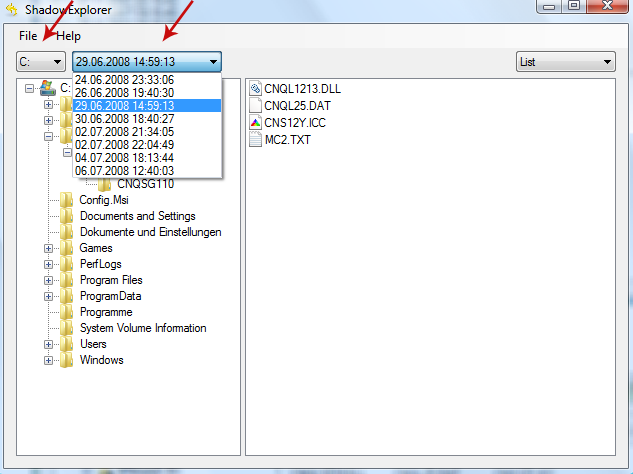
1. Download and install Shadow Explorer. Note, this tool is available with Windows XP Service Pack 2, Windows Vista, Windows 7, and Windows 8.
2. Open Shadow Explorer. From the drop down list you can select from one of the available point-in-time Shadow Copies. Select drive and the latest date that you wish to restore from.
3. Righ-click any encrypted file or entire folder and Export it. You will then be prompted as to where you would like to restore the contents of the folder to.
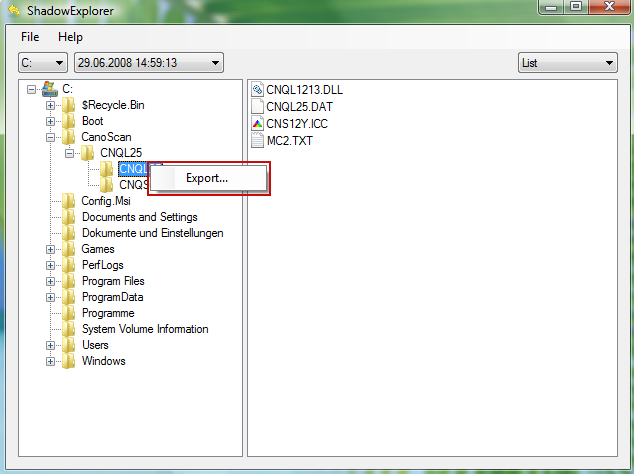
Hopefully, this will help you to restore all encrypted files or at least some of them.
Go to link Download
Wednesday, April 5, 2017
How to Remove HELP DECRYPT Virus and Restore Encrypted Files
How to Remove HELP DECRYPT Virus and Restore Encrypted Files
HELP_DECRYPT.HTML, HELP_DECRYPT.TXT and HELP_DECRYPT.PNG files belong to the CryptoWall 3.0 ransomware. If all your files have a random extension (ie: .xnldzbl) appended on the end of the legit extension (ie: DOC, EXE etc) and you see HELP_DECRYPT files in every directory then your computer is infected with ransomware. Your files were encrypted and you can only get them back by paying the ransom or using backups. If you dont have backups you can still use data recovery tools listed below and hope for the best. We are all well aware of the many dangers associated with the numerous types of malicious software, or malware. From spyware and adware to Trojan Horses and Potentially Unwanted Programs we have to be on guard against all of these attackers. However, one type of malware might have passed you by as it never seems to garner the same publicity as the others, chiefly because it seems to come and go in waves, and that is ransomware. However regardless of whether or not it is a constant threat, you definitely need to know of its existence, as this is one unpleasant threat that you really do want to keep a watchful eye out for.

HELP_DECRYPT has a few different names and you may also come across the terms crypto-virus, cryptoware, crypto-Trojan or crypto-worm, regardless of what this malware is called, what YOU need to know is what it can do and how you should react if it has infected your computer.
HELP_DECRYPT infects your computer by taking advantage of your curiosity
The majority of ransomware is disseminated by email. More specifically, in files that are attached to messages. These spam emails will either look like a tempting special offer that you simply cant miss out on, or they may come via a friend or acquaintance in your contact list that has been hacked. The attachment is carrying the HELP_DECRYPT virus and once you have clicked on the file, video clip or document to open it, it will install itself on your PC.
Some variants if this ransomware may also attack you if you have been unlucky enough to visit a compromised website that has been infected with it.
How do you lower the chances of being infected by HELP_DECRYPT virus? Well unfortunately it is not possible to know in advance whether a website has been compromised but you can definitely be proactive when it comes to emails (and instant messenger chat windows that come with links embedded in them). Weve been told it a thousand times, but it is shocking the amount of people who still cant resist opening emails – and even attachments – that come from an unknown sender.
What does HELP_DECRYPT do to your computer?
It has been created to extort money from you. Its as simple as that. And to increase the chances of you giving in to its demands it needs to give you the most cause for alarm that it possibly can.
If youre under attack from this ransom virus your files or documents will be held hostage and you will receive a ransom note, either by email or in a pop-up window that is asking for an amount of money in return for the release of your data or files. The release normally comes in the form of a code that tells you youll be able to use it in order to unlock your file or files. However, not all of these codes actually work so handing over the ransom is no indication you will even get your files back.
What should I do if Ive been infected?
Its easy to say, but try not to panic. And whatever you do, dont pay the ransom unless the encrypted files are very important and you cant afford to lose them. If the encrypted files are not very important or you dont have money to pay the ransom, you can remove try to restore your files (at least some of them) using Shadow Explorer, Recuva and some other specialized tools listed below. Please note that even of you decide to pay the ransom theres really no guarantee that cyber crooks will recover your files. If you have any questions, please leave a comment below. Last, but not least, if theres anything you think I should add or correct, please let me know. It might be a pain but the issue needs to be dealt with – and the way to do it is by not giving in, not paying up and not letting the attackers win.
Written by Michael Kaur, http://deletemalware.blogspot.com
Step 1: Removing HELP_DECRYPT and related malware:
Before restoring your files from shadow copies, make sure HELP_DECRYPT is not running. You have to remove this malware permanently. Thankfully, there are a couple of anti-malware programs that will effectively detect and remove this malware from your computer.
1. First of all, download and install recommended anti-malware scanner. Run a full system scan and remove detected malware.

2. Then, download ESET Online Scanner and run a second scan to make sure there are no other malware running on your computer.
Thats it! Your computer should be clean now and you can safely restore your files. Proceed to Step 2.
Step 2: Restoring files encrypted by HELP_DECRYPT virus:
Method 1: The first and best method is to restore your files from a recent backup. If you have been regularly performing backups, then you should use your backups to restore your files.
Method 2: Try to restore previous versions of files using Windows folder tools. To learn more, please read Previous versions of files.
Method 3: Using the Shadow Volume Copies:
1. Download and install Shadow Explorer. Note, this tool is available with Windows XP Service Pack 2, Windows Vista, Windows 7, and Windows 8.
2. Open Shadow Explorer. From the drop down list you can select from one of the available point-in-time Shadow Copies. Select drive and the latest date that you wish to restore from.
3. Righ-click any encrypted file or entire folder and Export it. You will then be prompted as to where you would like to restore the contents of the folder to.
Hopefully, this will help you to restore all encrypted files or at least some of them.
Go to link Download
Wednesday, December 21, 2016
How to Remove HELP TO SAVE FILES txt Virus and Restore Encrypted Files
How to Remove HELP TO SAVE FILES txt Virus and Restore Encrypted Files
HELP_TO_SAVE_FILES.txt is a ransom note that contains links and information on how you can pay the ransom to decrypt your files that were encrypted by Alpha Crypt ransomware. The Trojan ransom encrypts your files using a very strong RSA-2048 encryption algorithm, appends the .ezz extension to each encrypted file and creates multiple HELP_TO_SAVE_FILES.txt files on your computer. Basically, this ransom note can be found in every folder with at least one encrypted file. In this day and age, we all need to know as much as we can about the different types of malware that are out there trying to do us harm. And one of those pieces of malicious software that it is in our interests to know a little more about is ransomware. Staying one step ahead of cyber crime is crucial, therefore if you want to know how to best protect yourself from falling victim to this particularly nasty form of malware, carry on reading as I will give you a couple of simple ways to keep the ransomware at bay.
What is Alpha Crypt and why it creates HELP_TO_SAVE_FILES.txt?
You may have heard of a Trojan ransom because its one of the most commonly found strain of malware. It is also one of the most unpleasant for sure. Not only does it cause carnage on your computer by encrypting your documents but it can have a serious affect on your overall security too, making you even more vulnerable to further attack by other types of malware, for example spyware.
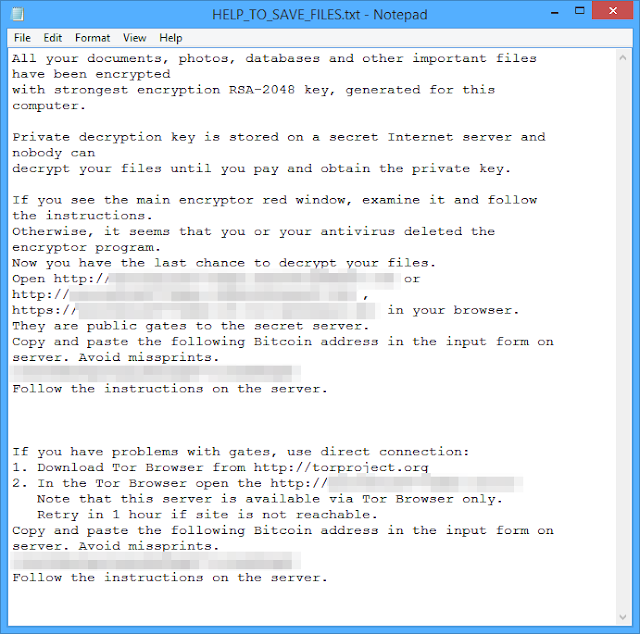
How does this ransomware work?
If you have been infected by HELP_TO_SAVE_FILES.txt or Alpha Crypt ransomware it will kidnap your files and hold them hostage until you pay for their release. Some users reported that cyber criminals asked to pay 1 Bitcoin while others mentioned only 0.5 Bitcoin. One way or another, its still at least $100. Its a classic and time worn method of extorting money – the only difference is now were dealing with online kidnapping. But this one is even more evil. It tries to delete shadow copies and even restore points to make it nearly impossible to restore your files. Luckily, it does not always succeeds, so there is a chance you can recover your encrypted data files using file recovery programs such as TeslaCrypt Decryption Tool by Cisco. Cisco programmers did a great job. The tool worked well with the previous version of this ransomware called Tesla Crypt.
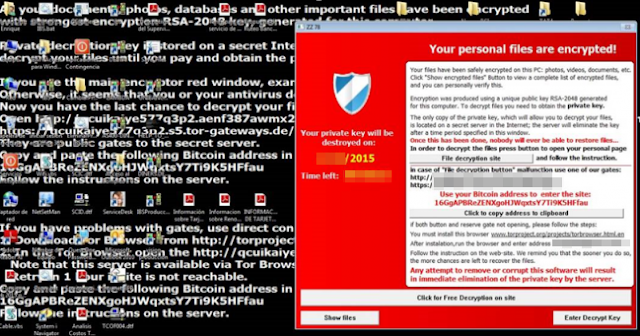
- The majority of ransom Trojans are spread via email attachments or links in instant messenger chats. Therefore never open attachments or click on links in messages where you dont know the sender. Other Trojans are packaged with shareware or peer to peer files so only download from reputable sources.
- A smaller, but still significant amount of Trojans are installed during a drive by installation meaning you have visited a website that has been compromised by the malware. Theres no way of telling which sites are infected but bear in mind that the shadier the site, the more chance you have of leaving with some kind of infection
Is there a way to recover my files?
Unfortunately, at this time there is no way to decrypt the files without your unique decryption key which can be bought from cyber criminals for 1BTC. However, do not pay the ransom unless your files are very important to you and are worth more than $100 or $300. And of course, if the tools given below do not work. Instead, follow the removal guide below how to salvage your data and clean your computer ASAP. There are a few tools that can help you to restore at least some of your files without paying a ransom: Shadow Explorer and TeslaCrypt Decryption Tool by Cisco. Even though, theres no guarantee that these tools will help you, theres also no reason not to try them out. Who know, maybe you will be the lucky one. Please follow the steps in the removal guide below.
If you have any questions, please leave a comment below. And now youre done reading this, may I suggest that you back up all your files onto an external hard drive NOW. That way if you are unlucky enough to fall victim to HELP_TO_SAVE_FILES.txt ransomware, youll be able to simply wipe clean your internal disk drive and replace it with up to date data. If you have any questions, please leave a comment down below. Good luck and be safe online!
Written by Michael Kaur, http://deletemalware.blogspot.com
Step 1: Removing Alpha Crypt and related malware:
Before restoring your files from shadow copies, make sure Alpha Crypt is not running. You have to remove this malware permanently. Thankfully, there are a couple of anti-malware programs that will effectively detect and remove this malware from your computer.
1. First of all, download and install recommended anti-malware scanner. Run a full system scan and remove detected malware.

Important! If you cant download or run it, please restart your computer in Safe Mode with Networking or Safe Mode and try again.
2. Then, download ESET Online Scanner and run a second scan to make sure there are no other malware running on your computer.
Thats it! Your computer should be clean now and you can safely restore your files. Proceed to Step 2.
Step 2: Restoring files encrypted by Alpha Crypt virus:
Method 1: The first and best method is to restore your files from a recent backup. If you have been regularly performing backups, then you should use your backups to restore your files.
Method 2: Try to restore previous versions of files using Windows folder tools. To learn more, please read Previous versions of files.
Method 3: Try the TeslaCrypt Decryption Tool by Cisco. Download TeslaDecrypt tool and run it.
Method 4: Try the TeslaDecoder Decryption Tool. Download TeslaDecoder tool and run it.
Method 5: Using the Shadow Volume Copies:
1. Download and install Shadow Explorer. Note, this tool is available with Windows XP Service Pack 2, Windows Vista, Windows 7, and Windows 8.
2. Open Shadow Explorer. From the drop down list you can select from one of the available point-in-time Shadow Copies. Select drive and the latest date that you wish to restore from.
3. Righ-click any encrypted file or entire folder and Export it. You will then be prompted as to where you would like to restore the contents of the folder to.
Hopefully, this will help you to restore all encrypted files or at least some of them.
Go to link Download
Subscribe to:
Posts (Atom)