Showing posts with label chrome. Show all posts
Showing posts with label chrome. Show all posts
Sunday, April 23, 2017
How to get the all opened tab back in Google Chrome if you have closed all the tab by mistake
How to get the all opened tab back in Google Chrome if you have closed all the tab by mistake
Hi Friends,
This is just for an information I am sure most of you must know it already.I wanted to let you know how you can get all the opened tab in Google Chrome back if you have closed all the tab by mistake, because when you manually close it, you dont get the option of restore so if you dont get the restore option here is how you can get all those opened tab back.
Get all opened pages that you were working on back
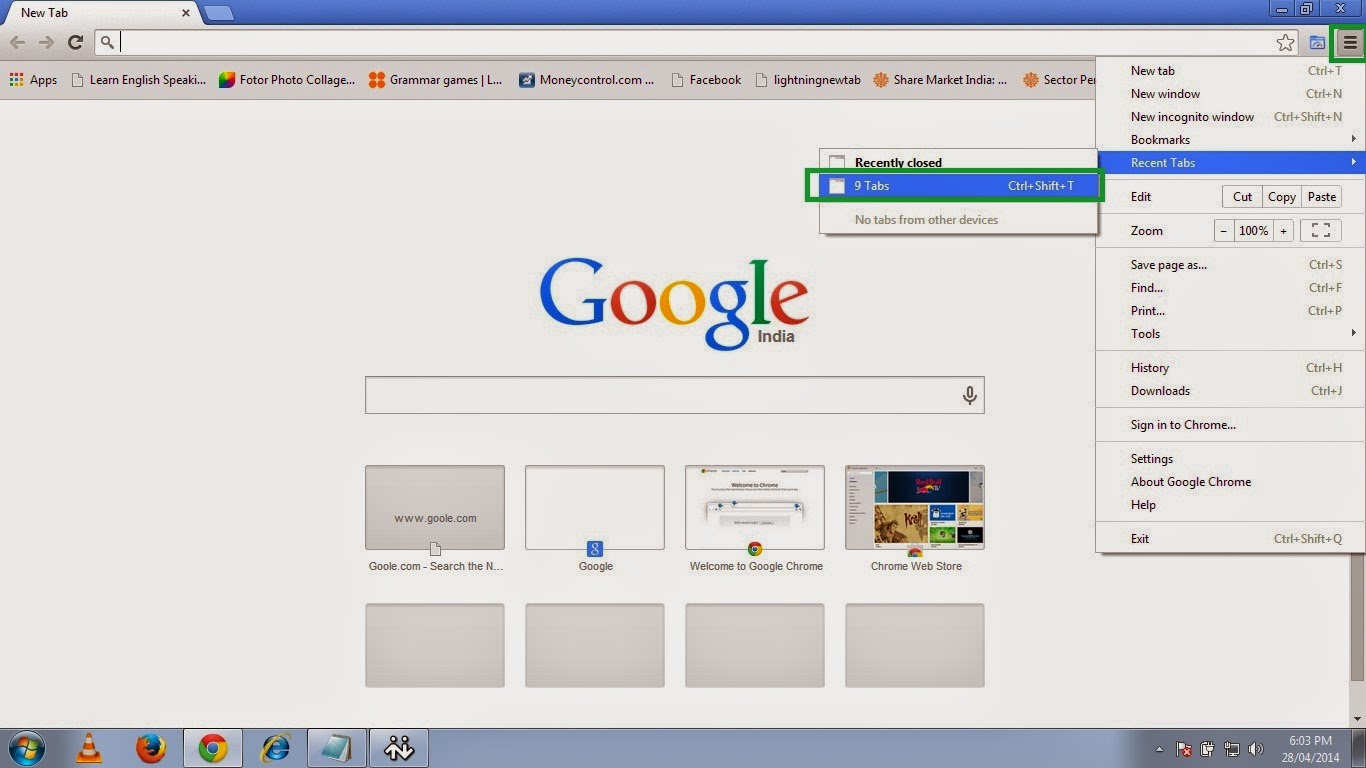
1. Open chrome and click on the three small parallel lines on the top right hand side and then move to Recent Tab and click the no. of Tab option so here in this picture it shows 9 Tab because I had 9 tabs opened before closing the Chrome.
So click on the 9 Tab.
OR
Just press Ctrl+Shift+T.
2. And then it will open all previously opened tabs with the webpages you were browsing.
Happy Learning
Nasir
People Also read my Following Posts.
Get a Website ups and running @ $2.95
What is a website and how is it accessed on the web?How to build and host it free?
How to Speed up your computer 20 Times faster.
Restore and Reset your iPhone, iPad or iPod back to the original Factory Default Settings.
This is just for an information I am sure most of you must know it already.I wanted to let you know how you can get all the opened tab in Google Chrome back if you have closed all the tab by mistake, because when you manually close it, you dont get the option of restore so if you dont get the restore option here is how you can get all those opened tab back.
Get all opened pages that you were working on back
1. Open chrome and click on the three small parallel lines on the top right hand side and then move to Recent Tab and click the no. of Tab option so here in this picture it shows 9 Tab because I had 9 tabs opened before closing the Chrome.
So click on the 9 Tab.
OR
Just press Ctrl+Shift+T.
 |
| Pic-14(a) |
2. And then it will open all previously opened tabs with the webpages you were browsing.
 |
| Pic-14(b) |
Happy Learning
Nasir
People Also read my Following Posts.
Get a Website ups and running @ $2.95
What is a website and how is it accessed on the web?How to build and host it free?
How to Speed up your computer 20 Times faster.
Restore and Reset your iPhone, iPad or iPod back to the original Factory Default Settings.
Go to link Download

Thursday, February 16, 2017
Google Chrome 43 0 2357 81 Offline Installer Free Download Latest
Google Chrome 43 0 2357 81 Offline Installer Free Download Latest

Google Chrome is today’s most popular browser in the world, managing in early 2015 to capture little over 42% of world’s non-mobile browser usage, easily beating all of its competitors in the likes of Internet Explorer (18%), Mozila Firefox (15%), Safari (6%) and Opera (2%).
Google’s game changing browser Chrome combines sophisticated technology with a simple UI, to create a faster, safer and easier browsing experience. Launched in 2008, Google Chrome quickly dominated the browser market to become the most used browser globally within 4 years of its public release. Google’s rapid and continuous development cycle ensures the browser continues to compete with the other most popular and advanced web browsers available.
Speed Perhaps the area Google invested most of its development time to differentiate from other browsers. Google Chrome launches extremely quickly from your desktop, runs applications at speed thanks to a powerful JavaScript engine and loads pages rapidly using the WebKit open source rendering engine. Add to this quicker search and navigation options from the simplified UI and you have a browser that is pretty hard to beat on speed
Download Google Chrome Standclone Offline Setup & Installer Every Version Like
Google Chrome 40.0 Offline Installer
Google Chrome 41.0 Offline Installer
Google Chrome 42.0 Offline Installer
Google Chrome 43.0 Offline Installer And Up To Soon New Version You Can Download From Here
For Download Google Chrome Offline Setup Or Installer Click On Download Now
Download Now
Go to link Download
Thursday, February 9, 2017
Google Chrome 44 0 2403 107 instal offline
Google Chrome 44 0 2403 107 instal offline
 Google Chrome merupakan sebuah browser yang dalam kurun waktu lama, telah berjaya Browser Mozilla Firefox dan Internet Explorer, masing masing bersaing untuk menarik lebih banyak pengguna dengan fungsi fungsi browser tersebut.
Namun, Mesin raksaksa Google Akhirnya memutuskan untuk membuat Browser sendiri guna memasuki persaingan sengit dalam hal memperbanyak pengguna, Tools, fungsi dan kecepatan semua bersaing untuk menjadi sang Raja Browser Internet. dan Kini browser tersebut kita kenal dengan nama : GOOGLE CHROME
Dan seiring waktu berjalan, sejak perluncuran perdananya di tahun 2008, Browser Google Chrome dengan cepat menarik perhatian pengguna, karena fiture dan kecepatan, serta kemudahan yang membuat banyak pengguna lain beralih memilih Google Chrome ini.
Antar muka yang bersih , menarik, sederhana, membuat browser ini memiliki kareakter khusus, untuk memanjakan pengguna dalam hal coustumize nya penamabhan theme agar jauh lebih menarik.Sebuah hal baru yang di terapkan di dalam google Chrome adalah pada kenyataan penggguna yang sering mengunjungi website dengan tab lebih dari satu, sehingga ketika salah satu halamn Chras, pengguna hanya perlu mengeluarkan tab tersebut tanpa harus mengeluarkan seluruh tab dari Google Chrome,
Freeware License dan selalu update adalah suatu kebanggan tersendiri dengan menggunakan browser ini, yang mana pengguna dapat selalu mengupdate guna memperbaiki, terus memperbaiki segala bug/celah yang dapat merugikan pengguna.
Dirancang dengan kesederhanaan dan mudah untuk menambahkan Add ons membuat browser ini menjadi sebuah browser dengan paket yang handal.
Download
Go to link Download
Tuesday, February 7, 2017
Google Chrome eating the Windows resources
Google Chrome eating the Windows resources
If you use Google Chrome and found your system is very slow, it may related to the Chrome. Google Chrome will leave a list of process running in the background even you are not using it, and they are memory and network intensive. It has a little icon on the system tray (next to the system clock), you will need to close the Google Chrome from the tray to free up its memory and process.

Go to link Download
Thursday, January 26, 2017
Google Chrome 49 0 2593 0 Dev
Google Chrome 49 0 2593 0 Dev
 Google Chrome 49.0.2593.0 Dev
How To Browse Privately In Google Chrome
Google’s game changing browser Chrome combines sophisticated technology with a simple UI, to create a faster, safer and easier browsing experience. Launched in 2008, Google Chrome quickly dominated the browser market to become the most used browser globally within 4 years of its public release. Google’s rapid and continuous development cycle ensures the browser continues to compete with the other most popular and advanced web browsers available.
Speed
Perhaps the area Google invested most of its development time to differentiate from other browsers. Google Chrome launches extremely quickly from your desktop, runs applications at speed thanks to a powerful JavaScript engine and loads pages rapidly using the WebKit open source rendering engine. Add to this quicker search and navigation options from the simplified UI and you have a browser that is pretty hard to beat on speed, especially if gaming is your thing.
Clean, simple UI
Google Chrome’s most striking feature and a substantial factor in its popularity - the simple UI hasn’t changed much since the beta launch in 2008. Google focused on trimming down unnecessary toolbar space to maximise browsing real estate. The browser is made up of 3 rows of tools, the top layer horizontally stacks automatically adjusting tabs, next to a simple new tabs icon and the standard minimize, expand & close windows controls. The middle row includes 3 navigation controls (Back, Forward & Stop/Refresh), a URL box which also allows direct Google web searching and a star bookmarking icon. Extensions and browser settings icons line up to the right of the URL box. The third row is made up of bookmark folders and installed apps. Easily overlooked now, this clean UI was a breath of fresh air compared to the overcrowded toolbars of popular browsers pre-2008.
Privacy
Another hugely popular feature, Incognito mode allows you to browse privately by disabling history recording, reducing traceable breadcrumbs and removing tracking cookies on shutdown. Chrome’s settings also allow you to customize regular browsing privacy preferences.
Security
Chrome’s Sandboxing prevents malware automatically installing on your computer or affecting other browser tabs. Chrome also has Safe Browsing technology built in with malware and phishing protection that warns you if you encounter a website suspected of containing malicious software/activity. Regular automatic updates ensure security features are up to date and effective.
Customization
A vast selection of apps, extensions, themes and settings make your browsing experience unique to you. Improve productivity, security, navigation speed, pretty much anything you can think of with apps and extensions from the Google Chrome Store. Install themes created by top artists or make your own using mychrometheme.com. Sign in with your Google Account to back up your contacts, preferences, history as well as access all your Google tools with a single login.
The program provider has restricted distribution of older versions of this product. FileHippo apologises for any inconvenience caused.
Go to link Download
Tuesday, January 24, 2017
Hacker How to disable history in Chrome without using hidden browsing mode
Hacker How to disable history in Chrome without using hidden browsing mode
I was searching about settings in google chrome to disable history saving.
I was surprised that is not implemented. (only manual deletion)
So, i searched on internet and I found that, to avoid hidden browsing mode but having cookies saved the only solution is to search for history file here:
C:UsersusernameAppDataLocalGoogleChromeUser DataDefaulthistory putting it in read only mode
http://www.geekissimo.com/2011/02/06/chrome-come-disabilitare-salvataggio-siti-cronologia-senza-modalita-incognito/
Go to link Download
Tuesday, January 3, 2017
How to Fix Google Search Engine is not Working in Google Chrome
How to Fix Google Search Engine is not Working in Google Chrome

A few days ago Google Search Engine was stop working in windows 7 PCs Google Chrome. When we search Google for something on Google Chrome, it mostly shows nothing (Like above screenshot). Currently developers dont know the problem behind it but the solution is very simple.
Google Instant Search is a good feature for give a fast search result but current this issue can be clear by turning it off.
To turn off Google Instant Search and Solve this issue Follow the Instruction blow:-
1- Go to https://www.google.com

2- Click on Settings showing at blow-right corner of page

3- Click Search settings

4- On next page in the tab of Google instant predictions check Never show instant results

5- Scroll-down and click Save

3- Click Search settings
4- On next page in the tab of Google instant predictions check Never show instant results
5- Scroll-down and click Save
Now try to search something on Google. If your Issue has been solved please say thanks in comment. If problem still present tell us in comment or get live help from blow-right corner on our site.
Note:-
Make Sure Your are sign in to Google Chrome and Google.com with same account.
Go to link Download
Tuesday, December 27, 2016
Free Download Google Chrome Full Offline Installer
Free Download Google Chrome Full Offline Installer
To Download Google Chrome Full Offline Installer
Google Chrome is one of the most popular flagship Web browsers out there. It’s easy to use add-ons and a vast ecosystem of extensions makes it one of the most widely used Web browsers in the world.
Although the installation process of Google Chrome is quite simple and straightforward however sometimes users face a little disruption while installing Google Chrome on a relatively slow internet connection.
chrome full install, chrome full install package, chrome installer exe, chrome offline installer, google chrome full free download, google chrome standalone, how to install chrome offline,
So in these conditions the installation process can take comparatively more time than usual.

So you don’t need to be worried about because we have just came up with a solution to install Google Chrome on either a slow internet connection or even you are offline.
chrome full install, chrome full install package, chrome installer exe, chrome offline installer, google chrome full free download, google chrome standalone, how to install chrome offline
With this Google Chrome.exe standalone, alternate, offline installer you can install Google Chrome without any interruption.
chrome full install, chrome full install package, chrome installer exe, chrome offline installer, google chrome full free download, google chrome standalone, how to install chrome offlineSo what are you waiting for download and enjoy and don’t forget to share with your friends.
Go to link Download
Monday, December 19, 2016
Google Chrome v41 Offline Installer Standalone
Google Chrome v41 Offline Installer Standalone

Description:-
Google’s game changing browser Chrome combines sophisticated technology with a simple UI, to create a faster, safer and easier browsing experience. Launched in 2008, Google Chrome quickly dominated the browser market to become the most used browser globally within 4 years of its public release. Google’s rapid and continuous development cycle ensures the browser continues to compete with the other most popular and advanced web browsers available.
Speed:-
Perhaps the area Google invested most of its development time to differentiate from other browsers. Google Chrome launches extremely quickly from your desktop, runs applications at speed thanks to a powerful JavaScript engine and loads pages rapidly using the WebKit open source rendering engine. Add to this quicker search and navigation options from the simplified UI and you have a browser that is pretty hard to beat on speed, especially if gaming is your thing.
Clean, simple UI:-
Google Chrome’s most striking feature and a substantial factor in its popularity - the simple UI hasn’t changed much since the beta launch in 2008. Google focused on trimming down unnecessary toolbar space to maximise browsing real estate. The browser is made up of 3 rows of tools, the top layer horizontally stacks automatically adjusting tabs, next to a simple new tabs icon and the standard minimize, expand & close windows controls. The middle row includes 3 navigation controls (Back, Forward & Stop/Refresh), a URL box which also allows direct Google web searching and a star bookmarking icon. Extensions and browser settings icons line up to the right of the URL box. The third row is made up of bookmark folders and installed apps. Easily overlooked now, this clean UI was a breath of fresh air compared to the overcrowded toolbars of popular browsers pre-2008.
Privacy:-
Another hugely popular feature, Incognito mode allows you to browse privately by disabling history recording, reducing traceable breadcrumbs and removing tracking cookies on shutdown. Chrome’s settings also allow you to customize regular browsing privacy preferences.
Security:-
Chrome’s Sandboxing prevents malware automatically installing on your computer or affecting other browser tabs. Chrome also has Safe Browsing technology built in with malware and phishing protection that warns you if you encounter a website suspected of containing malicious software/activity. Regular automatic updates ensure security features are up to date and effective.
Customization:-
A vast selection of apps, extensions, themes and settings make your browsing experience unique to you. Improve productivity, security, navigation speed, pretty much anything you can think of with apps and extensions from the Google Chrome Store. Install themes created by top artists or make your own using mychrometheme.com. Sign in with your Google Account to back up your contacts, preferences, history as well as access all your Google tools with a single login.
Change Log:-
# Contains many improvements including:
* A number of new apps/extension APIs
* Lots of under the hood changes for stability and performance
* A number of new apps/extension APIs
* Lots of under the hood changes for stability and performance
Program Version:-
41.0.2272.118
Requirements:-
Windows XP / Windows 7/ Windows 8 / Windows 8.1 or above With Minimum Requirements
Previews:-


Download Link:-
 |
Download Google Chrome Password is: blackeyez007.blogspot.com |
Go to link Download
Saturday, December 10, 2016
Google Chrome 46 0 2490 76 For Android
Google Chrome 46 0 2490 76 For Android

Description:-
Browse fast on your Android phone and tablet with the Google Chrome browser you love on desktop. Pick up where you left off on your other devices with tab sync, search by voice, and save up to 50% of data usage while browsing.
Sync Across Devices
Sync Across Devices
seamlessly access and open tabs and bookmarks from your laptop, phone or tablet
Save Data
Save Data
reduce mobile data usage by up to 50% while browsing
Faster Browsing
Faster Browsing
choose from search results that instantly appear as you type and quickly access previously visited pages
Voice Search
Voice Search
use the magic of Google voice search to find answers on-the-go without typing
Translate
Translate
easily read webpages in any language
Intuitive Gestures
Intuitive Gestures
open as many tabs as your heart desires and quickly flip through them by swiping from side to side on the toolbar
Privacy
Privacy
use Incognito mode to browse without saving your history
Version:-
46.0.2490.76
Requirements:-
4.1 + or Up
File Size:-
43 MB
Previews:-


Download Link:-

Go to link Download
Sunday, November 20, 2016
Google Chrome v37 0 2062 120m Offline Installer Standalone
Google Chrome v37 0 2062 120m Offline Installer Standalone
Description:-
Google’s game changing browser Chrome combines sophisticated technology with a simple UI, to create a faster, safer and easier browsing experience. Launched in 2008, Google Chrome quickly dominated the browser market to become the most used browser globally within 4 years of its public release. Google’s rapid and continuous development cycle ensures the browser continues to compete with the other most popular and advanced web browsers available.
Speed:-
Perhaps the area Google invested most of its development time to differentiate from other browsers. Google Chrome launches extremely quickly from your desktop, runs applications at speed thanks to a powerful JavaScript engine and loads pages rapidly using the WebKit open source rendering engine. Add to this quicker search and navigation options from the simplified UI and you have a browser that is pretty hard to beat on speed, especially if gaming is your thing.
Clean, simple UI:-
Google Chrome’s most striking feature and a substantial factor in its popularity - the simple UI hasn’t changed much since the beta launch in 2008. Google focused on trimming down unnecessary toolbar space to maximise browsing real estate. The browser is made up of 3 rows of tools, the top layer horizontally stacks automatically adjusting tabs, next to a simple new tabs icon and the standard minimize, expand & close windows controls. The middle row includes 3 navigation controls (Back, Forward & Stop/Refresh), a URL box which also allows direct Google web searching and a star bookmarking icon. Extensions and browser settings icons line up to the right of the URL box. The third row is made up of bookmark folders and installed apps. Easily overlooked now, this clean UI was a breath of fresh air compared to the overcrowded toolbars of popular browsers pre-2008.
Privacy:-
Another hugely popular feature, Incognito mode allows you to browse privately by disabling history recording, reducing traceable breadcrumbs and removing tracking cookies on shutdown. Chrome’s settings also allow you to customize regular browsing privacy preferences.
Security:-
Chrome’s Sandboxing prevents malware automatically installing on your computer or affecting other browser tabs. Chrome also has Safe Browsing technology built in with malware and phishing protection that warns you if you encounter a website suspected of containing malicious software/activity. Regular automatic updates ensure security features are up to date and effective.
Customization:-
A vast selection of apps, extensions, themes and settings make your browsing experience unique to you. Improve productivity, security, navigation speed, pretty much anything you can think of with apps and extensions from the Google Chrome Store. Install themes created by top artists or make your own using mychrometheme.com. Sign in with your Google Account to back up your contacts, preferences, history as well as access all your Google tools with a single login.
Program Version:-
37.0.2062.120 m
Requirements:-
Windows XP / Windows 7/ Windows 8 / Windows 8.1 or above With Minimum Requirements
Previews:-
Download Link:-
|
| Download Google Chrome Password is: blackeyez007.blogspot.com |
Go to link Download
Saturday, October 29, 2016
Funny Extension For Chrome 2015 Plugin Block Tracking Cookies
Funny Extension For Chrome 2015 Plugin Block Tracking Cookies
Block Tracking Cookies Best Extensions For Chrome
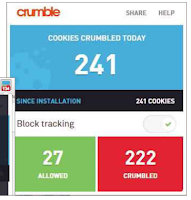 Most websites use cookies for the valid purposes of storing your login information and preferences, but others plant cookies in your browser to track your online activities for advertising and analytics. If you’re not comfortable with this potential invasion of your privacy, you can use famous software and antivirus company AVG’s new "Crumble" best privacy extension for chrome to gain more control over cookies. This cleverly named Chrome extension lets you block – or ‘crumble’ – non-essential cookies, while allowing those that websites need to function properly. Crumble’s color coded panel keeps track of all the cookies it’s ‘crumbled’ today and since you installed the add-on, and you can hover your mouse over the green and red sections to see their names. Crumble works quietly and efficiently, and usefully blocks trackers from social-media sites. On one Digital Spy page, it prevented more than 130 cookies from installing!
Restore Chrome’s old Bookmark Manager
Chrome’s new Bookmark Manager extension in 2015 displays your saved sites as a grid of colored tiles rather than in a list, which makes it more visually appealing but harder to manage if you have a lot of bookmarks. If you’d prefer to have the old Bookmark Manager back, you can use the following simple tweak. Type chrome:flags into the address bar and press Enter to open the ‘Careful, these experiments may bite’ page. Find the entry Enable Enhanced Bookmarks, choose Disabled from the drop-down menu and relaunch Chrome to apply the change. You can easily switch back to the new Bookmark Manager by re- enabling the feature.
Stop companies knowing you’ve read their emails with new privacy extension
Some companies now embed an ‘invisible’ pixel in marketing emails that allows them to track the message. As soon as you open the email, the pixel sends information back to the server including the time, your location and the device you’re using. This info helps the company target you with further marketing messages, but you may also regard it as an invasion of your privacy, which is where PixelBlock comes in handy. This new privacy extension for Gmail blocks attempts to use hidden pixels to track emails, and highlights sneaky messages with a red-eye symbol. Click this symbol and PixelBlock tells you the source of the email, which may differ from the official sender. Although the add-on prevents companies from knowing that you’ve opened their emails, you may want to boost your privacy further by adding repeat offenders to your list of blocked senders.
Give everyone on the web a trendy beard with funny extension
I recommended the fun extension Googlifier which adds googly eyes to people in online photos. Wurstify performs the similar trick of superimposing a tidy beard on everyone’s face, in honour of last year’s Euro vision winner, Conchita Wurst. Once it’s installed, you just click the toolbar button to ‘wurstify’ every visage on that page. This best funny extension works surprisingly well and it’s amazing how much better some folk look with a bit of growth on their chin (see Edward Miliband).

Download Complete Package of Best Adds-on / Extension
Installation Instruction:
- First temporary disable your anti-virius because anti-virius prevent crack file to install
- Download full version software live installer package from the below link
- Now open the file and run client installer .exe file (crack file is included into the package)
- Keep doing next and allow all programs by clicking yes until installation complete

Dont forget to run live installer after download
Download Complete Package
Note: This full version live installer package has made for complete PC installation with cracked file without any survey exclusive on All Crack Free Download.
Go to link Download
Monday, October 10, 2016
How to backup Saved Password History and Bookmarks in Chrome
How to backup Saved Password History and Bookmarks in Chrome
Every software malfunctions after some time and when it does that you get annoyed and want to troubleshoot the problem.In order to troubleshoot any issue with browser we would reset the browser that fix all the problem as it sets the browser back to its default setting with disabling all the browser addons and it also deletes all the saved password and home page or bookmark.
So it is very important to backup your saved password, history (if you need) and bookmarks.So here I am gonna show you how you can backup those stuffs.Chrome saves all these information for every user in their respective userprofile so you need to backup these data for each user separately by going into their userprofile.
How to back up saved passwords,History, bookmarks and cookies
1) Go to the Start menu > Run.
2) Enter one of the following address in the open box, then press OK.
For Windows XP: %USERPROFILE%Local SettingsApplication DataGoogleChromeUser Data
For Windows Vista/7/8: %USERPROFILE%AppDataLocalGoogleChromeUser Data
3) Locate and open the folder called "Default" in the directory window that opens.
4) Now under this Default folder as shown below in Pic-24(b) you have your everything,Saved passwords,History, Cookies,Bookmarks that you can copy and back up.
5) TO COPY BOOKMARKS: Copy the file named "Bookmarks", and save it for backup.
6) TO COPY PASSWORDS: Copy the file named "Login Data", and save it for backup.
7) TO COPY HISTORY: Copy the file named "History", and save it for backup.
8) TO COPY COOKIES: Copy the file named "Cookies", and save it for backup.
9) Once you have formatted the drive or created a new profile, follow steps 1-3 and simply paste the files saved in steps 4 & 5.
10) All your bookmark data and password data are back!
11) In above steps you copy all this files one by one so to save time you can also copy the whole user data by copying %userprofile%AppDataLocalGoogleChromeUser Data.
Use the Chrome Sync Features
Google Chromes Sync feature is kind of Lifesaver in case your computer had died and you lost all of your data but you still have access to your favorites, bookmarks and saved password.This all will be accessible due to enabling Sync feature while setting up chrome.Yes, When you first set up Chrome it offers you the option to enable Chrome Sync – do it!.
Just in case it doesn’t, you can access it by clicking on the three horizontal lines to the right of the navigation bar near the top right hand corner, then clicking on settings. Right at the top (under settings) are the words “sign in to Chrome” and a button which allows you to connect your Google Account to your Chrome browser. Do that and sync will be enabled with the usual default settings.
Once you click on Sign in to Chrome it will ask you to login with your Google account and after you logged in you will be presented with the Advanced Sync settings option to choose what to Sync, here you can chose to Sync everything or choose what to sync.
Here you can sync your Chrome Apps, Extensions, Settings, Autofill, History, Themes, Bookmarks, Passwords and Open tabs.
Using Chrome Sync means that if I login to Chrome on any computer, it immediately starts the syncing process, which is useful, especially for bookmarks and browsing history. As a writer, I do a lot of online research and save some of that research via bookmarks, so I find this particularly valuable.And once it is synced it is accessible from anywhere, anytime even you have reinstalled your OS and then install the Chrome .You just need to login to Chrome and it will be available to you again.
Note: Now let me tell you one interesting thing that just strike in my mind.While writing about backing up passwords and bookmark, I recall a method to create a new Chrome user profile.Yes, you can create a new browser user profile in case the Chrome is malfunctioning,hijacked, or redirecting to unwanted website or if there is any problems with the browser.
if your browser user profile is corrupted, you can create a new user profile to replace the broken one:
In Mac
Quit Google Chrome completely.
If you wish, you can transfer information from your old user profile to your new one. However, this action is not recommended, since a part of your old profile may be corrupt. With that in mind, to transfer your old bookmarks, copy the "Bookmarks.bak" file from the "Backup default" folder to your new "Default" folder. Once moved, rename the file from "Bookmarks.bak" to "Bookmarks" to complete the migration. All other browser data will remain in the "Backup default" folder, but you wont be able to transfer it to your new profile.
So it is very important to backup your saved password, history (if you need) and bookmarks.So here I am gonna show you how you can backup those stuffs.Chrome saves all these information for every user in their respective userprofile so you need to backup these data for each user separately by going into their userprofile.
How to back up saved passwords,History, bookmarks and cookies
1) Go to the Start menu > Run.
2) Enter one of the following address in the open box, then press OK.
For Windows XP: %USERPROFILE%Local SettingsApplication DataGoogleChromeUser Data
For Windows Vista/7/8: %USERPROFILE%AppDataLocalGoogleChromeUser Data
3) Locate and open the folder called "Default" in the directory window that opens.
 |
| Pic-24(a) |
4) Now under this Default folder as shown below in Pic-24(b) you have your everything,Saved passwords,History, Cookies,Bookmarks that you can copy and back up.
 |
| Pic-24(b) |
5) TO COPY BOOKMARKS: Copy the file named "Bookmarks", and save it for backup.
6) TO COPY PASSWORDS: Copy the file named "Login Data", and save it for backup.
7) TO COPY HISTORY: Copy the file named "History", and save it for backup.
8) TO COPY COOKIES: Copy the file named "Cookies", and save it for backup.
9) Once you have formatted the drive or created a new profile, follow steps 1-3 and simply paste the files saved in steps 4 & 5.
10) All your bookmark data and password data are back!
11) In above steps you copy all this files one by one so to save time you can also copy the whole user data by copying %userprofile%AppDataLocalGoogleChromeUser Data.
Use the Chrome Sync Features
Google Chromes Sync feature is kind of Lifesaver in case your computer had died and you lost all of your data but you still have access to your favorites, bookmarks and saved password.This all will be accessible due to enabling Sync feature while setting up chrome.Yes, When you first set up Chrome it offers you the option to enable Chrome Sync – do it!.
Just in case it doesn’t, you can access it by clicking on the three horizontal lines to the right of the navigation bar near the top right hand corner, then clicking on settings. Right at the top (under settings) are the words “sign in to Chrome” and a button which allows you to connect your Google Account to your Chrome browser. Do that and sync will be enabled with the usual default settings.
 |
| Pic-24(c) |
 |
| Pic-24(d) |
Here you can sync your Chrome Apps, Extensions, Settings, Autofill, History, Themes, Bookmarks, Passwords and Open tabs.
Using Chrome Sync means that if I login to Chrome on any computer, it immediately starts the syncing process, which is useful, especially for bookmarks and browsing history. As a writer, I do a lot of online research and save some of that research via bookmarks, so I find this particularly valuable.And once it is synced it is accessible from anywhere, anytime even you have reinstalled your OS and then install the Chrome .You just need to login to Chrome and it will be available to you again.
Note: Now let me tell you one interesting thing that just strike in my mind.While writing about backing up passwords and bookmark, I recall a method to create a new Chrome user profile.Yes, you can create a new browser user profile in case the Chrome is malfunctioning,hijacked, or redirecting to unwanted website or if there is any problems with the browser.
So here are the steps to create a new browser profile.
In Windowsif your browser user profile is corrupted, you can create a new user profile to replace the broken one:
- Exit Google Chrome completely.
- Enter the keyboard shortcut Windows key +E to open Windows Explorer.
- In the Windows Explorer window that appears enter the following in the address bar.
- Windows XP: %USERPROFILE%Local SettingsApplication DataGoogleChromeUser Data
- Windows Vista/ Windows 7/ Windows 8: %LOCALAPPDATA%GoogleChromeUser Data
- Locate the folder called "Default" in the directory window that opens and rename it as "Backup default."
- Try opening Google Chrome again. A new "Default" folder is automatically created as you start using the browser.
In Mac
Quit Google Chrome completely.
- Go to the Go menu > Go to Folder.
- Enter the following directories in the text field, then press Go.
- ~/Library/Application Support/Google/Chrome/
- Locate the folder called "Default" in the directory window that opens and rename it as "Backup default."
- Try opening Google Chrome again. A new "Default" folder is automatically created as you start using the browser.
If you wish, you can transfer information from your old user profile to your new one. However, this action is not recommended, since a part of your old profile may be corrupt. With that in mind, to transfer your old bookmarks, copy the "Bookmarks.bak" file from the "Backup default" folder to your new "Default" folder. Once moved, rename the file from "Bookmarks.bak" to "Bookmarks" to complete the migration. All other browser data will remain in the "Backup default" folder, but you wont be able to transfer it to your new profile.
*********************************
Go to link Download
Subscribe to:
Posts (Atom)