Friday, April 7, 2017
Getting Started with Googles New Photos App
Getting Started with Googles New Photos App
Battle of the Photos- New Google Photos
Google and Apple have built homes in the cloud for your photos, making it easier to sync and find them on all your devices and to tweak the ones that need retouching.Once you’ve backed up your photo library to the service, all your photos and videos, including any new ones you take, are synced among all of these devices automatically.In April, Apple released Photos for iOS, Mac and the Web—a smart way to get us to pay for iCloud Drive storage. Then a couple of week ago, Google dropped big news: Its own Photos app for Android, iPhone and the Web would store all of your photos and videos free of charge.
There are many other free cloud photo storage options despite similar names and talents, picking one isn’t as easy as you think. Sure, you could choose based on what devices you own and how much you are willing to pay for cloud storage. But even if you own an iPhone and money is no object, Google Photos is a better choice for all but serious photographers. It combines the company’s unmatched search smarts with everything I’ve ever wanted in a photo service, while making it incredibly fun to relive old memories.Here is a comparison of few very famous cloud picture storage options.
 |
| Comparison between Google Photos, iCloud, Dropbox, Flickr and Amazon Cloud |
If you have thousands of photos, it could take many days to upload them all—regardless of the service you choose and even if you have a fast broadband connection to the Internet.
But like any free service, there’s a sacrifice in quality.Google compresses your images and downsizes any shots larger than 16 megapixels. I closely compared the original and compressed files, and though I could spot the differences when zoomed in, the compressed versions are still high quality enough for printing 8x10 photos or displaying on an HDTV. The services also compress video, and while files up to 1080p keep their original resolution, 4K or 5K video is downsized as well.So the maximum resolution of a picture you can keep as original without downsizing is 16 Megapixels which is the highest resolutions used by average smartphone owners.
Google does have an option to keep full-res images just as they came out of your DSLR camera but thats counted against your limited storage of 15 GB for free account.If you want unlimited storage with full resolution it’ll just cost you. At the lower end, pricing is comparable: Google Drive costs $2 a month for 100GB and Apple’s iCloud Drive is $4 for 200GB. But if you’ve been shooting digital for a decade, you may need more capacity and that’s where Google beats Apple: $10 a month will get you 1TB from Google, but only 500GB from Apple. Apple’s first 5GB are free.
You will need to choose the storage type for your account as shown in the picture and in order to do that click on the menu on the top left corner and select settings.
 |
| Getting Started with Googles New Photos App |
Here’s the really unbelievable stuff: Using visual analysis, Google assigns attributes to your many photos so you can then search by keyword. Punching in “food” returns an embarrassing amount of food photos I’ve taken over the years. “Vacation 2013” brings up shots from my trip to Bangkok that year. It really is as great—and wildly addictive—as having your own personal Google Image Search.
Explore the crazy-powerful new search feature of Google Photos-- starting with face recognition
 |
| Getting Started with Googles New Photos App |
See that blue circular icon with a magnifying glass in your main photos list? Tap it.
That icon takes you to Photos search screen, which holds some of the apps coolest and most powerful features.
At the top of the search screen, youll see the six most frequently photographed faces from your images.You can also see more faces by tapping the "More" link next to the word "People."
Tap any of those faces, and youll see all of the photos - or at least many of them -- in which that particular person appears. And heres whats crazy: Google says the app is able to track a persons face and continue to recognize it as they age over time. So in theory, at least, the current photos of my daughter as an infant will one day be grouped together with photos of her as a young child, a teenager, and an adult.
Google does it better. In fact, it’s jaw-droppingly good at recognizing faces. It identified my mom in a photo taken 30 years ago and another taken when she was only 10! Annoyingly, though, Google doesn’t yet let you assign names to faces. You just click on one face to see the other similar ones. The company says this has been a highly requested feature and, if added, it won’t tie face tagging to other Google accounts, a la Facebook.
Explore your photos by location
In addition to People, Google Photos also lets you search your photo by Places and Things. Places uses location data to group photos so you can see photos of a trip you made without needing to first creating an album. More impressive is the Things category which lets you search for photo of forests, food, stadiums, dancing and much more.
Scroll down below the faces in that same search screen, and youll find a list of locations in which your photos have been taken. Whats particularly remarkable about this is that it works even if you dont have location reporting activated.
How? Google says its technology is able to recognize known geographical landmarks from photos and then use logic (and the laws of physics) to infer your location in other nearby photos. If you took a snapshot of the Eiffel Tower on February 9th at 2 p.m., for instance, Google can safely assume you were still in Paris in that selfie you took in front of a bakery 45 minutes later. The accuracy and level of detail may surprise you.
Explore your photos by objects and themes in Google Photos
This may be the most impressive part of the new Photos app: Beneath the locations in the search screen, youll see a list of common themes found in your photos -- things like flowers, concerts, weddings, forests, nightclubs, and dancing. Tap any categorization, and youll find a selection of photos that matches that description.
 |
| Getting Started with Googles New Photos App |
Play around with Google Creations and Assistant
If you used Google+ Photos in the past, you might be wondering what happened to Auto Awesome -- the fun set of collages, animations, and videos Google automatically generated based on your images. Fear not: Theyre still here; they just have a new name.
Scroll all the way down on the Photos search screen, and youll see an option called Creations. There, youll find all the different ways Google has mashed your photos together into interesting new forms.
The Photos app will still make those mashups automatically, as the old app did in the past. But with the new app, you can also manually make any of those items anytime you want.
To do so, just select any set of photos from your collection (more on the act of selecting in a second). Tap the "+" icon that appears in the upper-right corner of the screen, then choose from any of the options that appear -- adding the images into a new album, movie, story, animation, or collage. Youll be able to view and share the resulting creation seconds later.
Your assistant shows you fun new things automatically created from your photos & helps you stay organized.
if you have taken photos quickly in a motion and uploaded them all to the Google Photos it will automatically create an animation as shown in the picture below.
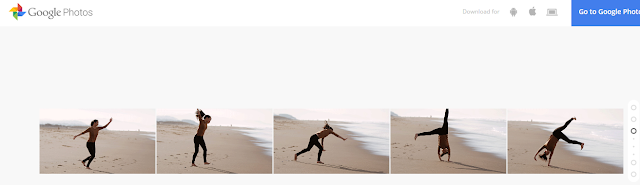 |
| Photos uploaded in sequence to Google Photos |
 |
| Animation created by Google Photos App |
Capture the full scene with Google Photos
Upload two or more photos to get a sweeping, perfectly stitched panorama.
 |
| Photos uploaded to Google Photos App |
When you upload these pictures it will automatically turn into a perfectly stitched panorama as shown below.
 |
| Panorama Created by Google Photos App |
Select photos the smarter way with Google Photos
Manually selecting a bunch of items on a phone can be a pain -- long-pressing one item, then tapping each additional item you want to be included one by one.The new Photos app has a better solution.
While viewing images in the Photos app, long-press on any photo to start the selection process. Then, without lifting your finger, drag upward or downward. Thatll allow you to quickly select a bunch of consecutive photos without having to do the typical tap-tap-tap dance.
When you want to select multiple pictures — say, for sharing or creating an album — you don’t have to tap on them one by one. You can just select the first one and then slide your finger to add others to the selection.
Navigation
Also, you can pinch and zoom to switch the view of your photo library from years to months to days.Google Photos has made this very convenient.
Free up space on your phone
One of Photos key features is the ability to automatically and continuously back up photos from your phone to the cloud for safe-keeping and universal access. Once a photo is backed up, then, theres really no reason to also keep storing it locally and thus take up precious space on your phone or tablet.
The new Photos app makes it easy as pie to free up space on your device by removing redundant local copies of images. Theres just one drawback: You have to choose to back up images at their full original resolution in order for the feature to be available. If you choose to use the free and unlimited "High quality" backup option, Photos wont offer to delete local versions of images -- since the local versions arent identical to those stored on Googles servers.
 |
| Getting Started with Googles New Photos App |
If youre uploading at full resolution, look in the Assistant section of the new Photos app. When the local storage on your device gets low, youll see a card there showing exactly how much space you can free up by deleting local copies. Youll also get a single-tap option to do the deed and remove all the local copies.
Quality
It’s true: The free tier of Google Photos uploads photos in “High Quality,” meaning that the images are compressed from their original resolution, provided said original resolution exceeds 16 megapixels. Rest assured that for most people, that’s just fine. iPhone photos and photos from small-ish point and shoots won’t suffer from a major loss of quality. Those shooting on DSLRs and higher quality cameras should note that the images won’t be stored in full resolution for free. However, you can choose to save the images in their original resolution to your Google Drive—it’ll just count against your Drive storage.
The big picture? Google Photos may not be the perfect photo backup, storage, and sharing solution for everyone, but because of its ease of use, robust feature set, and surprisingly helpful Assistant tool, it’s going to be a great pick and a new standby for many—particularly those of us who have a hard time remembering to back up. In many ways, Google Photos feels like everything we wanted iCloud to be. There are few things more precious on our phones than photos, and finally there’s a convenient place to keep them.
Sharing
Google Photos makes the work of sharing your photos relatively quick and painless as well. Google Docs users will find the process familiar: Simply click on the “Share” icon and choose to upload to Google+, Facebook, or Twitter, or opt for a shareable link.
 |
| Getting Started with Googles New Photos App |
And as someone who loathes the process of uploading and tagging and describing and titling photos on Facebook (it’s exhausting), it takes me exactly two seconds to name the album. Google knows the faces of my mom and my dad and my dog and best friends, but it doesn’t pressure me to tag them. If Google Photos finds a great picture of me and mom, I’ll decide to share it on my own—which is very easy. But I know that the rest of my photos are just for me and that I won’t get a notification in two years that a Facebook acquaintance has pawed through my old photos and “liked” a few out of the blue. (Also, never ever do that.)
On the Google Photos Web app, click the share button at the top when you have a group of photo selected and click Get sharable link. On the iOS app, select your photos, tap the share button and then tap Copy Link to Clipboard. You will then be able to paste the link into an email, and your recipient will not need any special app or login to view your photos.
 |
| Getting Started with Googles New Photos App Note:- To Download the Google Photos App go to https://photos.google.com/ and to read more about it go to https://www.google.com/photos/about/. |
Photos Google
Go to link Download

Wednesday, March 1, 2017
How to Fix after installing windows 7 pinnacle studio 12 cannot be started anymore What could have happened
How to Fix after installing windows 7 pinnacle studio 12 cannot be started anymore What could have happened
after installing windows 7, pinnacle studio 12 cannot be started anymore. What could have happened?__
after installing windows 7, pinnacle studio 12 cannot be started anymore.
What could have happened?
Solutions to the Problem after installing windows 7, pinnacle studio 12 cannot be started anymore. What could have happened?__
Download Error Fixer (Free)
Hello Tinotino,
Thank you for posting to the Microsoft Answers Forum.
Are you getting an error message when trying to start Pinnacle Studio 12? If so, then please reply back with the exact error message.
Have you tried to install in safe mode?
Have you tried to install in Compatibility mode?
If the program is not compatible, then you may try to install and run the program in compatibility mode.
Use the following steps:
1) Right click on the Program
2) Click on Properties
3) Click on Compatibility tab
4) Select Run this program in compatibility mode and select Windows Vista or whatever operating system the program was running successfully.
Pinnacle Studio 12 shows to be compatible with Windows 7 but Pinnacle Studio Plus version 12 and Pinnacle Studio Ultimate version 12 are not compatible.
They need an upgrade to be compatible.
Please reply back with an update and let us know if your issue is resolved or if you still need assistance.
Sincerely,
Marilyn
Microsoft Answers Support Engineer
Visit our
Microsoft Answers Feedback Forum and let us know what you think
- Access the files on your computer via MY COMPUTER
- Under the C: drive, access the WINDOWS folder
- Select the SOFTWARE DISTRIBUTION folder, followed by the DOWNLOAD folder.
- Delete any files within this download folder.
- If you are unable to delete these files, open the command prompt (CMD) as the administrator, and type "net stop wuauserv" into the CMD prompt window. Press ENTER. This should allow you to delete the files from step 4.
- Once the files are deleted, open and run the CMD as the administrator and type "wuauclt.exe /updatenow". Press ENTER.
Another Safe way to Fix the Problem: after installing windows 7, pinnacle studio 12 cannot be started anymore. What could have happened?__:


How to Fix after installing windows 7, pinnacle studio 12 cannot be started anymore. What could have happened?__ with SmartPCFixer?
1. Click the button to download Error Fixer . Install it on your system. Run it, and it will scan your system. The errors will be shown in the list.

2. After the scan is finished, you can see the errors and problems which need to be fixed.

3. The Fixing part is finished, the speed of your computer will be much higher than before and the errors have been removed.

Related: Fast Solution to Problem: Error http//go.microsoft/fwlink/?linkId=144689 occurs at every reboot,,Troubleshooting:I tried to download the latest version of Internet Explorer 9, but it will not update the download due to a message that states "Wrong version of Internet Explorer installer" Error,Fast Solution to Error: IE9 Search Taking Me to Web Pages Rather Than Search Results,Random freezing after updating to SP1 (Windows 7) Tech Support,[Anwsered] Thinkpad 8611 Boot,How to Resolve - Svchost Helper?,Fast Solution to Problem: L30 101 Driver Windows 7,Troubleshooter of Error: Io Device,How to Fix Error - Dell Laptop Code 39?
Read More: Troubleshooting:After repairing Word 2010 starter it as it asked. It wont let me open Microsoft Word 2010. It pops up and says internet lost and then freezes.,Tech Support: After upgrading from Vista to Windows 7 my IE8 becomes blurry sometimes....,After Upgrade from Vista to W7 HomePrem Removable HDs arent recognized. How Fix? [Anwsered],After running Disk Defragmenter in XP, system hangs or runs very slow,[Solved] After sign on to share point online, it ask for the credentials when trying to open a word or excel file,Able To Install Multiple Versions Of Office?,A couple of years ago I downloaded a homeccounting template I cant find now is there a place where I can look for other templates that are not lis ated?,add on information bar - Preventing me from being able to download anything,addin for excel doesnt exist in "C:Program FilesMicrosoft OfficeOffice121033",Adding degrees on Calculator
Go to link Download
Thursday, December 8, 2016
Getting started with new Mac OS X 10 11 El Capitan
Getting started with new Mac OS X 10 11 El Capitan
Earlier this month, At its Worldwide Developers Conference ( WWDC ) last week, Apple introduced OS X 10.11 El Capitan, the newest version of its Mac-based operating system.Piggybacking off of the operating system before it - OS X Yosemite - El Capitan claims to be faster and come with some nifty new features for desktop Mac users.
But one question remains: Why in the world did Apple decide to call it El Capitan?
The history of OS X naming goes all the way back to 2001. The first official version of OS X was dubbed "Cheetah." Then, until 2012, each following operating system was named after another fast and agile cat. The last feline-named version of Apples Mac operating system was Mountain Lion.
Then in 2013, Apple made a change. OS X 10.9, instead of representing yet another cat-like species, was instead dubbed Mavericks.Mavericks is a favorite surfing spot in Northern California.
Following Mavericks was OS X Yosemite, which was named after Yosemite National Park.
And now we have El Capitan, which (despite sounding a bit like a Mexican restaurant) is actually a vertical rock formation located within Yosemite National Park in Mariposa County, California, U.S.
Apple didnt provide a formal reason for why it chose El Capitan, but the rock formation is considered an important California landmark. Hikers know it well, and its even considered one of the best places in the world for rock climbing and base jumping.
Like Mavericks, its a destination for agile and daredevil-ing sport enthusiasts. EL Capitan is a spanish word which means The Captain.
 |
| OS X 10.11 El Capitan |
Support list for OS X 10.11
iMac (Mid-2007 or later)
MacBook (13-inch Aluminum, Late 2008), (13-inch, Early
2009 or later)
MacBook Pro (13-inch, Mid-2009 or later), (15-inch, Mid/
Late 2007 or later), (17-inch, Late 2007 or later)
MacBook Air (Late 2008 or later)
Mac Mini (Early 2009 or later)
Mac Pro (Early 2008 or later)
Xserve (Early 2009)
In this preview Im only going to cover the biggest new features, but expect a full review when Mac OS X El Capitan is released this fall. It is, once again, a free upgrade for existing Mac users.
Apple will be making a beta version of the new software available to download on your Mac in July, or you can wait for the full version to arrive in the autumn. Heres how you will be able to get the new version of OS X on your Mac, either as a dual boot partition on your Mac, as a separate install on a external hard drive, or in virtualisation software.
How to get the OS X El Capitan beta
Initially it will only be developers who are members of Apples developer community that will be able to download the software. But Apple is also repeating the successful public beta programme that it ran last year, so consumers will also be able to get their hands on the beta versions of the software in July.
The OS X El Capitan beta has been available to developers since 8 June, if you are signed up to the Apple Developer Program you will be able it download it now. You can now join the OS X and iOS developer programs for a single fee of $99 (£64) a year, rather than joining the two programs for $99 each per year. Developing for the WatchOS is also included in that fee. To join the Apple Developer Program enrol here.
Once you have signed up for the public beta Apple will contact you via email when the software is ready to download.
When you receive the email from Apple there will be a download link and a redeem code. You will be able to download the Mac OS X 10.11 Installation from the App Store.
Follow these instructions to install the beta:
- Open the Install OS X 10.11 Developer Preview file in the Applications folder.
- Click Continue.
- Click Agree and Agree.
- Click Install.
- Enter your Admin password.
However, we dont recommend that you install El Capitan on your main Mac - or if you must, then you should install it on a secondary partition of the Mac or on an external hard drive. Either way, we’d recommend a full back up before you install it.
How to install the OS X El Capitan beta on an external hard drive
To install El Capitan on a external hard drive follow the following guide:
- Connect the external hard drive.
- Open the Install OS X 10.10 Developer Preview file in the Applications folder.
- Click Continue.
- Click Agree and Agree.
- Click Show All Disks.
- Highlight the external hard drive.
- Click Install.
- Enter your Admin password

1. Split View
 |
| OS X 10.11 El Capitan Split View |

2. Mission Control
You’ve never been so good at space management.
 |
| OS X 10.11 El Capitan mission control |
 |
| OS X 10.11 El Capitan mission control |
A three finger swipe upwards on your trackpad, a tap of the Mission Control key (F3) from your keyboard, or a click of the Mission Control icon with your mouse will still take you right to the main view, just as before. But once youre in Mission Control, you have a new way of interacting with your windows.
Theres also a new draggable Mission Control shortcut coming to El Cap: Just pull any window to the top of the screen, then drag a little more to reveal the Spaces Bar. From there, you can drop the window where you want it, either full screen, onto an existing full screen app to create a Split View, or onto a new or existing desktop Space.
Lost your cursor on your crowded desktop? Just shake your finger back and forth on the trackpad or give your mouse a shake, and the cursor gets bigger so it’s easy to spot.

3. Spotlight as search engine
Even more versatile. And helpful.
Spotlight gets even smarter in El Capitan, delivering results for weather, sports, stocks, web video, and transit information. And now you can ask Spotlight to find a file using natural language — so when you’re looking for something, just type it the way you’d say it.For example, typing in “photos from last year” will display photos from the previous year. It also works with search terms like, “find emails from Anthony.”
Spotlight is also more flexible: You can resize its window to see more results and move it anywhere on your desktop.
Search results from more sources.
Spotlight now searches even more places to give you more useful results. Check up on the latest stock prices, weather conditions and forecasts for your current location or cities around the world, and sports scores, schedules, standings, and athlete information. You can even search for web videos.
 |
| OS X 10.11 El Capitan Spotlight |
 |
| OS X 10.11 El Capitan Spotlight |
 |
| OS X 10.11 El Capitan Spotlight |
Ask in your own words.
Searching for files has never been easier now that Spotlight understands natural language.You can also use more complex searches, like “presentation I worked on yesterday that contains budget,” and you’ll get just what you’re looking for. You can search with your own words in Mail and Finder, too.
 |
| OS X 10.11 El Capitan Spotlight |

4. Safari gets pinned and Mute the Noisy Tab like in chrome
With OS X El Capitan, the best browser for your Mac brings new tools for better surfing. Now Safari lets you keep favorite websites open and accessible with Pinned Sites.When a website is pinned, it stays up to date in the background, so what youre seeing when you click over to it is always current. Sites like Gmail, Facebook, and Twitter are particularly good uses of this feature, quietly refreshing in the background and always displaying the most recent info.Pinned Sites can be created by clicking on the title bar of an open website and dragging it to the left.While useful, this feature is nothing new, because you already have this functionality in third party browsers like Firefox.
 |
| Safari in OS X 10.11 El Capitan |
Go to link Download