Showing posts with label app. Show all posts
Showing posts with label app. Show all posts
Friday, April 7, 2017
Getting Started with Googles New Photos App
Getting Started with Googles New Photos App
Battle of the Photos- New Google Photos
Google and Apple have built homes in the cloud for your photos, making it easier to sync and find them on all your devices and to tweak the ones that need retouching.Once you’ve backed up your photo library to the service, all your photos and videos, including any new ones you take, are synced among all of these devices automatically.In April, Apple released Photos for iOS, Mac and the Web—a smart way to get us to pay for iCloud Drive storage. Then a couple of week ago, Google dropped big news: Its own Photos app for Android, iPhone and the Web would store all of your photos and videos free of charge.
There are many other free cloud photo storage options despite similar names and talents, picking one isn’t as easy as you think. Sure, you could choose based on what devices you own and how much you are willing to pay for cloud storage. But even if you own an iPhone and money is no object, Google Photos is a better choice for all but serious photographers. It combines the company’s unmatched search smarts with everything I’ve ever wanted in a photo service, while making it incredibly fun to relive old memories.Here is a comparison of few very famous cloud picture storage options.
 |
| Comparison between Google Photos, iCloud, Dropbox, Flickr and Amazon Cloud |
If you have thousands of photos, it could take many days to upload them all—regardless of the service you choose and even if you have a fast broadband connection to the Internet.
But like any free service, there’s a sacrifice in quality.Google compresses your images and downsizes any shots larger than 16 megapixels. I closely compared the original and compressed files, and though I could spot the differences when zoomed in, the compressed versions are still high quality enough for printing 8x10 photos or displaying on an HDTV. The services also compress video, and while files up to 1080p keep their original resolution, 4K or 5K video is downsized as well.So the maximum resolution of a picture you can keep as original without downsizing is 16 Megapixels which is the highest resolutions used by average smartphone owners.
Google does have an option to keep full-res images just as they came out of your DSLR camera but thats counted against your limited storage of 15 GB for free account.If you want unlimited storage with full resolution it’ll just cost you. At the lower end, pricing is comparable: Google Drive costs $2 a month for 100GB and Apple’s iCloud Drive is $4 for 200GB. But if you’ve been shooting digital for a decade, you may need more capacity and that’s where Google beats Apple: $10 a month will get you 1TB from Google, but only 500GB from Apple. Apple’s first 5GB are free.
You will need to choose the storage type for your account as shown in the picture and in order to do that click on the menu on the top left corner and select settings.
 |
| Getting Started with Googles New Photos App |
Here’s the really unbelievable stuff: Using visual analysis, Google assigns attributes to your many photos so you can then search by keyword. Punching in “food” returns an embarrassing amount of food photos I’ve taken over the years. “Vacation 2013” brings up shots from my trip to Bangkok that year. It really is as great—and wildly addictive—as having your own personal Google Image Search.
Explore the crazy-powerful new search feature of Google Photos-- starting with face recognition
 |
| Getting Started with Googles New Photos App |
See that blue circular icon with a magnifying glass in your main photos list? Tap it.
That icon takes you to Photos search screen, which holds some of the apps coolest and most powerful features.
At the top of the search screen, youll see the six most frequently photographed faces from your images.You can also see more faces by tapping the "More" link next to the word "People."
Tap any of those faces, and youll see all of the photos - or at least many of them -- in which that particular person appears. And heres whats crazy: Google says the app is able to track a persons face and continue to recognize it as they age over time. So in theory, at least, the current photos of my daughter as an infant will one day be grouped together with photos of her as a young child, a teenager, and an adult.
Google does it better. In fact, it’s jaw-droppingly good at recognizing faces. It identified my mom in a photo taken 30 years ago and another taken when she was only 10! Annoyingly, though, Google doesn’t yet let you assign names to faces. You just click on one face to see the other similar ones. The company says this has been a highly requested feature and, if added, it won’t tie face tagging to other Google accounts, a la Facebook.
Explore your photos by location
In addition to People, Google Photos also lets you search your photo by Places and Things. Places uses location data to group photos so you can see photos of a trip you made without needing to first creating an album. More impressive is the Things category which lets you search for photo of forests, food, stadiums, dancing and much more.
Scroll down below the faces in that same search screen, and youll find a list of locations in which your photos have been taken. Whats particularly remarkable about this is that it works even if you dont have location reporting activated.
How? Google says its technology is able to recognize known geographical landmarks from photos and then use logic (and the laws of physics) to infer your location in other nearby photos. If you took a snapshot of the Eiffel Tower on February 9th at 2 p.m., for instance, Google can safely assume you were still in Paris in that selfie you took in front of a bakery 45 minutes later. The accuracy and level of detail may surprise you.
Explore your photos by objects and themes in Google Photos
This may be the most impressive part of the new Photos app: Beneath the locations in the search screen, youll see a list of common themes found in your photos -- things like flowers, concerts, weddings, forests, nightclubs, and dancing. Tap any categorization, and youll find a selection of photos that matches that description.
 |
| Getting Started with Googles New Photos App |
Play around with Google Creations and Assistant
If you used Google+ Photos in the past, you might be wondering what happened to Auto Awesome -- the fun set of collages, animations, and videos Google automatically generated based on your images. Fear not: Theyre still here; they just have a new name.
Scroll all the way down on the Photos search screen, and youll see an option called Creations. There, youll find all the different ways Google has mashed your photos together into interesting new forms.
The Photos app will still make those mashups automatically, as the old app did in the past. But with the new app, you can also manually make any of those items anytime you want.
To do so, just select any set of photos from your collection (more on the act of selecting in a second). Tap the "+" icon that appears in the upper-right corner of the screen, then choose from any of the options that appear -- adding the images into a new album, movie, story, animation, or collage. Youll be able to view and share the resulting creation seconds later.
Your assistant shows you fun new things automatically created from your photos & helps you stay organized.
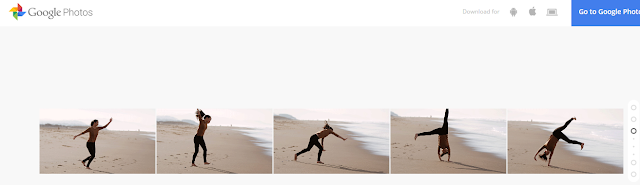
if you have taken photos quickly in a motion and uploaded them all to the Google Photos it will automatically create an animation as shown in the picture below.
 |
| Photos uploaded in sequence to Google Photos |
 |
| Animation created by Google Photos App |
Capture the full scene with Google Photos
Upload two or more photos to get a sweeping, perfectly stitched panorama.
 |
| Photos uploaded to Google Photos App |
When you upload these pictures it will automatically turn into a perfectly stitched panorama as shown below.
 |
| Panorama Created by Google Photos App |
Select photos the smarter way with Google Photos
Manually selecting a bunch of items on a phone can be a pain -- long-pressing one item, then tapping each additional item you want to be included one by one.The new Photos app has a better solution.
While viewing images in the Photos app, long-press on any photo to start the selection process. Then, without lifting your finger, drag upward or downward. Thatll allow you to quickly select a bunch of consecutive photos without having to do the typical tap-tap-tap dance.
When you want to select multiple pictures — say, for sharing or creating an album — you don’t have to tap on them one by one. You can just select the first one and then slide your finger to add others to the selection.
Navigation
Also, you can pinch and zoom to switch the view of your photo library from years to months to days.Google Photos has made this very convenient.
Free up space on your phone
One of Photos key features is the ability to automatically and continuously back up photos from your phone to the cloud for safe-keeping and universal access. Once a photo is backed up, then, theres really no reason to also keep storing it locally and thus take up precious space on your phone or tablet.
The new Photos app makes it easy as pie to free up space on your device by removing redundant local copies of images. Theres just one drawback: You have to choose to back up images at their full original resolution in order for the feature to be available. If you choose to use the free and unlimited "High quality" backup option, Photos wont offer to delete local versions of images -- since the local versions arent identical to those stored on Googles servers.
 |
| Getting Started with Googles New Photos App |
If youre uploading at full resolution, look in the Assistant section of the new Photos app. When the local storage on your device gets low, youll see a card there showing exactly how much space you can free up by deleting local copies. Youll also get a single-tap option to do the deed and remove all the local copies.
Quality
It’s true: The free tier of Google Photos uploads photos in “High Quality,” meaning that the images are compressed from their original resolution, provided said original resolution exceeds 16 megapixels. Rest assured that for most people, that’s just fine. iPhone photos and photos from small-ish point and shoots won’t suffer from a major loss of quality. Those shooting on DSLRs and higher quality cameras should note that the images won’t be stored in full resolution for free. However, you can choose to save the images in their original resolution to your Google Drive—it’ll just count against your Drive storage.
The big picture? Google Photos may not be the perfect photo backup, storage, and sharing solution for everyone, but because of its ease of use, robust feature set, and surprisingly helpful Assistant tool, it’s going to be a great pick and a new standby for many—particularly those of us who have a hard time remembering to back up. In many ways, Google Photos feels like everything we wanted iCloud to be. There are few things more precious on our phones than photos, and finally there’s a convenient place to keep them.
Sharing
Google Photos makes the work of sharing your photos relatively quick and painless as well. Google Docs users will find the process familiar: Simply click on the “Share” icon and choose to upload to Google+, Facebook, or Twitter, or opt for a shareable link.
 |
| Getting Started with Googles New Photos App |
And as someone who loathes the process of uploading and tagging and describing and titling photos on Facebook (it’s exhausting), it takes me exactly two seconds to name the album. Google knows the faces of my mom and my dad and my dog and best friends, but it doesn’t pressure me to tag them. If Google Photos finds a great picture of me and mom, I’ll decide to share it on my own—which is very easy. But I know that the rest of my photos are just for me and that I won’t get a notification in two years that a Facebook acquaintance has pawed through my old photos and “liked” a few out of the blue. (Also, never ever do that.)
On the Google Photos Web app, click the share button at the top when you have a group of photo selected and click Get sharable link. On the iOS app, select your photos, tap the share button and then tap Copy Link to Clipboard. You will then be able to paste the link into an email, and your recipient will not need any special app or login to view your photos.
 |
| Getting Started with Googles New Photos App Note:- To Download the Google Photos App go to https://photos.google.com/ and to read more about it go to https://www.google.com/photos/about/. |
******************************
Incoming Search Traffic
Getting Started with Googles New Photos App
Google Photos App
Google Photos
Battle of photo storage cloud
Photos Google
Photos Google
iCloud vs Google Photos
iCloud vs. Google Photos Vs. Flikr
Features and Jawdropping deal with Free Google Photos
Free unlimited storage with Google Photos
Go to link Download

Tuesday, March 28, 2017
Good News Android Users Hack on Android Freedom v1 0 8d Apk Unlimited In App Purchases
Good News Android Users Hack on Android Freedom v1 0 8d Apk Unlimited In App Purchases
Apply These Secret Techniques in Using Freedom V1.0.8d Apk Unlimited In-app Purchases Hack On Android
About Freedom v1.0.8 (d) Apk
This app Freedom V 1.0.8, will be able to
- purchase all Coins,
- Gems,
- Levels and Lives for free!!
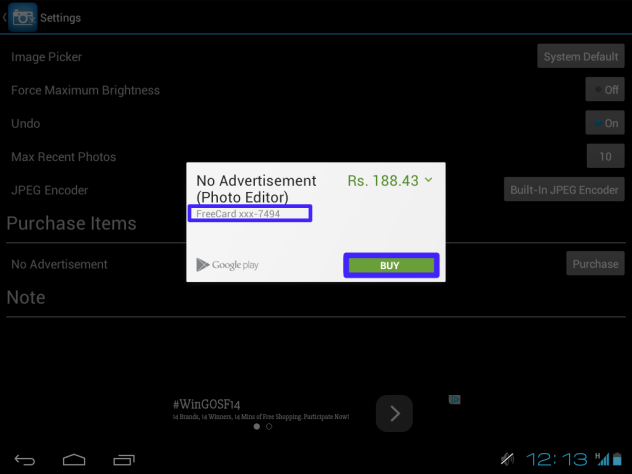
- It contains an inbuilt free card, which can be used on Google Play!
What IS new on this Version 1 0.8 ?
- You will have bug fixes
- We also have some added support for more apps/games
- For MARSHMALLOW Users, you will experience stability fixes!
INSTRUCTIONS AND USAGE PROCEEDURE
- First uninstall previous Freedom apk from your device if you have any before
- Then proceed to download Latest Freedom apk file given below down this page
- Then extract the app
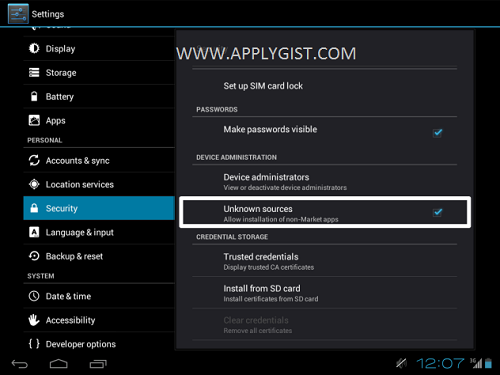
- Also Make sure that you have “Unknown sources” enabled in your security settings
- Install downloaded APK and launch it
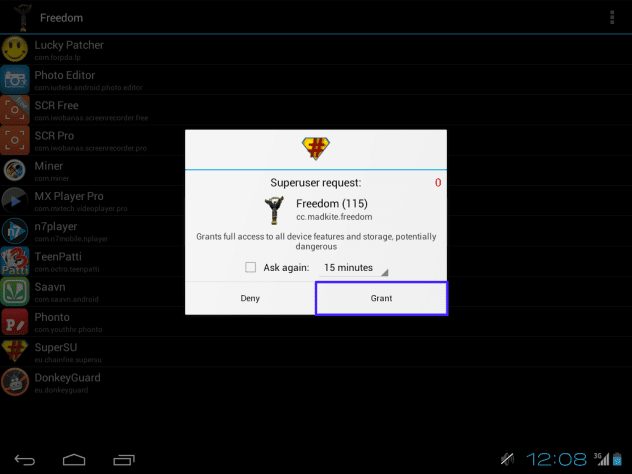
- Allow superuser permissions request(root access)
- Tap on application in which you want to use free in-app purchase, wait a little. Application should start automatically
- ensure your in-app purchase
- Finally follow the screen Shot bellow or use the comment Box to talk to us
SCREEN SHOT
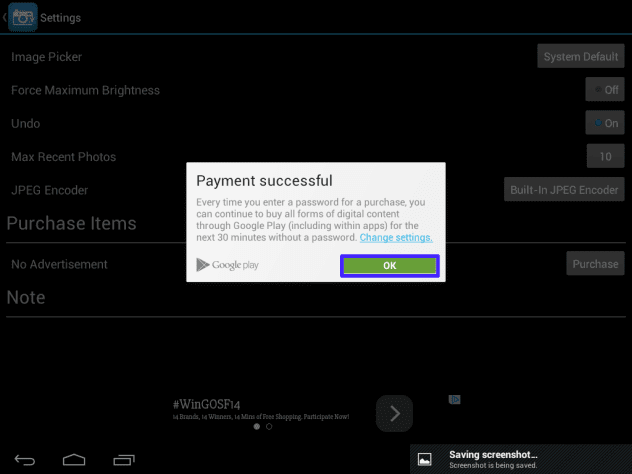
TO DOWNLOAD, CLICK THE DOWNLOAD BUTTON BELOW
Freedom v1.0.8d Apk (1.21MB)

Download Link 2==> HERE
Go to link Download
Thursday, February 9, 2017
How to Easily Remove Numbers in Calculator app
How to Easily Remove Numbers in Calculator app

For those of you who frequently use the Calculator app on the iPhone for counting, tips this time you should not miss. It should be noted, is meant here is the Calculator app in Apples native applications not third-party applications.
Now try to open the Calculator app on your iPhone or iPod Touch and enter any number. Just type any number, make sure the more than two digits to try this trick. Afterwards, delete the numbers.
You probably are one iDevice user who always uses the Clear to remove the numbers in Calculator app. The way it is considered easy because it could erase the entire number on a screen iPhone without deleting them one by one. But it also means that when you are just one type of the numbers then all the numbers will be erased and you have to type from scratch.
Well, did you know that deleting numbers in Calculator app you can do with a single swipe? Try just swipe from left to right, in the box where the figures before you type. What you are used to?
Exactly! Calculator app will only delete the last digit you type. This is not a trick that is extraordinary as various jailbreak tweaks that are widely available but it would be very important tips for you who often work with numbers :)
Go to link Download
Thursday, February 2, 2017
How To Delete an App From Android Phone
How To Delete an App From Android Phone

How To Delete an App From Android Phone - A wide range of applications available on the Android smartphone. And perhaps this is what makes android increasingly favored by many people or society in general. Thousands or perhaps millions of applications can be installed and used easily in Android-based mobile phones. This ease disekiakan so many people more comfortable and more convenient to use android. And can not be denied also, because of this, making the android smartphone mobile phone sales soar high in the market of mobile smartphone sales.
If you are indeed loyal android user, must have been a frequent or are familiar with a wide range of applications in disedisakan google google play or any store. And of course also very often install and uninstall various applications. But even so, this time congkel will share a few tips that are easier in terms uninstall applications you have installed on your android. And maybe this article will be beneficial to the recently using android and love to do a variety of oprek on his cell phone.
More precisely this article is about how to easily remove (uninstall) the application has been installed on the android. Here are the steps.
By default (Default android)
First of all, the home menu, select andorid Market -> MyApps.
Then, select the application you want to waste.
Finally, select the Uninstall button to remove or uninstall the application you want.
Note: If necessary, add a message why did you remove it from the Android app.
Use additional applications.
In addition to using the inherent features of Android, Android users can also use additional applications specific to erase or clicking-unisntall an application. For example, as easy Uninstaller which can be obtained for free on the Android Market.
How to use it:
First of all, run apps Easy Uninstaller.
Then, select the application you want to remove or uninstall.
Finally, select Uninstall Selected Apps button and wait until the process is complete.
Note: With this application you can easily remove or uninstall useless apps from your Android phone.
Go to link Download
Friday, December 9, 2016
Google’s removal of Taliban app
Google’s removal of Taliban app
...won’t stop the spread of terrorist propaganda online

Terrorists are no strangers to using social media for recruiting and spreading propaganda. Google, however, is trying to curb that tactic and has removed an app created by the Taliban from the Play Store for spreading hate speech.
The app, Alemarah, was being used by the group to publish propaganda, news and videos. Discovered on Friday, Google was quick to remove the app by Sunday evening but this surely won’t be the end of the group’s online efforts.
Google’s policies explicitly state that apps are not allowed to “advocate against groups of people based on their race or ethnic origin, religion, disability, gender, age, nationality, veteran status, sexual orientation, or gender identity,” which is what Alemarah was doing.
Speaking to TNW, a Google spokesperson said: “While we don’t comment on specific apps, we can confirm that we remove apps from Google Play that violate our policies.”
The app was just one part of the Taliban’s digital campaign, which it is using to target a worldwide audience and gather support. It already has a website available in five languages and active accounts on Facebook and Twitter. They have had these taken down before but the group has always managed to get back online.
Of course, it had probably hoped the app would provide them with a more stable outlet.
Like the arguably more visible ISIS, the Taliban has a channel on the encrypted messaging app Telegram, but with the likes of Anonymous keeping a close eye and disrupting the terrorist groups’ online plans, it’s becoming increasingly difficult for them to remain active.
ISIS also has its own Android app, which doesn’t appear to have been removed from the Play Store just yet. Perhaps this is because the ISIS app, Alrawi, is a messaging platform, so it’s technically not broadcasting hate speech or propaganda in the same manner as the Taliban’s news app.
However, a reporter from Bloomberg has said that a representative for the Taliban has confirmed to him that the app went offline because of technical issues and will be live again soon.
Social networks are often criticised for not doing enough to cull the accounts of terrorists as they become more and more sophisticated on the Web, and it really is a growing problem.
Earlier this year, heads from Apple, Facebook and Twitter, among others, attended a meeting with federal policymakers in the US to address the issue. Short of being vigilant and removing everything as it crops up, it’s going to remain a longstanding issue for tech companies to curb this kind of use of its platforms.
If it was possible for larger organizations like Facebook or Google to intercept terrorists before they manage to get posts online, it would require mass surveillance, which isn’t likely to be successful without snooping on pretty much everyone.
So, despite Google’s best efforts, this isn’t the last we’ll see of the insurgent groups’ app or any others. As it stands, Facebook, Twitter, Apple, YouTube, WhatsApp, Telegram, Tumblr and many others, are unwillingly facilitating the global spread of terrorism.
Go to link Download
Sunday, November 20, 2016
Free Download Iron Man 3 Game for iPhone Free in the App Store
Free Download Iron Man 3 Game for iPhone Free in the App Store

How, if you are watching the latest movie Iron Man 3? With the amazing special effects, of course, makes us amazed with Iron Man 3. Well, after watching the movie, now is the time you feel it so Tony Stark, wearing armor, and of course fly against an enemy who is equally tough, through the latest games for the iPhone and iPad that Iron Man 3 - The Official Game can be downloaded for free in the App Store.
So, immediately connect to Wifi iPhone or iPad, then go to the App Store and download it direct Iron Man 3 Game for your iPhone. Do not worry, Games Iron Man 3 for iPhone is available for free in the App Store, but certainly because of its size very large nearly 644MB or 1/2 GB, then you have to be patient when downloading this game. Suggested, Iron Man 3 game download using the Wifi connection is super fast, let me not be too long download process ..
Do not worry, the games graphical display this Iron Man 3 will not disappoint and will keep you hooked. Now you can play a role as Tony Stark to safeguard the earth and the enemy threat. Are you ready? lets play Game Iron Man 3 on iPhone!

Go to link Download
Friday, November 11, 2016
Google Play had twice as many app downloads as Apple’s App Store in 2015
Google Play had twice as many app downloads as Apple’s App Store in 2015
There were twice as many downloads from the Google Play store globally as there were from Apple’s App Store, according to 2015 stats from app metrics company App Annie.
Overall, the report says, Google Play saw around 200 million (Android) versus 100 million (iOS) downloads over the course of the year, largely driven by Android’s growth in emerging markets. Brazil, India, Indonesia, Turkey and Mexico accounted for nearly half of Android’s download growth.
While that impressive growth in users might be good news for Google’s ad business – a larger user base means a bigger, more enticing pool of people that advertisers can reach – Apple’s App Store revenue still far outstripped Play, though both made gains across the year.

App Annie says that the App Store’s revenue growth was driven primarily by users in China, the US and Japan, accounting for nearly 90 percent of the increase.
Google is still struggling to shake Apple’s dominance in some markets, however. For example, in the UK, iOS downloads and revenue put the country in fourth place globally for Apple but the UK’s contribution to Google Play doesn’t even make it into the top 10.
Other highlights in the report show an increase in the number of Apple Watch apps – from 3,000 in April to 14,000 by December – and that global revenue for music streaming services was 2.2 times higher in 2015 than 2014.
Finally, and potentially more concerning for anyone particularly invested in online privacy matters, the report says that all of the top five apps by monthly active users are owned by Google or Facebook – given that 11 percent of the world use Messenger alone, that’s not altogether surprising.
Go to link Download
Subscribe to:
Posts (Atom)