Showing posts with label googles. Show all posts
Showing posts with label googles. Show all posts
Friday, April 7, 2017
Getting Started with Googles New Photos App
Getting Started with Googles New Photos App
Battle of the Photos- New Google Photos
Google and Apple have built homes in the cloud for your photos, making it easier to sync and find them on all your devices and to tweak the ones that need retouching.Once you’ve backed up your photo library to the service, all your photos and videos, including any new ones you take, are synced among all of these devices automatically.In April, Apple released Photos for iOS, Mac and the Web—a smart way to get us to pay for iCloud Drive storage. Then a couple of week ago, Google dropped big news: Its own Photos app for Android, iPhone and the Web would store all of your photos and videos free of charge.
There are many other free cloud photo storage options despite similar names and talents, picking one isn’t as easy as you think. Sure, you could choose based on what devices you own and how much you are willing to pay for cloud storage. But even if you own an iPhone and money is no object, Google Photos is a better choice for all but serious photographers. It combines the company’s unmatched search smarts with everything I’ve ever wanted in a photo service, while making it incredibly fun to relive old memories.Here is a comparison of few very famous cloud picture storage options.
 |
| Comparison between Google Photos, iCloud, Dropbox, Flickr and Amazon Cloud |
If you have thousands of photos, it could take many days to upload them all—regardless of the service you choose and even if you have a fast broadband connection to the Internet.
But like any free service, there’s a sacrifice in quality.Google compresses your images and downsizes any shots larger than 16 megapixels. I closely compared the original and compressed files, and though I could spot the differences when zoomed in, the compressed versions are still high quality enough for printing 8x10 photos or displaying on an HDTV. The services also compress video, and while files up to 1080p keep their original resolution, 4K or 5K video is downsized as well.So the maximum resolution of a picture you can keep as original without downsizing is 16 Megapixels which is the highest resolutions used by average smartphone owners.
Google does have an option to keep full-res images just as they came out of your DSLR camera but thats counted against your limited storage of 15 GB for free account.If you want unlimited storage with full resolution it’ll just cost you. At the lower end, pricing is comparable: Google Drive costs $2 a month for 100GB and Apple’s iCloud Drive is $4 for 200GB. But if you’ve been shooting digital for a decade, you may need more capacity and that’s where Google beats Apple: $10 a month will get you 1TB from Google, but only 500GB from Apple. Apple’s first 5GB are free.
You will need to choose the storage type for your account as shown in the picture and in order to do that click on the menu on the top left corner and select settings.
 |
| Getting Started with Googles New Photos App |
Here’s the really unbelievable stuff: Using visual analysis, Google assigns attributes to your many photos so you can then search by keyword. Punching in “food” returns an embarrassing amount of food photos I’ve taken over the years. “Vacation 2013” brings up shots from my trip to Bangkok that year. It really is as great—and wildly addictive—as having your own personal Google Image Search.
Explore the crazy-powerful new search feature of Google Photos-- starting with face recognition
 |
| Getting Started with Googles New Photos App |
See that blue circular icon with a magnifying glass in your main photos list? Tap it.
That icon takes you to Photos search screen, which holds some of the apps coolest and most powerful features.
At the top of the search screen, youll see the six most frequently photographed faces from your images.You can also see more faces by tapping the "More" link next to the word "People."
Tap any of those faces, and youll see all of the photos - or at least many of them -- in which that particular person appears. And heres whats crazy: Google says the app is able to track a persons face and continue to recognize it as they age over time. So in theory, at least, the current photos of my daughter as an infant will one day be grouped together with photos of her as a young child, a teenager, and an adult.
Google does it better. In fact, it’s jaw-droppingly good at recognizing faces. It identified my mom in a photo taken 30 years ago and another taken when she was only 10! Annoyingly, though, Google doesn’t yet let you assign names to faces. You just click on one face to see the other similar ones. The company says this has been a highly requested feature and, if added, it won’t tie face tagging to other Google accounts, a la Facebook.
Explore your photos by location
In addition to People, Google Photos also lets you search your photo by Places and Things. Places uses location data to group photos so you can see photos of a trip you made without needing to first creating an album. More impressive is the Things category which lets you search for photo of forests, food, stadiums, dancing and much more.
Scroll down below the faces in that same search screen, and youll find a list of locations in which your photos have been taken. Whats particularly remarkable about this is that it works even if you dont have location reporting activated.
How? Google says its technology is able to recognize known geographical landmarks from photos and then use logic (and the laws of physics) to infer your location in other nearby photos. If you took a snapshot of the Eiffel Tower on February 9th at 2 p.m., for instance, Google can safely assume you were still in Paris in that selfie you took in front of a bakery 45 minutes later. The accuracy and level of detail may surprise you.
Explore your photos by objects and themes in Google Photos
This may be the most impressive part of the new Photos app: Beneath the locations in the search screen, youll see a list of common themes found in your photos -- things like flowers, concerts, weddings, forests, nightclubs, and dancing. Tap any categorization, and youll find a selection of photos that matches that description.
 |
| Getting Started with Googles New Photos App |
Play around with Google Creations and Assistant
If you used Google+ Photos in the past, you might be wondering what happened to Auto Awesome -- the fun set of collages, animations, and videos Google automatically generated based on your images. Fear not: Theyre still here; they just have a new name.
Scroll all the way down on the Photos search screen, and youll see an option called Creations. There, youll find all the different ways Google has mashed your photos together into interesting new forms.
The Photos app will still make those mashups automatically, as the old app did in the past. But with the new app, you can also manually make any of those items anytime you want.
To do so, just select any set of photos from your collection (more on the act of selecting in a second). Tap the "+" icon that appears in the upper-right corner of the screen, then choose from any of the options that appear -- adding the images into a new album, movie, story, animation, or collage. Youll be able to view and share the resulting creation seconds later.
Your assistant shows you fun new things automatically created from your photos & helps you stay organized.
if you have taken photos quickly in a motion and uploaded them all to the Google Photos it will automatically create an animation as shown in the picture below.
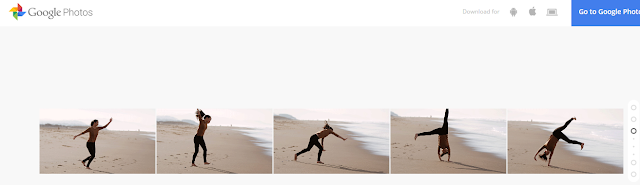 |
| Photos uploaded in sequence to Google Photos |
 |
| Animation created by Google Photos App |
Capture the full scene with Google Photos
Upload two or more photos to get a sweeping, perfectly stitched panorama.
 |
| Photos uploaded to Google Photos App |
When you upload these pictures it will automatically turn into a perfectly stitched panorama as shown below.
 |
| Panorama Created by Google Photos App |
Select photos the smarter way with Google Photos
Manually selecting a bunch of items on a phone can be a pain -- long-pressing one item, then tapping each additional item you want to be included one by one.The new Photos app has a better solution.
While viewing images in the Photos app, long-press on any photo to start the selection process. Then, without lifting your finger, drag upward or downward. Thatll allow you to quickly select a bunch of consecutive photos without having to do the typical tap-tap-tap dance.
When you want to select multiple pictures — say, for sharing or creating an album — you don’t have to tap on them one by one. You can just select the first one and then slide your finger to add others to the selection.
Navigation
Also, you can pinch and zoom to switch the view of your photo library from years to months to days.Google Photos has made this very convenient.
Free up space on your phone
One of Photos key features is the ability to automatically and continuously back up photos from your phone to the cloud for safe-keeping and universal access. Once a photo is backed up, then, theres really no reason to also keep storing it locally and thus take up precious space on your phone or tablet.
The new Photos app makes it easy as pie to free up space on your device by removing redundant local copies of images. Theres just one drawback: You have to choose to back up images at their full original resolution in order for the feature to be available. If you choose to use the free and unlimited "High quality" backup option, Photos wont offer to delete local versions of images -- since the local versions arent identical to those stored on Googles servers.
 |
| Getting Started with Googles New Photos App |
If youre uploading at full resolution, look in the Assistant section of the new Photos app. When the local storage on your device gets low, youll see a card there showing exactly how much space you can free up by deleting local copies. Youll also get a single-tap option to do the deed and remove all the local copies.
Quality
It’s true: The free tier of Google Photos uploads photos in “High Quality,” meaning that the images are compressed from their original resolution, provided said original resolution exceeds 16 megapixels. Rest assured that for most people, that’s just fine. iPhone photos and photos from small-ish point and shoots won’t suffer from a major loss of quality. Those shooting on DSLRs and higher quality cameras should note that the images won’t be stored in full resolution for free. However, you can choose to save the images in their original resolution to your Google Drive—it’ll just count against your Drive storage.
The big picture? Google Photos may not be the perfect photo backup, storage, and sharing solution for everyone, but because of its ease of use, robust feature set, and surprisingly helpful Assistant tool, it’s going to be a great pick and a new standby for many—particularly those of us who have a hard time remembering to back up. In many ways, Google Photos feels like everything we wanted iCloud to be. There are few things more precious on our phones than photos, and finally there’s a convenient place to keep them.
Sharing
Google Photos makes the work of sharing your photos relatively quick and painless as well. Google Docs users will find the process familiar: Simply click on the “Share” icon and choose to upload to Google+, Facebook, or Twitter, or opt for a shareable link.
 |
| Getting Started with Googles New Photos App |
And as someone who loathes the process of uploading and tagging and describing and titling photos on Facebook (it’s exhausting), it takes me exactly two seconds to name the album. Google knows the faces of my mom and my dad and my dog and best friends, but it doesn’t pressure me to tag them. If Google Photos finds a great picture of me and mom, I’ll decide to share it on my own—which is very easy. But I know that the rest of my photos are just for me and that I won’t get a notification in two years that a Facebook acquaintance has pawed through my old photos and “liked” a few out of the blue. (Also, never ever do that.)
On the Google Photos Web app, click the share button at the top when you have a group of photo selected and click Get sharable link. On the iOS app, select your photos, tap the share button and then tap Copy Link to Clipboard. You will then be able to paste the link into an email, and your recipient will not need any special app or login to view your photos.
 |
| Getting Started with Googles New Photos App Note:- To Download the Google Photos App go to https://photos.google.com/ and to read more about it go to https://www.google.com/photos/about/. |
******************************
Incoming Search Traffic
Getting Started with Googles New Photos App
Google Photos App
Google Photos
Battle of photo storage cloud
Photos Google
Photos Google
iCloud vs Google Photos
iCloud vs. Google Photos Vs. Flikr
Features and Jawdropping deal with Free Google Photos
Free unlimited storage with Google Photos
Go to link Download

Thursday, November 24, 2016
Googles 2015 Nexus phones Specs details and what they mean for the enterprise
Googles 2015 Nexus phones Specs details and what they mean for the enterprise
On Tuesday, September 29, Google officially unveiled the Nexus 5X and Nexus 6P. Heres what you need to know about the latest Android flagships.


Dave Burke presenting the new Nexus phones.
With the plethora of versions, options, and features available, its nearly impossible to pin down what phone provides the ultimate Android experience. Companies like Samsung, Motorola, and LG all have their own top-shelf offerings but, for Google itself, the template for the pure Android experience starts and ends with its Nexus line.
Beginning in 2010 with the release of the Nexus One, the Nexus line has been designed and developed by Google and manufactured by partners such as HTC, Motorola, Samsung, and LG. Although there are now Nexus tablets and media players, the phones have always been the focus.
"A Nexus is Android as we designed it," said Dave Burke, Googles vice president of engineering for Android.
On Tuesday, September 29, Google announced two new Nexus phones — the LG-made Nexus 5X and Huawei-made Nexus 6P. In addition, the company also announced two new Chromecasts. Here are the specs for the two new Nexus phones.
The Nexus 5X
5.2" Screen
Plastic design
Colors: Carbon black, Quartz white, Blue
Storage: 16GB, 32GB
Memory: 2 or 3GB RAM
Qualcomm Snapdragon 808 processor
2700 mAh battery
Front camera: 5MP, 1.55 micron pixels
Rear camera: 12.3 MP
Fingerprint scanner on back of phone
USB-C
Starting price: $379
The Nexus 6P
5.7" Screen
Metal unibody design
Colors: Aluminum, Graphite, Frost White
Storage: 32GB, 64GB, 128GB
Memory: 3GB RAM
Qualcomm Snapdragon 810 processor
3450 mAh battery
Front camera: 8MP
Rear camera: 12 MP, 1.55 micron pixels
Fingerprint scanner on back of phone
USB-C
Starting price: $499
Both phones will launch with Android 6.0 Marshmallow, the latest iteration of Googles mobile OS. The updates for Marshmallow will be available to the existing Nexus line before becoming generally available to other Android devices. Android 6.0 will roll out to existing devices, including the Nexus 5, 6, 7, 9, and the Nexus player next week.
In referencing the 6Ps camera, Burke called it the best camera that Google has put in a phone. The new camera has slow motion video capabilities and 4K resolution at normal rate.
An Android Sensor hub can wake up the device to low-power display and has four key features that help it power the new generation of Nexus phones.
Sensor fusion
Activity recognition
Gesture recognition
Low power
The latest line of Nexus phones also has fingerprint capabilities called Nexus Imprint. Its an added security feature that can benefit business users and those who want to use Android Pay. Additionally, the updated run time permissions could help with security in the enterprise as well.
Business travelers will undoubtedly enjoy the many new features that help extend the life of the battery. For starters, the large batteries in the device charge quickly and hold a charge for a long time. Additionally, the new feature Doze helps conserve power if the phone hasnt moved in a while. This is great if you accidentally forget to charge your phone while you sleep.
From the lock screen, users can tell how fast the phone is charging and approximately how long it will be until the phone is fully charged. Heads up notifications show up at the top of the screen and users can swipe up to dismiss, or down to engage — a very iOS like feature.
With Android 6.0, the phone begins to learn your app use patterns and will prioritize apps at a certain time based on how you interact with the app. It makes apps more easily available based on the time of day you normally open them, or if you normally open them in series. For example, if you normally open Instagram after Twitter, it will automatically recommend Instagram after you have opened Twitter.
One of the biggest features of Android M is the Now on Tap virtual assistant feature. Voice interactions from Now on Tap have been extended to Android developers and can be built into their apps, which could be helpful for internal apps.
Nexus 5X and 6P are available for preorder now in select countries and will ship in late October 2015. As usual, the phones will be unlocked without a contract. All Nexus preorders will come with a 90-day free subscription to Google Music, and all preorders come with $50 Play credit.
Despite the two new phones, its still not necessarily about the hardware for Google. The phones are simply a platform to showcase the new OS, said Boris Metodiev of 451 Research. The Nexus line is a baseline for what works with the latest and greatest Android features.
The two form factors show that Google wants to hold onto the high end market with devices like the Nexus 6P, while continuing to target the middle and lower end of the market with devices like the Nexus 5X.
"If there is any growth left in the smartphone market, it is more in the low-end and the [middle] of the market," Metodiev said. "The high end of the market is really saturated and the growth is not really there."
The release pattern for Nexus devices is something needed for Android device manufacturers who want to play in the enterprise. Gartners Ken Dulaney said that businesses are frustrated by the multi-step release process typical of Android devices where it moves from the open source pool, to chip manufacturers, to the OEM, and finally on to the carrier.
"Google needs to have at least an option like Apple does where there are devices that receive updates directly from Google with the stock Android image," Dulaney said. By offering Nexus device directly from Google, that is keeping the market stronger, he said.
In addition to the announcement of the new handsets, Google also announced a new protection plan called Nexus Protect. The plan gives each user an additional year of protection against manufacturers defects, as well as a two year protection against accidental damage. Claims can be made 24 hrs a day, and there is the possibility youll receive a replacement phone by the next business day.
Nexus Protect costs $69 for the Nexus 5X and $89 for Nexus 6P. Both are available on the new Google Fi network.
The most surprising announcement was a new tablet called the Pixel C. In this case, "C" stands for convertible. The convertible tablet attaches magnetically to a keyboard and is adjustable to different angles.
The Pixel C has a 10.2" screen and the keyboard attaches to the back of the tablet when you want it out of the way. Its a Bluetooth keyboard that has a small battery, and it is inductively charged by the tablet. It boasts a 2560x1800 resolution with 308 ppi. The Pixel C starts at $499 and keyboard is $149.
The introduction of the Pixel C further heats up the market for convertible tablets as Apple recently announced its iPad Pro to compete with the Microsoft Surface Pro 3.
Still, despite the interesting and innovative things that Google is doing with Android devices, Metodiev believes that they will continue to deal with the same fragmentation problems they have dealt with in the past. Google will need to find a way to keep innovating, but get a handle on fragmentation as well.
Google also announced a new Google Play music family plan, updates to Google Photos, and two new Chromecast devices.
Go to link Download
Tuesday, October 18, 2016
Googles New E Mail Bot Writes Your Replies BusinessWeek
Googles New E Mail Bot Writes Your Replies BusinessWeek

A Google I/O developers conference in San Francisco.
- Tool uses artificial intelligence to produce simple responses
- Feature relies on similar approach to AI within search engine
Google, not content with trying to be your search engine, music library, e-mail service, fitness monitor and Internet advertising billboard, now wants to be your secretary.
The Alphabet Inc.-subsidiary said Tuesday that its Inbox e-mail service is getting a free tool named Smart Reply, which uses artificial intelligence to scan the contents of messages, pick three of a possible 20,000 common responses and suggest them to you.
For example, if someone asks about your vacation plans, and whether you can send them, Smart Reply will offer three pre-written responses, like “no plans yet,” “I just sent them to you,” or “I’m working on them,” Google said in a blog post.
Smart Reply uses similar AI technology to that recently rolled out in the Mountain View, California-based company’s main Google search engine, via a system named RankBrain. Smart Reply, like RankBrain, uses an approach to convert the words and sentences in the e-mail into mathematical entities -- called vectors -- that let it understand and reason about the content of the message. It then figures out what some appropriate responses might be.
This system is emblematic of the way large technology companies are trying to use AI to do easy-to-automate tasks that people otherwise do manually. The bet is that a consumer will be more likely to use a company’s particular software if they know they can accomplish tasks in a shorter amount of time. Google has been one of the biggest corporate sponsors of AI, and has invested heavily in it for videos, speech, translation and search.
These features have already been rolled out in personal-assistant products such as Apple Inc.’s Siri, Microsoft Corp.’s Cortana, and Google’s own Google Now. Startups like X.Ai and Clara are also using machine learning to produce narrower systems that can scan an e-mail and, if it looks like there’s a meeting being arranged, automatically add it to your calendar.
Early versions of Smart Reply had an overwhelming tendency to suggest the response “I love you” to seemingly anything.
Go to link Download
Friday, October 7, 2016
How Private is Googles Incongito Mode
How Private is Googles Incongito Mode

With the increase in the number of users of internet globally cyber crimes have also increased remarkably and people should try to be more careful while using the internet than ever before. In the age where almost everyone has access to the internet privacy is one of the most important things that you should worry about while browsing on the internet.
If you are using a public computer for general search like for the schedule of the football world cup fixtures or look for the weather report, privacy is not entirely necessary. But if you are booking a table in a restaurant online, shopping online by using your credit card, checking your bank account, logging into your social media profile or checking your email you need your browsing to be private.
If you are browsing in a public computer you need to be aware that the data you search can easily be accessed by someone else who uses the same computer after you. Mostly people who want their browsing to be private and don’t want anyone to see what they search on the internet remove the history manually after they are done. The traces are removed by clearing the cache and cookie files to completely remove the history. It can also be used specifically for the sites you want to be cleared. They can be removed selectively and the process which does not take much of your time.
Privacy on the internet is now taken very seriously and most modern browsers ship have a private browsing mode that you can be start independently. This helps to avoid keeping the record of the sites visited and the information browsed in that session cannot be restored once the browser is closed.
Private modes of browsing of all the browsers are the same. A new window opens that is independent from the main session. Just like the main session users can open as many sites as they want to open.
There is however a difference between the functioning of Firefox private browsing mode and google chromes incognito mode.
In google chrome when you close the browser after using the incognito mode the data cannot be restored. Not everyone needs the private mode of browsing as If you search of a website of something that you need and after finding it you close the window than this information that you searched cannot be restored and if you do not remember the exact site that you searched you cannot reopen it as the data is not saved.
But in Firefox this feature is different. In Firefox data can be restored in the same way just like in the normal browser which is by using ctrl+shift-t. It can also be achieved by right click on the tab bar and undo close tabs from the context menu.
Other browser like opera and internet explorer also use private browsing. Opera is chromium based so its private browsing mode is just like that of google chrome’s incognito and the closed tab cannot be restored while internet explorer handles private browsing just like Firefox.
Comparing these browsers and their private browsing a question arises that is why these applications are different in re-opening the tabs once after they are closed. There is no official answer to this but an appropriate and logical reason can be that the browser that can re-open the closed tabs holds data on a window level while the browsers that cannot re-open the closed tabs in incognito mode like google chrome and opera hold data on tab level.
It makes google chrome’s incognito mode more private as there is no restoration of a tab once after it is closed.
Author Bio:
Brooke fill in as Parental and Tech expert and writer has earned her an exhibited accumulating of readers who are needing for the most recent news and audit about Tech updates. Her work turns around the most recent in spy app for mobile phones like Mobile Tracker.
Go to link Download
Subscribe to:
Posts (Atom)