Showing posts with label messages. Show all posts
Showing posts with label messages. Show all posts
Saturday, April 29, 2017
How to Delete all Unwanted Gmail messages with Just a Single Click
How to Delete all Unwanted Gmail messages with Just a Single Click
This is How to Delete Thousands of Unwanted Messages from any Anybody disturbing your peace on Gmail

I observe That most newbies Using Gmail, Yahoo-mail, and others have thousands of email messages unread and unwanted. This often get me bewildered why liter your email box with messages from social media, Sport and News feeds. Basically your email Inbox should be void of unwanted emails. This is because you may not know which is Spam message and the real email.
Another Disadvantage for Leaving Thousands of thousands of unread and unwanted messages ion your mailinbox is that you are likely to miss the most important emails from which will appear on spam box. I am sure no one will love such occurrence
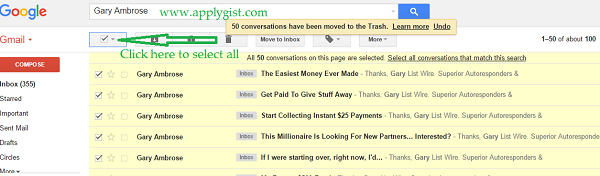
The bellow simple steps will help you resolve this issues by simply searching for the senders name, and all messages from such will appear, all you need to so is to select all and delete that is all.

After that select all Like Bellow Screen Shot
Now click the Delete Icon Tool As seen Bellow
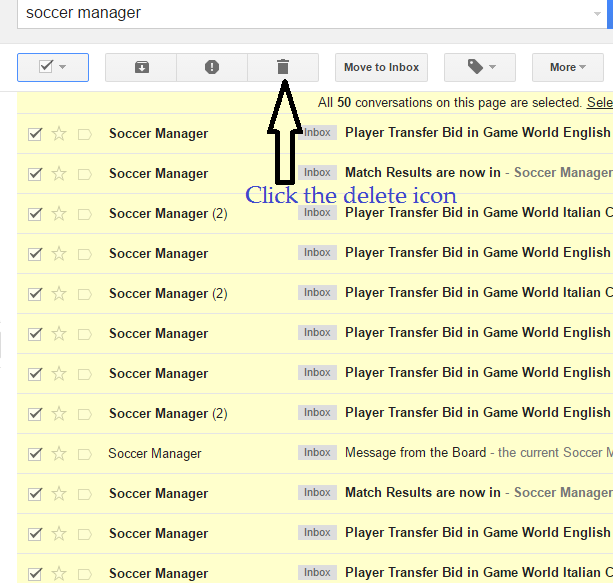
When the First Page gets deleted, click the select all Box and Click Delete till you Delete them all.
NOTE: You can reserve one of the Annoying mail. then click Report SPAM to prevent it from coming any further or unsubscribe from such sender totally
FINAL WORDS
DONT ALLOW TOO MUCH UNREAD MAILS IN YOUR INBOX USE THE ABOVE TO WIPE THEM OFF AND LEAVE YOUR MAIL BOX CLEAN AND TIDY
Go to link Download

Sunday, March 12, 2017
How to Recover Deleted SMS Messages from Galaxy S5 S6 S7
How to Recover Deleted SMS Messages from Galaxy S5 S6 S7
"I have a habit of cleaning my text messages regularly,and I also have stored many precious SMS on my Samsung Galaxy S5.Yesterday when I was deleting some useless messages as usual,I touched wrong buttons and deleted all text messages from my mobile phone all of a sudden.Do you know any good solution to help me recover deleted text messages from Samsung phone?Ill be really appreciated if you can help me."-Kam

Are you still crazy about your lost files,like deleted messages,photos,audios, videos,documents from your families,friends,lovers,etc. in your Samsung Galaxy phone because of your carelessness?Are you wondering how to retrieve deleted text messages on Samsung Galaxy S5/S6/S7?Things can be even worse that the deleted SMS means a lot for yourself and cant be reproduced.We usually say-"There is no medicine for regret".Nevertheless,when it comes to Samsung Message Recovery,there could be regret medicine indeed after you deleting the text messages and recover deleted SMS from Samsung Galaxy.
With Samsung SMS Recovery,you are able to recover deleted messages/SMS from Samsung mobile phone no matter you lose messages because of wrong operations,breaking device or formatting phone data.But you need to keep in mind that after deleting text messages from your Samsung phone mistakenly,you shouldnt send any message to any one or receive new SMS. Otherwise your new message data will overwrite those old ones,then you will lose your messages and may never get them back forever.
For Galaxy S6 users: how to recover deleted SMS on Galaxy S6/S6 Edge


How to Restore Deleted SMS/Messages from Galaxy S5/S6/S7
Step 1.Connect Samsung Phone to the computer
Download, install and run the program.Then connect your Samsung phone to PC via USB.

Step 2 Enable USB debugging on Your Samsung
If you have not opened the USB debugging option yet, this program will ask you to do it. Follow the way below to do it now.
1) For Android 2.3 or earlier: Enter "Settings" < Click "Applications" < Click "Development" < Check "USB debugging"
2) For Android 3.0 to 4.1: Enter "Settings" < Click "Developer options" < Check "USB debugging"
3) For Android 4.2 or newer: Enter "Settings" < Click "About Phone" < Tap "Build number" for several times until getting a note "You are under developer mode" < Back to "Settings" < Click "Developer options" < Check "USB debugging"
4) For Android 5.0 or newer: Tap "Settings" > "About Phone" to tap "Build number" seven times for "You are now a developer!" signal. Then, move to "Settings" > "Developer options" to turn on "USB debugging"

The program supports to scan different types of Samsung files, you can check the "select all" and scan all deleted data from your Samsung phone.
Step 3. Analyze and Scan Your Samsung Phone for Deleted Messages/SMS
Now the program needs to analyze your device before scanning it, you can click "Start" on the window below to begin it.After clicking "Start" on the programs window,it will begin to scan your Samsung.


Then go to your device when you get the window below. Here you need to move to your phone and tap on "Allow" to enable the Superuser Request.

Step 4.Preview and Restore Deleted Samsung Messages/SMS
When the scan finishes,you can preview the whole message contents in the scan result as a list. You can preview them one by one and choose those you want to recover and click "Recover" button to save them on your computer.

Note: You can see that messages found here contains those you deleted recently (displayed in orange) and those existing on your Samsung.You can separate them by using the button above: Only display deleted items.
Moreover, you can preview and restore contacts, photos and videos, as well as you do with the messages.
The Samsung Message Recovery supports to recover text messages/SMS/MMS, contacts,photos, videos and other deleted data from your Samsung device.Whether you accidentally deleted files or corrupted your OS through a software update or ROM flashing,the Samsung Message Recovery can restore your most important files from Samsung phone.
More Tips:
Tip 1.Stop updating any data on your Samsung phone after you deleted text messages by mistaken. Or the deleted messages may be overwritten and you can never get them back.
Tip 2.The powerful software supports to restore data from any models of Samsung smart phones,including Samsung Galaxy S3/S4/S5/S6/S6 Edge/S7/Note 3/Note 4/Note 5/Note 6 and more.
Tip 3.If your Samsung phone can’t be detected by the program, just check your phone OS and follow the right way to open USB debugging on the device.
Read more:
How to Recover Deleted Photos from Galaxy S6/S5/Note 5
How to Restore Deleted SMS from Galaxy S7
Go to link Download
Tuesday, October 11, 2016
How to restore deleted messages Undelete Facebook Find what is removed
How to restore deleted messages Undelete Facebook Find what is removed
How to restore deleted messages Undelete Facebook Find what is removed
Created with the new applications today, there is now a possibility to find deleted messages on facebook to recover. You can find out how here in this article.
Introduction
Today there are many applications out to find deleted messages on facebook. Many people say that what they have lost forever lost in Facebook. If you believe that then you believe in a lie. For your information, you can now.
What people think of first?
For applications that, for some reason and Facebook features, the task of how deleted messages were filed impossible Facebook. So many people believe that if the Delete button, it can never be retrieved. Therefore, the people that this is not true. I do not blame them, because in reality, informed Facebook us that although we can really.
If you work this new feature?
You can disable this feature if you accidentally deleted messages drowsiness caused by an error or boredom. It can not be avoided, and we must not forget that we are only human. Another way to use this feature if you want to see the posts people are eliminated, but it can be a dirty secret that they publish a notice offensive that the true personality of a person or a case of "Frape" tells them to recover and enjoy reading.
So how do you find deleted messages on Facebook?
In fact, there are four options for deleted Facebook messages to search. Here are the two ways:
1. E-mail alerts
Every time there is someone or had written a message, a copy of your e-mail. Consequently, one can easily check, there is the message in case there had been cleaned in Facebook. If it does not appear, please check your spam or junk mail folder because sometimes thinks your e-mail address of the server that the statements of junk mail or spam, and automatically puts it in the appropriate folder.
If you are not in your Facebook or junk folder or spam folder, then you probably have not checked in the settings. Here is a step-by-step guide on how to activate it in the account settings: First, check to Account Settings and click on Accounts. Then, click Communications, and only for the articles and news from Facebook in order to transfer files to your e-mail.
2. Save the URL link of deleted message
If you post the URL link stored in the isolation mode or extension of a vision (which is unlikely), then held the place. It is interesting to note that Facebook does not delete your old messages and announcements, behind a hidden or invisible mode. Strange as it seems, no one seems to know except for them, not to eliminate the reason they (if youre embarrassing messages that have been removed do to me are tired, its still there).
3. Find it in your story
If you are used to clear the browser history (probably because someone would be ashamed to know which sites you have visited), then you could find in this way, deleted messages on Facebook, lose again. Try to find it in your browser history, if you want so desperately desperate search deleted messages on Facebook, although more than a week ago.
Facebook applications
In fact, there are new applications that Facebook messages are secreted. Its actually funny when you are lifted each item to see any other reason than the eyes. You can laugh, you laugh, and you can of eyebrows to read what you raise. These applications are available as add-ons are on Facebook and other sites also able to recover deleted facebook messages to find, even if the process is a bit difficult.
What are the advantages of this function
In fact, there are things that you will benefit from the use of this function. On the one hand, if a person is sensitive (constant dreamer) to things by mistake, it is then you probably want. Gone are the times that he is unconscious, the consequences of the click, because you can recover.
Another advantage of this feature is to know what we are eliminating others. Now you know how bad or how painful that the post be deleted. Hard to not laugh at jokes or post really, but people laugh, thinking that their secrets safe with them. Basically, the biggest advantage that in the end that has no place or mail its not about you, you can breathe easy one.
In view of the disadvantages of this function
That nothing will be forgotten. This is a big disadvantage, because if you get something permanently saved through Facebook messaging and e-mail address on your account. What is placed, you can remove any more, even the annoying messages. Another disadvantage is that you have privacy, because its plain to see, what you achieved even if the loss is removed. People can use this function and see who you are, you feel that you unzipped your pants unbuttoned with or sit.
"Frape" Prone
You know what a Frape? Frape, if someone hacks into your Facebook account and posts false or embarrassing things about you. After this function, something misspelled or embarrassed about themselves will never be removed. In short, whats done is done. And there are - you can not delete a scar, a memory that can not be forgotten.
Survey
If you feel that you can not delete Facebook messages to look for then you are wrong. With this function you can now have access to this privilege (or curse, if others have access to, and use it on your account). Simply put, he pros and cons are, but if used sparingly and, when used by older people, a great feature. To put it briefly, now you can find deleted messages on facebook.
How to restore deleted messages Undelete Facebook Find what is removed
Introduction
Today there are many applications out to find deleted messages on facebook. Many people say that what they have lost forever lost in Facebook. If you believe that then you believe in a lie. For your information, you can now.
What people think of first?
For applications that, for some reason and Facebook features, the task of how deleted messages were filed impossible Facebook. So many people believe that if the Delete button, it can never be retrieved. Therefore, the people that this is not true. I do not blame them, because in reality, informed Facebook us that although we can really.
If you work this new feature?
You can disable this feature if you accidentally deleted messages drowsiness caused by an error or boredom. It can not be avoided, and we must not forget that we are only human. Another way to use this feature if you want to see the posts people are eliminated, but it can be a dirty secret that they publish a notice offensive that the true personality of a person or a case of "Frape" tells them to recover and enjoy reading.
So how do you find deleted messages on Facebook?
In fact, there are four options for deleted Facebook messages to search. Here are the two ways:
1. E-mail alerts
Every time there is someone or had written a message, a copy of your e-mail. Consequently, one can easily check, there is the message in case there had been cleaned in Facebook. If it does not appear, please check your spam or junk mail folder because sometimes thinks your e-mail address of the server that the statements of junk mail or spam, and automatically puts it in the appropriate folder.
If you are not in your Facebook or junk folder or spam folder, then you probably have not checked in the settings. Here is a step-by-step guide on how to activate it in the account settings: First, check to Account Settings and click on Accounts. Then, click Communications, and only for the articles and news from Facebook in order to transfer files to your e-mail.
2. Save the URL link of deleted message
If you post the URL link stored in the isolation mode or extension of a vision (which is unlikely), then held the place. It is interesting to note that Facebook does not delete your old messages and announcements, behind a hidden or invisible mode. Strange as it seems, no one seems to know except for them, not to eliminate the reason they (if youre embarrassing messages that have been removed do to me are tired, its still there).
3. Find it in your story
If you are used to clear the browser history (probably because someone would be ashamed to know which sites you have visited), then you could find in this way, deleted messages on Facebook, lose again. Try to find it in your browser history, if you want so desperately desperate search deleted messages on Facebook, although more than a week ago.
Facebook applications
In fact, there are new applications that Facebook messages are secreted. Its actually funny when you are lifted each item to see any other reason than the eyes. You can laugh, you laugh, and you can of eyebrows to read what you raise. These applications are available as add-ons are on Facebook and other sites also able to recover deleted facebook messages to find, even if the process is a bit difficult.
What are the advantages of this function
In fact, there are things that you will benefit from the use of this function. On the one hand, if a person is sensitive (constant dreamer) to things by mistake, it is then you probably want. Gone are the times that he is unconscious, the consequences of the click, because you can recover.
Another advantage of this feature is to know what we are eliminating others. Now you know how bad or how painful that the post be deleted. Hard to not laugh at jokes or post really, but people laugh, thinking that their secrets safe with them. Basically, the biggest advantage that in the end that has no place or mail its not about you, you can breathe easy one.
In view of the disadvantages of this function
That nothing will be forgotten. This is a big disadvantage, because if you get something permanently saved through Facebook messaging and e-mail address on your account. What is placed, you can remove any more, even the annoying messages. Another disadvantage is that you have privacy, because its plain to see, what you achieved even if the loss is removed. People can use this function and see who you are, you feel that you unzipped your pants unbuttoned with or sit.
"Frape" Prone
You know what a Frape? Frape, if someone hacks into your Facebook account and posts false or embarrassing things about you. After this function, something misspelled or embarrassed about themselves will never be removed. In short, whats done is done. And there are - you can not delete a scar, a memory that can not be forgotten.
Survey
If you feel that you can not delete Facebook messages to look for then you are wrong. With this function you can now have access to this privilege (or curse, if others have access to, and use it on your account). Simply put, he pros and cons are, but if used sparingly and, when used by older people, a great feature. To put it briefly, now you can find deleted messages on facebook.
How to restore deleted messages Undelete Facebook Find what is removed
Go to link Download
Subscribe to:
Posts (Atom)