Showing posts with label off. Show all posts
Showing posts with label off. Show all posts
Monday, January 30, 2017
How do I get real player cloud icon off my computer
How do I get real player cloud icon off my computer
Hi Friends,
Today we got an issue where our Tier-1 support engineer spent almost four hours in trying to get rid of Real player cloud icon which is a system folder icon that shows in my computer under others list underneath the hard drive icons.It looks just like the icons listed under other in the following picture but you can not find an easy way to remove it.Real Player Cloud icon is such a stubborn icon that you can not get rid of easily.
This issue actually occurred after one of our clients uninstalled the Real player Cloud from his computer.He did not know that he would not completely get rid of the real player.So after it was uninstalled he went to Computer and found the Real Player Cloud system folder there.He tried to remove it, he checked the add remove program ( Program and features ) and scrolled through the list but did not find Real Player there.He then checked the control panel if he could find the real player cloud icon so that he could uninstall it from there but did not find any icons for Real player.Checked the start up items by going to Run-> typing "Msconfig" and in the system configuration utility clicked on start up and unchecked everything he could find related to the Real Player Cloud.So after doing all this he Googled about this issue and reached a support forum for Real Player here is the link of that support forum https://realnetworks.zendesk.com/entries/26869617-Uninstall-Realplayer-Cloud he read it and tried all the steps to get Rid of that.So he re-installed and uninstalled it but the same issue persists.
After the uninstall he was instructed to do the following
Delete the RealPlayer folders.
To delete the folders for RealPlayer located at:
c:program files ealRealPlayer
c:program filescommon files eal
1. Go to My Computer.
2. Go to C: or Local Disk (C:).
3. Go to the Program Files folder.
4. Go to the Real folder.
5. Delete the RealPlayer folder: c:program files ealRealPlayer
6. Go back to the Program Files folder.
7. Go to the Common Files folder.
8. Delete the Real folder: c:program filescommon files eal
NOTE: If you have a 64-bit operating system, the RealPlayer folders will be in a different location:
c:program files x86 ealRealPlayer
c:program files x86common files eal
1. Go to My Computer.
2. Go to C: or Local Disk (C:).
3. Go to the Program Files folder.
4. Go to the Real folder.
5. Delete the RealPlayer folder: c:program files x 86 ealRealPlayer
6. Go back to the Program Files folder.
7. Go to the Common Files folder.
8. Delete the Real folder: c:program files x86common files eal
After doing all these troubleshooting he was told to delete RPcloudview.dll file he searched through the computer and could not find that.He also checked process named recordingmanager.exe*32 and rndlresolversvc.exe*32 , Ended the process and deleted the file associated with them but could not get rid of the icon.
When I got this case escalated to me I got confused for some time as what to do next.
When I searched the Google I found apart from the Main executable file of Real Player (C:Program Files eal ealplayer ealplay.exe) there are multiple other files which were installed and they are as following.
rdsf3260.dll - RealPlayer (32-bit) (Audio Filter Plugin)
convert.exe - RealConverter
dbghelp.dll (by Microsoft) - Debugging Tools for Windows(R) (Windows Image Helper)
dunzip32.dll (by Inner Media) - DynaZIP-32 Multi-Threading UnZIP DLL
fixrjb.exe - RealNetworks RealPlayer (RealNetworks Fix RJB Application)
hxaudiodevicehook.dll - HXAudioDeviceHook Module
ierjplug.dll - ierjplug Module
mediainfo.dll (by MediaArea.net) - MediaInfo (All about your audio and video files)
mmcdda32.dll - RealNetworks CD Extract Component
realcleaner.exe - RealCleaner
realconverter.exe
realjbox.exe
realshare.exe - RealShare (RealShare Launcher)
realtrimmer.exe - RealTrimmer
rjbres.dll - RealPlayer (Resources)
rjdlg.dll - My Media Component
rjprog.dll
rjwmapln.dll - Windows Media Audio import plugin
rndevicedbbuilder.exe - rndevicedblauncher (RN Device DB Builder)
rpau3260.dll - rpautostream Module
rphelperapp.exe - RealNetworks Helper Application
rpplugprot.dll - rpplugprot module
rpshell.dll - RealPlayer Shell Extensions
rpshellextension.dll (by RealPlayer) - RealPlayer shellextension
rpshellsearch.dll - RealPlayer Search Shell Extension
rpwa3260.dll - RealPlayer Plugin
tnetdtct.dll - RealNetworks Online Utility
tpasdk.dll - RealNetworks Playback System
tsasdk.dll - RealNetworks Utility Services
wmdmhelper.dll - RealNetworks Products (32-bit) (WMDM PD Helper Plugin)
cddbcontrol.dll (by Gracenote) - CDDBControl Core Module
cddblink.dll (by Gracenote) - CddbLink Module
cddbmusicid.dll (by Gracenote) - CddbMusicID M
So in order to remove the real player cloud icon from my computer folder I am supposed to delete these files and folder too but I did not deal with any of those files.
I went to the C:/ drive and open the "Documents and Settings" folder .Go to your Windows username folder and click the "Application Data" folder and then find the "Real" folder and delete it.For windows 7 you can go to c:/users/UserName/AppData and delete the folder named Real from there.
I started researching and found this nice article to delete Namespace key contents from registry.This key lists several cryptic folders which define the icons that are displayed in My Computer in Windows Explorer.So delete all the subkeys listed under NameSpace key.To delete them do the following steps.
Steps to delete NameSpace Key contents
1). Click on start, Go to Run and Type Regedit and click ok.
2). Then navigate to the following key "HKEY_LOCAL_MACHINESOFTWAREMicrosoftWindowsCurrentVersionExplorerMyComputerNameSpace"
3). I deleted all the key under NameSpace and rebooted the computer I still see the Real Player Cloud icon in My Computer in Windows Explorer.
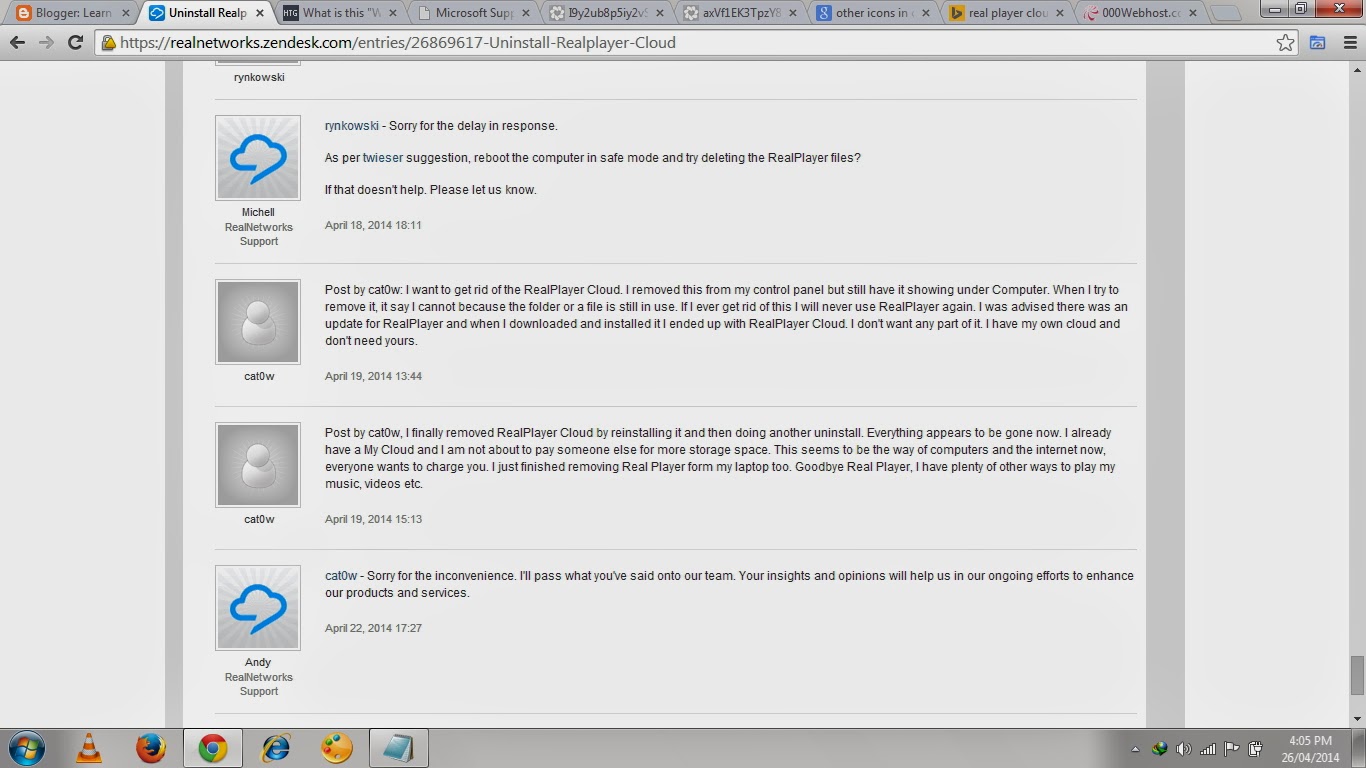
I searched the forum and found this apologies as shown in the picture- 13 (c) below from Real network support guys that they were sorry for the inconvenience and they apologize and are researching to fix this issue.
4. So then I opened the registry and started finding keys with keyword Real Player, Cloud and Real network and deleted all the keys related to Real player or Real player cloud or real network and I got 80% success as the Real Player cloud does not show up but I still had a Light White color Icon which reads System Folder in My Computer in Windows Explorer.
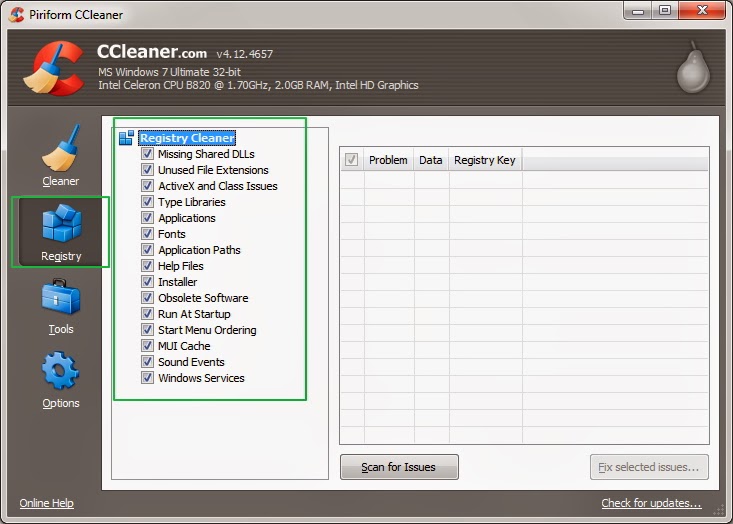
Then this Idea struck in my mind that why dont I clean the registry for left over file.So I Opened CCleaner and Clicked the Registry option at the left hand side and selected all the items to scan.So I scanned the registry with CCleaner as shown in the Pic-13(e) and It fixed all the issues related ton Registry and Bingo....!!!
That Real Player Cloud has gone away...I restarted the computer and It just worked fine.
Now I repent spending that much time in Removing Real Player Cloud icon while I wonder I could just take that off My Computer within 5 minutes after scanning the registry with CCleaner and fixing all the issues.
Conclusion: To remove real Player cloud icon from computer first delete the namespace and delegated folder entry from registry as shown in the above steps and then remove from other places in registry and clean the leftover registry items using the Ccleaners the regitry fix option.
Thanks for reading...
Happy Troubleshooting..!!!
Nasir
Today we got an issue where our Tier-1 support engineer spent almost four hours in trying to get rid of Real player cloud icon which is a system folder icon that shows in my computer under others list underneath the hard drive icons.It looks just like the icons listed under other in the following picture but you can not find an easy way to remove it.Real Player Cloud icon is such a stubborn icon that you can not get rid of easily.
 |
| RealPlayer Cloud icon, Pic-13(a) |
This issue actually occurred after one of our clients uninstalled the Real player Cloud from his computer.He did not know that he would not completely get rid of the real player.So after it was uninstalled he went to Computer and found the Real Player Cloud system folder there.He tried to remove it, he checked the add remove program ( Program and features ) and scrolled through the list but did not find Real Player there.He then checked the control panel if he could find the real player cloud icon so that he could uninstall it from there but did not find any icons for Real player.Checked the start up items by going to Run-> typing "Msconfig" and in the system configuration utility clicked on start up and unchecked everything he could find related to the Real Player Cloud.So after doing all this he Googled about this issue and reached a support forum for Real Player here is the link of that support forum https://realnetworks.zendesk.com/entries/26869617-Uninstall-Realplayer-Cloud he read it and tried all the steps to get Rid of that.So he re-installed and uninstalled it but the same issue persists.
After the uninstall he was instructed to do the following
Delete the RealPlayer folders.
To delete the folders for RealPlayer located at:
c:program files ealRealPlayer
c:program filescommon files eal
1. Go to My Computer.
2. Go to C: or Local Disk (C:).
3. Go to the Program Files folder.
4. Go to the Real folder.
5. Delete the RealPlayer folder: c:program files ealRealPlayer
6. Go back to the Program Files folder.
7. Go to the Common Files folder.
8. Delete the Real folder: c:program filescommon files eal
NOTE: If you have a 64-bit operating system, the RealPlayer folders will be in a different location:
c:program files x86 ealRealPlayer
c:program files x86common files eal
1. Go to My Computer.
2. Go to C: or Local Disk (C:).
3. Go to the Program Files folder.
4. Go to the Real folder.
5. Delete the RealPlayer folder: c:program files x 86 ealRealPlayer
6. Go back to the Program Files folder.
7. Go to the Common Files folder.
8. Delete the Real folder: c:program files x86common files eal
After doing all these troubleshooting he was told to delete RPcloudview.dll file he searched through the computer and could not find that.He also checked process named recordingmanager.exe*32 and rndlresolversvc.exe*32 , Ended the process and deleted the file associated with them but could not get rid of the icon.
When I got this case escalated to me I got confused for some time as what to do next.
When I searched the Google I found apart from the Main executable file of Real Player (C:Program Files eal ealplayer ealplay.exe) there are multiple other files which were installed and they are as following.
rdsf3260.dll - RealPlayer (32-bit) (Audio Filter Plugin)
convert.exe - RealConverter
dbghelp.dll (by Microsoft) - Debugging Tools for Windows(R) (Windows Image Helper)
dunzip32.dll (by Inner Media) - DynaZIP-32 Multi-Threading UnZIP DLL
fixrjb.exe - RealNetworks RealPlayer (RealNetworks Fix RJB Application)
hxaudiodevicehook.dll - HXAudioDeviceHook Module
ierjplug.dll - ierjplug Module
mediainfo.dll (by MediaArea.net) - MediaInfo (All about your audio and video files)
mmcdda32.dll - RealNetworks CD Extract Component
realcleaner.exe - RealCleaner
realconverter.exe
realjbox.exe
realshare.exe - RealShare (RealShare Launcher)
realtrimmer.exe - RealTrimmer
rjbres.dll - RealPlayer (Resources)
rjdlg.dll - My Media Component
rjprog.dll
rjwmapln.dll - Windows Media Audio import plugin
rndevicedbbuilder.exe - rndevicedblauncher (RN Device DB Builder)
rpau3260.dll - rpautostream Module
rphelperapp.exe - RealNetworks Helper Application
rpplugprot.dll - rpplugprot module
rpshell.dll - RealPlayer Shell Extensions
rpshellextension.dll (by RealPlayer) - RealPlayer shellextension
rpshellsearch.dll - RealPlayer Search Shell Extension
rpwa3260.dll - RealPlayer Plugin
tnetdtct.dll - RealNetworks Online Utility
tpasdk.dll - RealNetworks Playback System
tsasdk.dll - RealNetworks Utility Services
wmdmhelper.dll - RealNetworks Products (32-bit) (WMDM PD Helper Plugin)
cddbcontrol.dll (by Gracenote) - CDDBControl Core Module
cddblink.dll (by Gracenote) - CddbLink Module
cddbmusicid.dll (by Gracenote) - CddbMusicID M
So in order to remove the real player cloud icon from my computer folder I am supposed to delete these files and folder too but I did not deal with any of those files.
I went to the C:/ drive and open the "Documents and Settings" folder .Go to your Windows username folder and click the "Application Data" folder and then find the "Real" folder and delete it.For windows 7 you can go to c:/users/UserName/AppData and delete the folder named Real from there.
I started researching and found this nice article to delete Namespace key contents from registry.This key lists several cryptic folders which define the icons that are displayed in My Computer in Windows Explorer.So delete all the subkeys listed under NameSpace key.To delete them do the following steps.
Steps to delete NameSpace Key contents
1). Click on start, Go to Run and Type Regedit and click ok.
2). Then navigate to the following key "HKEY_LOCAL_MACHINESOFTWAREMicrosoftWindowsCurrentVersionExplorerMyComputerNameSpace"
 |
| Remove real player cloud icon from registry Pic-13(b) |
I searched the forum and found this apologies as shown in the picture- 13 (c) below from Real network support guys that they were sorry for the inconvenience and they apologize and are researching to fix this issue.
 |
| Pic-13(c) |
 |
| Pic-13(d) |
Then this Idea struck in my mind that why dont I clean the registry for left over file.So I Opened CCleaner and Clicked the Registry option at the left hand side and selected all the items to scan.So I scanned the registry with CCleaner as shown in the Pic-13(e) and It fixed all the issues related ton Registry and Bingo....!!!
That Real Player Cloud has gone away...I restarted the computer and It just worked fine.
 |
| Pic-13(e) |
Now I repent spending that much time in Removing Real Player Cloud icon while I wonder I could just take that off My Computer within 5 minutes after scanning the registry with CCleaner and fixing all the issues.
Conclusion: To remove real Player cloud icon from computer first delete the namespace and delegated folder entry from registry as shown in the above steps and then remove from other places in registry and clean the leftover registry items using the Ccleaners the regitry fix option.
Thanks for reading...
Happy Troubleshooting..!!!
Nasir
Go to link Download

Wednesday, September 28, 2016
Get 40 OFF Blu ray DVD Copy to Copy Thanksgiving Blu ray DVDs on PC Mac
Get 40 OFF Blu ray DVD Copy to Copy Thanksgiving Blu ray DVDs on PC Mac
Thanksgiving Day is coming. Some of you are probably planning the Thanksgiving menus for your family while some are ready for selecting the best Thanksgiving present for their parents. With great blessing and best wishes, Pavtube Studio also prepared a big gift for their consumer - Thanksgiving Promotion 2015 to celebrate Thanksgiving Day with our friends. Focusing on product quality and customer needs, Pavtube offers up to 40% discount for hot products to reward our customers.

Thanksgiving Day always comes with movies. I believe you must have prepared some Thanksgiving movies for enjoy with your family after dinner. With this wish, how can you bear the incompatibility issue when playing Thanksgiving Blu-ray/DVD movies on your HD TV, iPad, 4K Projector, etc. To avoid the embarrassing situation, you’d better rip the Blu-ray/DVD movies to your multimedia players with most compatible format and specs by using
Pavtube BDMagic for Windows / Mac
Pavtube DVDAid for Windows / Mac
Pavtube ByteCopy for Windows / Mac
When enjoying the Thanksgiving movies and having the Thanksgiving dinner together, how can you not record the scene to remember the warm time? After you record the happy time, you maybe want to edit the shooting in iMovie, FCP, Premiere Pro CC, etc before you sent it to your other family members or share it on Facebook. While putting the shoot into video editing program, you probably need the help of Pavtube Video Converter Ultimate and iMedia Converter for Mac, which can convert your HD/4K shoot to H.265 MKV/MP4, HD MP4, QuickTime, MOV, ProRes, AIC, DNxHD, MPEG-2, WMV, H.264, MPEG-4, etc. for your FCP X, iMovie, Premiere Pro CC, Sony Vegas Pro 13, Windows Media Player, VLC, Youtube, etc. On Windows 10/8.1/8/7/XP and Mac OS X 10.11 El Capitan, 10.10 Yosemite, 10.9 Mavericks, 10.8 Mountain Lion, 10.7, 10.6, 10.5.
Pavtube Video/BD/DVD software can convert Blu-ray/DVD, 4K/SD/HD video in any format to H.265 MP4/MKV, M3U8, MP4, MOV, MKV, AVI, M4V, etc. Especially, ByteCopy can rip Blu-ray/DVD to lossless MKV keeping multi-track subtitle/audio and all chapter markers. What’s more, Pavtube adds optimized preset profile for main digital products, like TV series, iPad, iPhone, Samsung, Sony, PS3/PSP, Xbox One/360, Android Tablet/Phone, Surface, etc.
Hot Search: Blu-ray Tips | DVD Tips | Chromecast Tips | Roku Tips | PS4 Tips
All of the products can be get now at up to 40% off discount. Below is the list:
1. 40% OFF Pavtube DVDAid for Windows/Mac
Original price: $35
Now: $21
Reasons to choose Pavtube DVDAid


2. 30% OFF Pavtube BDMagic for Windows/Mac
Original price: $49
Now: $34.3
Reasons to choose Pavtube BDMagic
3. 20% OFF Pavtube ByteCopy for Windows/Mac
Original price: $42
Now: $33.6
Reasons to choose Pavtube ByteCopy
4. 20% OFF Pavtube Video Converter Ultimate for Windows/Mac
Original price: $65
Now: $52
You won’t get a Blu-ray/DVD Software at such low price in normal days. So if you have a plan to purchase a BD/DVD/Video Converter in the near future, why not push the schedule forward and get it in Pavtube Thanksgiving Promotion activity.
Additional: To help you make a wise choice, I did a deep review and comparison between the four backup tools. You can check out the differences and then choose the favorite to create high quality Blu-ray/DVD/ISO/4K/HD Video and Movie backups: Pavtube Softwares Comparison: ByteCopy vs BDMagic vs DVDAid vs Video Converter Ultimate
Related Guides
1. Pavtube DVDAid for Windows/Mac Guides
PS. Have more questions about how to download, buy and use our Blu-ray/DVD Ripper, various Video Converter programs, please feel free to contact us>> or leave a message on our Official Facebook.
Thanksgiving Day always comes with movies. I believe you must have prepared some Thanksgiving movies for enjoy with your family after dinner. With this wish, how can you bear the incompatibility issue when playing Thanksgiving Blu-ray/DVD movies on your HD TV, iPad, 4K Projector, etc. To avoid the embarrassing situation, you’d better rip the Blu-ray/DVD movies to your multimedia players with most compatible format and specs by using
Pavtube BDMagic for Windows / Mac
Pavtube DVDAid for Windows / Mac
Pavtube ByteCopy for Windows / Mac
When enjoying the Thanksgiving movies and having the Thanksgiving dinner together, how can you not record the scene to remember the warm time? After you record the happy time, you maybe want to edit the shooting in iMovie, FCP, Premiere Pro CC, etc before you sent it to your other family members or share it on Facebook. While putting the shoot into video editing program, you probably need the help of Pavtube Video Converter Ultimate and iMedia Converter for Mac, which can convert your HD/4K shoot to H.265 MKV/MP4, HD MP4, QuickTime, MOV, ProRes, AIC, DNxHD, MPEG-2, WMV, H.264, MPEG-4, etc. for your FCP X, iMovie, Premiere Pro CC, Sony Vegas Pro 13, Windows Media Player, VLC, Youtube, etc. On Windows 10/8.1/8/7/XP and Mac OS X 10.11 El Capitan, 10.10 Yosemite, 10.9 Mavericks, 10.8 Mountain Lion, 10.7, 10.6, 10.5.
Pavtube Video/BD/DVD software can convert Blu-ray/DVD, 4K/SD/HD video in any format to H.265 MP4/MKV, M3U8, MP4, MOV, MKV, AVI, M4V, etc. Especially, ByteCopy can rip Blu-ray/DVD to lossless MKV keeping multi-track subtitle/audio and all chapter markers. What’s more, Pavtube adds optimized preset profile for main digital products, like TV series, iPad, iPhone, Samsung, Sony, PS3/PSP, Xbox One/360, Android Tablet/Phone, Surface, etc.
Hot Search: Blu-ray Tips | DVD Tips | Chromecast Tips | Roku Tips | PS4 Tips
All of the products can be get now at up to 40% off discount. Below is the list:
1. 40% OFF Pavtube DVDAid for Windows/Mac
Original price: $35
Now: $21
Reasons to choose Pavtube DVDAid
2. 30% OFF Pavtube BDMagic for Windows/Mac
Original price: $49
Now: $34.3
Reasons to choose Pavtube BDMagic
3. 20% OFF Pavtube ByteCopy for Windows/Mac
Original price: $42
Now: $33.6
Reasons to choose Pavtube ByteCopy
4. 20% OFF Pavtube Video Converter Ultimate for Windows/Mac
Original price: $65
Now: $52
You won’t get a Blu-ray/DVD Software at such low price in normal days. So if you have a plan to purchase a BD/DVD/Video Converter in the near future, why not push the schedule forward and get it in Pavtube Thanksgiving Promotion activity.
Additional: To help you make a wise choice, I did a deep review and comparison between the four backup tools. You can check out the differences and then choose the favorite to create high quality Blu-ray/DVD/ISO/4K/HD Video and Movie backups: Pavtube Softwares Comparison: ByteCopy vs BDMagic vs DVDAid vs Video Converter Ultimate
Related Guides
1. Pavtube DVDAid for Windows/Mac Guides
- Rip DVD with 99 Titles Strict Copy Protections on Win/Mac
- Upload DVDs to Google Drive for accessing on Phone/Tablet
- Stream DVD Movies to Watch on PS4 with Plex Media Server
- Add SRT/ASS/SSA Hard Subtitles to DVD Movies
- Stream Blu-ray/DVD Movies for Playing on Roku 4
- Backup Blu-rays to Dropbox for Easy Viewing and Sharing
- Backup Blu-ray to Synology DiskStation DS215j for Smart TV
- Watch Blu-ray/DVD on Mac Mini HTPC via XBMC With Lossless Quality
- Encode Blu-ray to TrueHD 7.1 Audio MKV on Windows 10/8.1/8
- Play 3D Blu-ray Movies on WD TV Live/Live Plus/Live Hub/Live Streaming
- How to preserve Blu-ray chapter markers in digital copies?
- Rip Blu-ray movies to MKV/MP4 for playing with Kodi (XBMC)
- Enjoy Blu-ray/DVD/Video on LG Ultra 4K TV Windows and Mac
- Watch 3D Yify Movie on Samsung Gear VR with 3D SBS format
- Save Movies and Videos on Dropbox, Google Drive, OneDrive, Box
- Edit BDMV Files with QuickTime, iMovie, FCP on Mac OS X El Capitan
PS. Have more questions about how to download, buy and use our Blu-ray/DVD Ripper, various Video Converter programs, please feel free to contact us>> or leave a message on our Official Facebook.
Source:http://open-media-community.com/2015/11/11/pavtube-thanksgiving-coupon/
Go to link Download
Subscribe to:
Posts (Atom)