Saturday, April 1, 2017
How to Delete Paint Recent Pictures from List in Windows 7
How to Delete Paint Recent Pictures from List in Windows 7

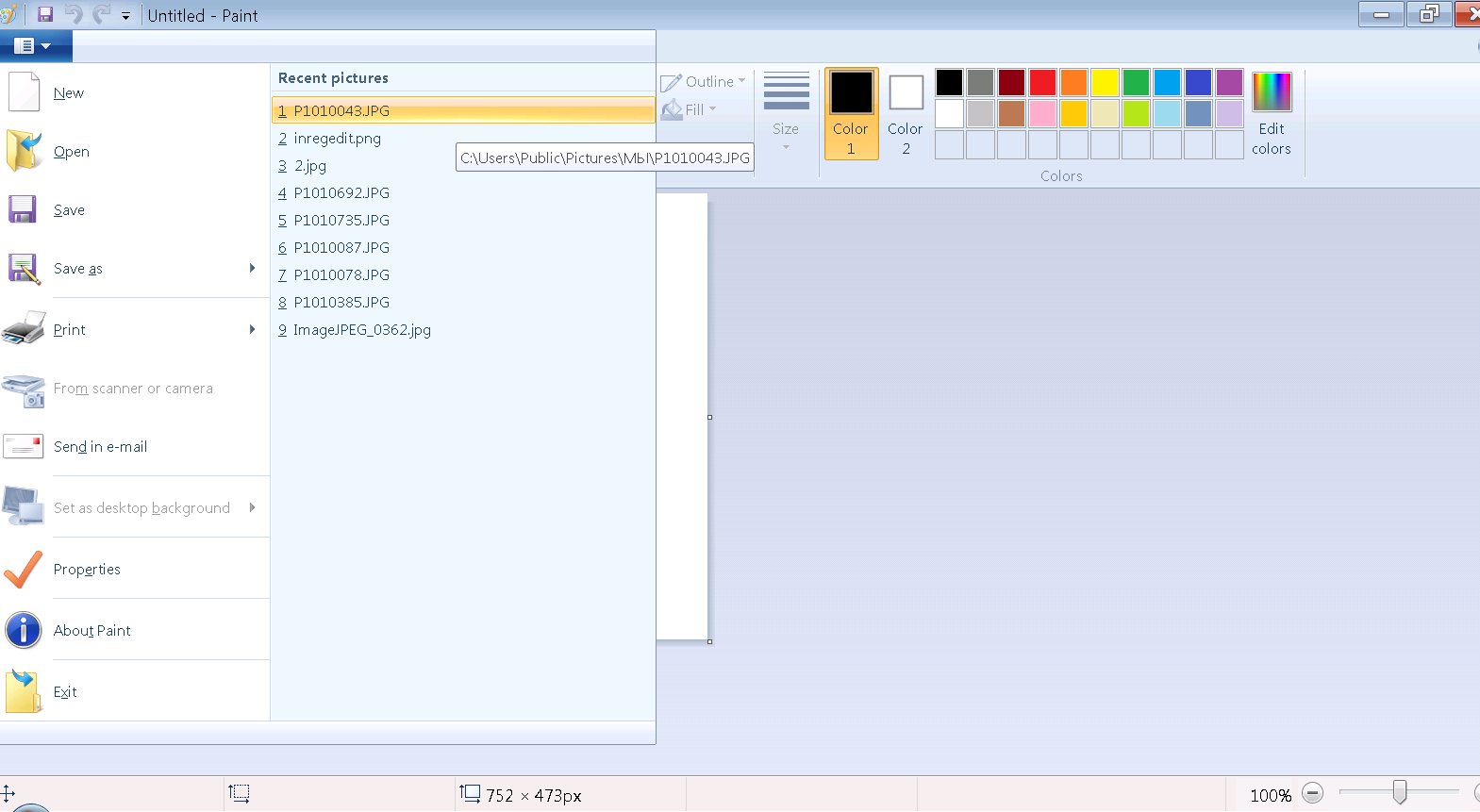
This tutorial will show you how to delete all or specific Recent pictures from the file button -> go to new/ Open/ and Save drop down menus in Paint (mspaint) for your user account in Windows 7 & Windows 8.
This can be handy if a recent file in the "Recent pictures" list is no longer available but still listed, or if you just wanted to clear the recent file history in your user accounts Paint from any prying eyes.
EXAMPLE: "Recent Pictures" in Paint ( mspaint.exe )
OPTION ONE:
To Delete Specific "Recent pictures" in Paint
1. Press the Windows + R keys to open the Run dialog, type regedit, and press Enter.
2. If prompted by UAC, then click/tap on Yes.
NOTE: Standard users will not be prompted for this.
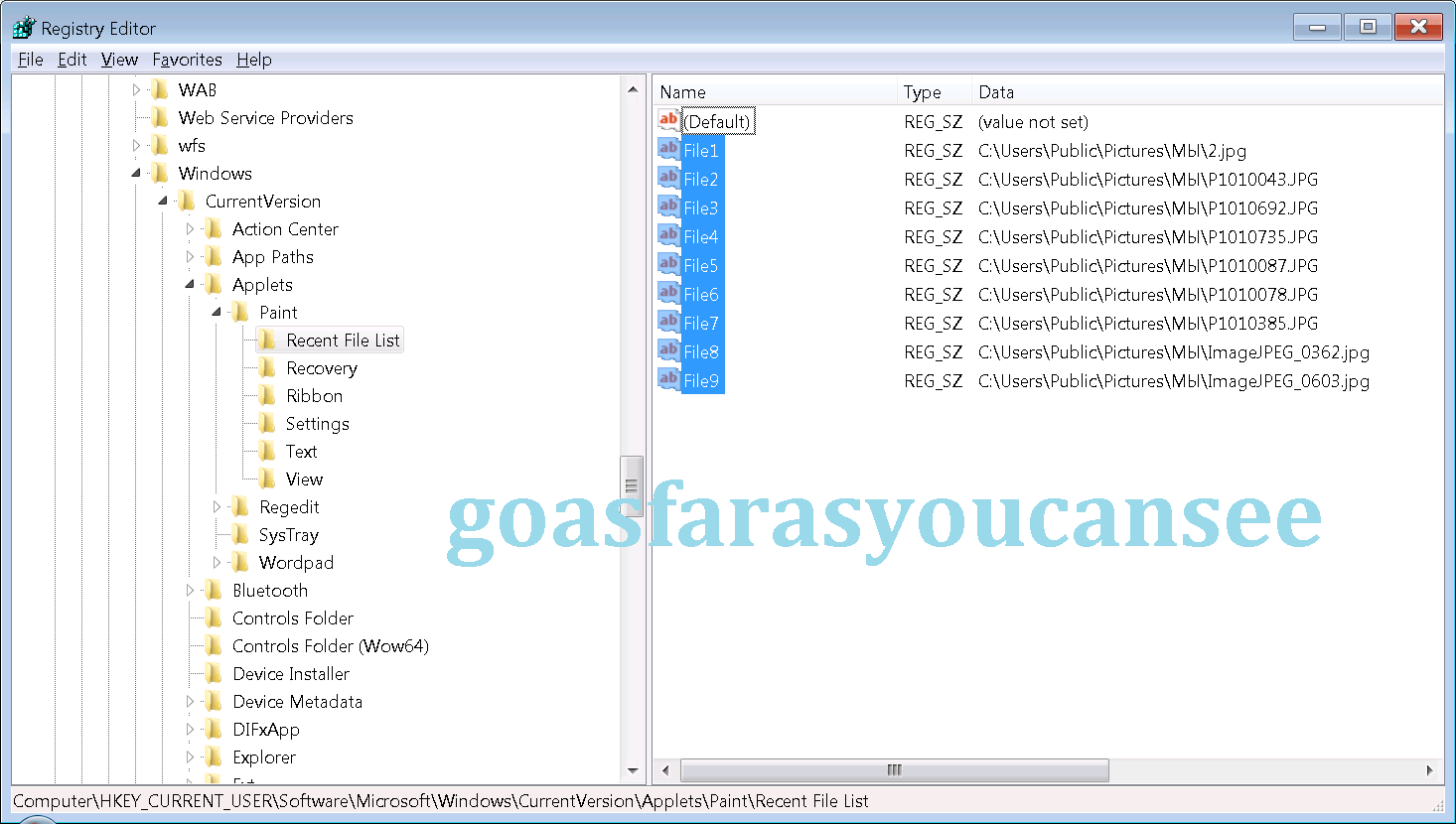
HKEY_CURRENT_USERSoftwareMicrosoftWindowsCurrentVersionAppletsPaintRecent File List
4. In the right pane of Recent File List, look for a listed File# string value that has the recent picture path that you wanted to delete. When found, right click on the File, and click/tap on Delete.
5. Click/tap on Yes to approve deleting it.
6. Repeat steps 4 and 5 if you would like to delete any other "Recent pictures" from the list in Paint.
7. When finished, close regedit.
8. If Paint is open, then close and reopen it to apply.
OPTION TWO:
To Reset and Clear All "Recent pictures" in Paint with a REG File
1. Click/tap on the Download link below to download the file below.
Reset_and_Clear_Paint_Recent_Pictures_List.reg
download
2. Save the .reg file to your Desktop.
3. Double click/tap on the downloaded .reg file to merge it.
4. If prompted, click/tap on Run, Yes (UAC), Yes, and OK to approve the merge.
5. If Paint is open, then close and reopen it to apply.
6. When done, you can delete the downloaded .reg file if you like.

Go to link Download

Thursday, February 23, 2017
How to Resolve Application Hangs in Task Manager Processs list after being closed
How to Resolve Application Hangs in Task Manager Processs list after being closed
Application Hangs in Task Manager Processs list after being closed
I have an application which uses Winsock control for TCP/IP communications. If I start the application and close it without connecting to a device through Winsock then the application goes away at that time in the Process tab of Task Manager.
If I start the application and then use it to connect to a socket on the server and then disconnect and close the application ...
The Application stays in the Processes list of task manager for about 20 seconds.
I have only seen this happen on SOME Windows 7 64bit machines...
not all.
I wonder if the client is running some type of monitoring program that may be holding this.
Any way to track this down?
Any ideas at all would be helpful
Thanks
Solutions to the Problem Application Hangs in Task Manager Processs list after being closed
Download SmartPCFixer to Fix It (Free)
Use the System File Checker tool to repair corrupted or missing system files:
- Click Start.
- Type cmd, and then press CTRL+SHIFT+ENTER to open the elevated command prompt (I.e. Command prompt with administrative rights).
- The User Account Control window should appear, be sure that the action it exhibits is correct, and then press the Continue button.
- Type or copy paste the below command line into it without quotes:
- "Sfc /scannow"
Another Safe way to Fix the Problem: Application Hangs in Task Manager Processs list after being closed:


How to Fix Application Hangs in Task Manager Processs list after being closed with SmartPCFixer?
1. Download Error Fixer . Install it on your system. Click Scan, and it will perform a scan for your computer. The errors will be shown in the scan result.

2. After the scan is finished, you can see the errors and problems which need to be fixed.

3. When the Fixing part is finished, your computer has been speeded up and the errors have been fixed

Related: error message fsui.exe/ wlidcli.dll is missing
,Solution to Error: Excel: Automatic number generation
,Troubleshoot:i wanna change language of all windows in Windows 7 Home Premium
,Troubleshooting:IF Function, if the vendor ID in column A matches any of the vendor IDs in column F, I want 1099 to appear in column D. Error
,Fast Solution to Problem: ReadyBoost is not working properly in my computer
,Troubleshoot:Error: "0x81000032 make sure the C: drive is online and set to NTFS" when trying to backup to external hard drive. Error,External Hard Drive not listed in Windows 7 backup wizard Tech Support,Tech Support: Im always being signed off so annoying,Solution to Problem: Impossible to use Internet Explorer! I keep getting the same error message every time i try to use IE.,Referencing data in Access using Excel [Anwsered],Need Best Way To Present Data [Anwsered],Same question but for windows 7 home edition,sometimes fullscreen wont activate [Solved],Solution to Error: We bought a new computer with windows 7 and it is constantly freezing. How do we fix this?,Solution to Error: Windows 8 update crash (2013-07-22),brclr.dll.mu_ Missing Error Fixer,How To Resolve Missing fin_myagtui.eng Problem,Corrupted f_0006ad File - How to Fix,nkebigvg.cpl Not Found Error Fixer,Corrupted olcontrols.ocx File - How to Fix
Read More: Troubleshoot:Apps and PC Setting do not work after upgrading to Windows 8.1 Error,Troubleshooting:Amazon Unbox wont play videos "error code 0xC00D2728",An unhandled exception - Error 0x1A88 [Solved],How Can I Fix - Another Hyperlink Editing Task?,How to Fix Problem - Annoying popup?,After Windows Update CD/DVD drive does not work,After installing windows 7 to laptop the labels print out of line how can I fix it,After my computer sleeps the wireless always disconnects and will no reconnect,After signing into Pogo.com, I get a message" This tab has been recovered"....what does this mean and how do I fix it.....,All desktop icons changed to windows live and does not open
Go to link Download