Showing posts with label options. Show all posts
Showing posts with label options. Show all posts
Sunday, March 26, 2017
How to enable DEVELOPER OPTIONS and put any Android Device in USB DEBUGGING mode
How to enable DEVELOPER OPTIONS and put any Android Device in USB DEBUGGING mode
STEP: 1 Enabling Developer Options
To enable the Developers Options you need to find the Build Number option in settings menu on your device and tap on it for 7 times.
For example on Moto E go to : Settings > About phone > Build number
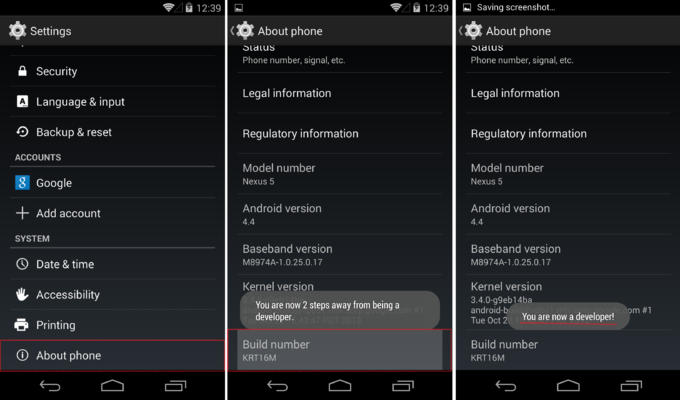
STEP: 2 Turning On Usb Debugging Mode
Now that you have enabled Developer Options, it will appear in your device settings. Tap on it and turn it on. And search for Usb Debugging in the list below, some warning will pop up, its no issue just tap on Okay.
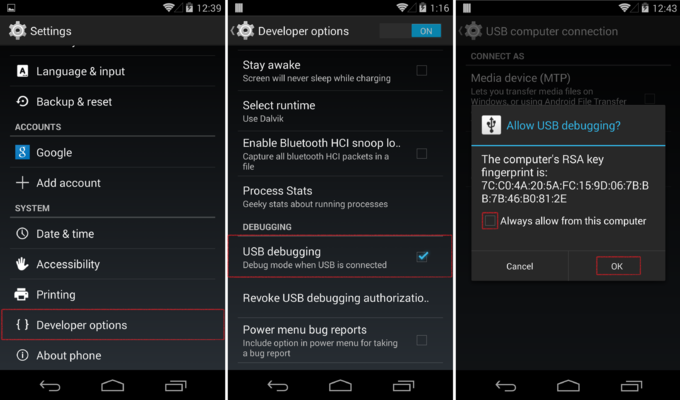
Its done!
Go to link Download

Thursday, October 20, 2016
How to use system recovery options in Windows
How to use system recovery options in Windows
BEST GREENHOUSES FOR GROOVING VEGETABLES
? ? 1(360)241-1624 ?

? ? 360organic.us ?
DURABLE! AFFORDABLE! ALUMINUM + UV POLYCARBONATE
To open the computer in the System Recovery Options menu
I. Remove all floppy disks, CD-ROMs and DVD-drives from the computer, and then restart your computer using the computers power button.
II.Do one of the following:
a) If your computer has a single operating system installed, press and hold the F8 key, restart your computer. You need to press F8 before the appearance of the logo for Windows. If you see a logo for Windows, you need to try again, wait until you see the entrance to the invitation of Windows, and then shut down and restart the computer.
b) If your computer has more than one operating system, using the arrow keys to select the operating system you want to repair, and then press and hold F8.
III. On the Advanced Boot Options screen, using the arrow keys to highlight Repair your computer, and then press Enter. (If Repair your computer is not listed as an option, then your computer does not include preinstalled recovery options, or your network administrator found it.)
IV. Select a keyboard layout, and then click Next.
V.On System Recovery Options menu, click a tool to open it.
.To open the System Recovery Options menu using the Windows 7 installation disc or a USB flash drive, or a system repair disc
If your computers system is severely damaged and you can not access the System Recovery Options menu on your computer, you can access it using the Windows 7 installation disc or a USB flash drive, or using a system repair disc if you created one earlier.
To use this method, you need to restart (boot) your computer using the disc or USB flash drive.
I.Insert the Windows 7 installation disc or USB flash drive, or a system repair disc, and then shut down your computer.
II.Restart your computer using the computers power button.
III.When prompted, press any key, and then follow the instructions that appear.
IV.On the Install Windows page, or on the System Recovery Options page, choose your language and other preferences, and then click Next.
a) If neither the Install Windows page nor the System Recovery Options page appear, and youre not asked to press any key, you might need to change some system settings. To learn how this can be done, see: Start your computer from a Windows 7 installation disc or USB flash drive.
V.If you are using the Windows installation disc or USB flash drive, click Repair your computer.
VI.Select the Windows installation you want to repair, and then click Next.
VII.On the System Recovery Options menu, click a tool to open it....
For more information please visit directly: Microsoft Support
Additional information
What is the difference between BIOS and CMOS?
What are the F1 through F12 keys?
How to use system recovery options in Windows?
Random black screen while playing games
How to Delete and Clear Recent Items in Windows 7 Jump Lists
How to enter the BIOS or CMOS setup
What is the difference between BIOS and CMOS?
What are the F1 through F12 keys?
MISSCELLENIOUS ITEMS

MISSCELLENIOUS ITEMS
Durable Greenhouses made from Polycarbonate UV Protected material and Aluminum
ALSO PLEASE VISIT THIS VIDEOS AND SEE IF YOU FIND SOMETHING NEED:
Windows Registry Tools can be downloaded here:
How to kip your PC Private by deleting DATA Permanently
http://askpctech.blogspot.com/2016/03/kip-your-pc-privat.html
This tutorial is made up on request several users, is well is fallowing video:
1)How to Delete Paint Recent Pictures from List in Windows 7
2)Win 7– Fix for “Safely Remove Hardware and Eject Media” not working How To
3)Windows 10 How to Fix Black Screen After Booting
4)How To Remove Windows 10 Upgrade Notification On Windows 7 And Windows 8
5)How to Delete Face book Page Permanently - 2015
6)How to Uninstall Windows 10 and Downgrade to Windows 7 or 8.1
7)detected: not-a-virus:remoteadmin.win32
8)How to change pictures into icons for folders
9)Speed up your PC Disable System Restore on SSD
10)Speed up your PC Disable Scheduled De-fragmentation SSD
11)2015 Black screen of DEATH Windows 7 & 8 - with cursor at start-up SOLVED
12)Upon start up only wallpaper shows FIX
13)Here is video on Windows 7 & 8 - Black screen with cursor at start-up FIX
You can also open Task Manager by pressing Ctrl+Shift+Esc.
14) I bought a windows 7 PC but it Look alike old PC FIX:
15) Windows 7 & 8 - Black screen with cursor at start-up FIX:
16) How To Fix Minecraft OpenGL Error Windows 7 xp vista 720p :
17) removing bars using regscanner regedit & file shredder 720p:
18) How to Recover windows Explorer from error 2014 720p
19) HOW TO Save on battery online
20) Windows 7 & 8 - Black screen with cursor at start-up FIX
Upon start up only wallpaper shows no icons
CTL+ALT+DEL then click file and new task. then type explorer.exe and press ok
Best Greenhouse system 2015
Go to link Download
Subscribe to:
Posts (Atom)